
Most support teams don't fail at choosing good tools or workflows. They fail at introducing them. The new routing logic gets flipped on for everyone at once. The macro library gets replaced overnight. The AI assist feature goes live on a Monday, and by Wednesday your first-response times are quietly slipping while nobody can agree on whether the new thing is the cause.
Change in a help desk is dangerous in a way it isn't in most departments, because your work never stops flowing. You can't pause the queue while you migrate. Customers keep coming, SLAs keep counting, and every change you make happens on top of a live system. That's the core tension a support change adoption playbook has to solve: how do you move fast enough to improve, without putting your service commitments at risk during the messy middle?
This is a systems piece. Not a list of "communicate early and often" platitudes. We're going through how a phased, governance-first rollout actually holds together — pilots, measurement windows, rollback triggers, the checklists managers and observers need, and the adoption KPIs that tell you whether the change stuck or just got tolerated.
Why help-desk rollouts break differently than other rollouts
In a sales team, a bad rollout means a slow quarter. In support, a bad rollout means breached SLAs, angry customers, and agents who lose trust in every future change you try to make. That last part is the one people underestimate.
There's a pattern that shows up across teams of every size: a change gets pushed, something breaks, the team scrambles, and the change gets half-rolled-back in a panic. Nobody documents what actually happened. Six weeks later you try the next improvement, and now your senior agents are skeptical, your managers are cautious, and adoption drags because the last three "improvements" made their lives harder. Change fatigue is real, and it compounds. Each botched rollout raises the cost of the next one.
-
No isolation. The change hits the whole team, so there's no clean comparison group and no way to tell signal from noise.
-
No agreed measurement window. People judge the change on day two, when the team is still fumbling with muscle memory, not on day fourteen when it's stabilized.
-
No rollback criteria defined in advance. So the decision to pull back becomes political and emotional instead of mechanical.
-
No ownership of the transition itself. Someone owns the tool. Nobody owns the adoption.
At small scale, you can sometimes brute-force through this. A five-person team can absorb a rough week because everyone's talking constantly. But the same sloppy approach at 30 or 60 agents turns into a genuine SLA incident, and at that point you're not managing a rollout — you're managing a fire.
The phase gates: what "governance-first" actually means
Governance-first doesn't mean bureaucracy. It means every phase has an entry condition, an exit condition, and a defined way to stop. You don't advance because it feels fine. You advance because the numbers cleared the bar you set before you started.
Never lose track of a customer request again.
Servyly helps you track, assign, and resolve every ticket quickly and efficiently.
- Centralized ticket management
- Automated response workflows
- Team collaboration tools
No credit card required
Here's the structure that tends to hold up:
| Phase | Who's involved | Duration | What you're proving | Exit condition |
|---|---|---|---|---|
| 0 – Design & baseline | Change owner, 1–2 senior agents | 1 week | You have a clean baseline and clear success metrics | Baseline captured, rollback plan written |
| 1 – Shadow / pilot | 3–5 volunteer agents | 2 weeks | The change works without hurting the pilot group's SLAs | Pilot metrics within tolerance, no unresolved blockers |
| 2 – Controlled expansion | ~25–30% of team | 2–3 weeks | It scales past the early adopters | Adoption KPIs on track, breach rate stable |
| 3 – Full rollout | Everyone | Ongoing | It holds at full load | Sustained metrics, training complete |
| 4 – Reinforcement | Managers, QA | 4+ weeks | It became the default, not the exception | Adoption sticks without prompting |
The single most skipped phase is Phase 0. Teams jump straight to "let's pilot it" without capturing a clean baseline first. Then when someone asks "is this actually better?" nobody can answer, because they never wrote down what "before" looked like.
A quick note on who to put in your pilot: resist the urge to load it with your best people. Your top agents will make almost any change look good through sheer skill, which gives you a falsely rosy read. A better pilot group is a mix — a couple of strong agents, a couple of average performers, ideally one skeptic. The skeptic is your best early-warning system.
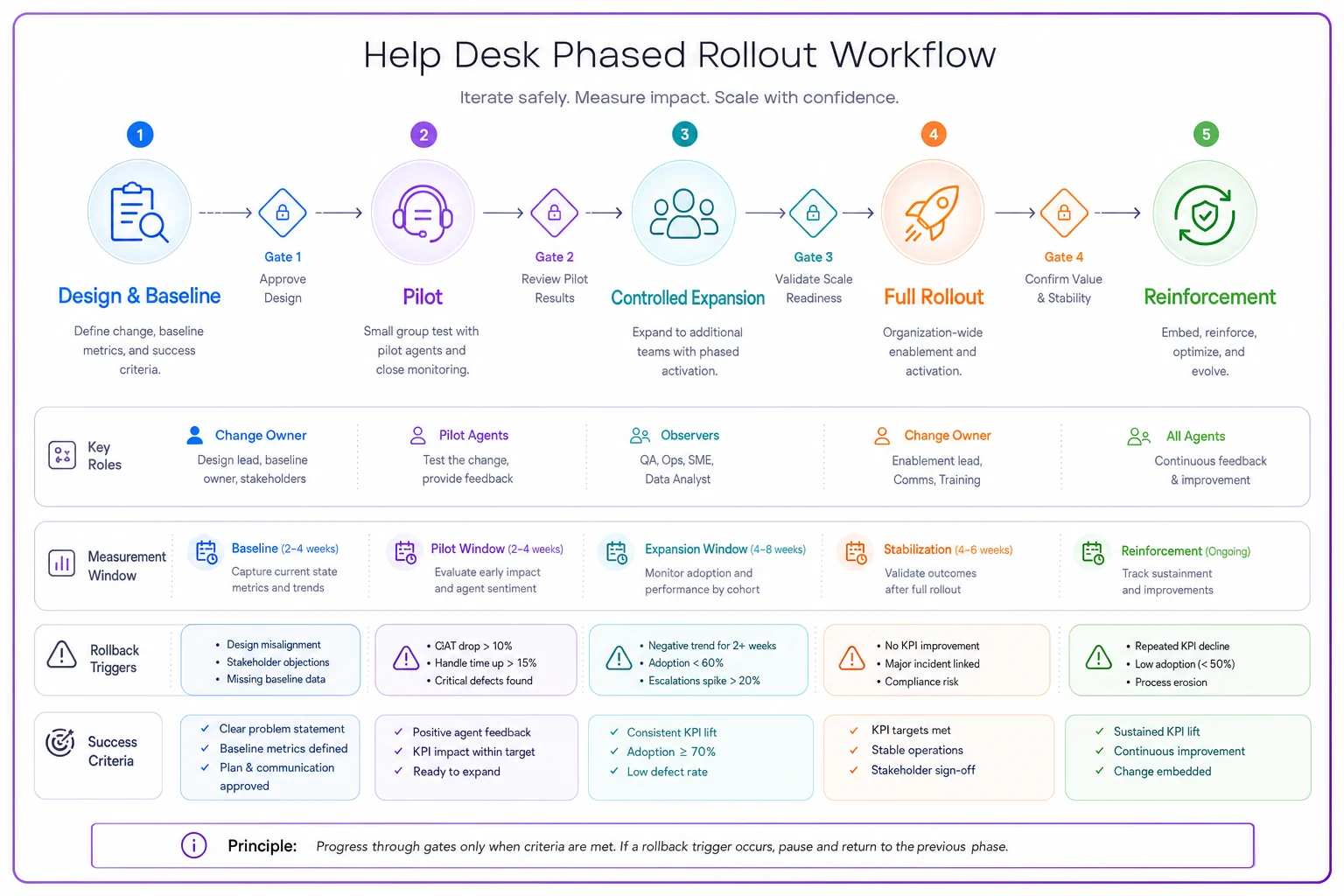
This diagram shows the flow through phases, where measurements happen, and where a rollback can be triggered based on guardrails.
Measurement windows: the part everyone rushes
The most common rollout mistake isn't picking the wrong metric. It's measuring at the wrong time.
Every change has a J-curve. Performance dips right after you introduce it, because people are learning, then recovers, then hopefully climbs above baseline. If you measure during the dip and panic-rollback, you kill changes that would have worked. If you measure only at the peak of early-adopter enthusiasm, you greenlight changes that fall apart under real load.
A workable rule: never evaluate a change inside its first three business days. That's the fumble window. Your real measurement window opens around day four and runs to the end of the phase.
-
Guardrail metrics (these protect your SLAs and can trigger rollback): first-response time, resolution time, SLA breach rate, reopen rate, CSAT.
-
Adoption metrics (these tell you if people are actually using the change): feature usage rate, macro adoption, percentage of tickets routed through the new path.
-
Friction signals (these tell you why something's failing): number of workaround requests, questions in the team channel, time-in-status anomalies.
The distinction between guardrail and adoption metrics matters a lot. A change can have great guardrail numbers and terrible adoption — which usually means only your pilot enthusiasts are using it and the rest of the team quietly ignored it. That's not success. That's a change that's about to die the moment the pilot ends.
Rollback criteria: decide before you're emotional
The whole point of defining rollback triggers up front is that you're calm when you write them and panicked when you'd otherwise use them. A mechanical trigger removes the argument.
Write rollback criteria as specific, measurable thresholds tied to your guardrail metrics. For example:
-
SLA breach rate for the pilot group exceeds baseline by more than ~20% for two consecutive days
-
First-response time regresses by more than a defined threshold and isn't recovering by day 5
-
Reopen rate climbs and CSAT drops together — the combination matters more than either alone
-
Any hard failure that touches customer data or billing — immediate rollback, no threshold needed
There's a useful distinction between a full rollback and a partial pullback. Full rollback means you kill the change entirely and return to the old state. Partial pullback means you narrow it — pull it back to the pilot group, disable one problematic piece, or reduce the automation's autonomy while keeping the rest. Most of the time, partial is the right move. Full rollback is expensive in credibility and should be reserved for genuine failures.
This connects tightly to how you handle any automated component in the rollout. If part of your change involves automation or AI assist, you want the same discipline covered in Automation Governance for Support: Safety Gates, Rollback Criteria and Human-in-the-Loop Thresholds — the ability to dial autonomy up and down instead of treating it as an all-or-nothing switch. And if the change involves knowledge or retrieval systems, the phased approach in Avoid Costly AI Mistakes in Support: Phased Knowledge Engineering, Retrieval Design and Rollback Controls pairs directly with the gates described here.
The checklists: managers and observers do different jobs
Rollouts fail in the gap between "we announced it" and "people actually changed how they work." Two roles close that gap, and they're not the same role.
The manager owns adoption and removes blockers. The observer — usually a QA lead or a senior agent not on the change team — watches for problems the manager is too close to see. The manager wants the rollout to succeed and will unconsciously downplay warning signs. The observer's whole job is to stay skeptical.
Manager checklist (run weekly during the rollout)
-
Did every agent in this phase receive the training before go-live? Not "was it sent" — was it completed.
-
Are adoption metrics moving, or flat? Flat usually means quiet non-adoption.
-
What blockers came up in the team channel this week, and which are still open?
-
Are any agents consistently working around the change? Who, and why?
-
Are guardrail metrics inside tolerance, or drifting toward a rollback trigger?
-
Is anyone privately struggling but not saying so? Check the quiet ones.
Observer checklist (run independently)
-
Do the guardrail metrics agree with the manager's optimistic read?
-
Are there time-in-status or reopen patterns that suggest hidden friction?
-
Is CSAT holding across all ticket types, or just the easy ones?
-
Are pilot agents using the change as designed, or improvising in ways that won't scale?
-
Would this survive the manager going on vacation for a week?
That last observer question is underrated. A lot of changes only work because a motivated manager is manually propping them up every day. The moment that attention moves elsewhere, adoption collapses. If your change can't survive a week of neglect, it hasn't actually been adopted — it's being life-supported.
Training cadence: front-load, then reinforce
One-and-done training is the reason most rollouts drift back to old habits. People retain a fraction of a single session, and support agents are context-switching all day, so retention is even worse under queue pressure.
A cadence that actually sticks tends to look like this:
-
Pre-launch (before Phase 1) Short, focused walkthrough for the pilot group. Not a slide deck — a live run through real tickets. Record it.
-
Go-live day A designated person available in real time for the first few hours. Most questions cluster in the first day.
-
Day 3–4 debrief Quick session to surface the friction the team hit once the novelty wore off. This is where the real problems come out.
-
End-of-phase review Consolidate what changed, update the docs, decide on advancement.
-
Reinforcement (Phase 4) Spot-checks in QA, occasional reminders, and — critically — folding the change into onboarding so new hires learn the new way as the only way.
The reinforcement phase is where most teams check out, and it's the phase that determines whether the change is permanent. If new hires are still being taught the old workflow because onboarding never got updated, your carefully-piloted change has an expiration date.
Adoption KPIs that actually mean something
Vanity here is easy. "95% of the team attended training" tells you nothing about whether they changed behavior. Focus on KPIs that measure usage under real conditions and SLA preservation together.
-
Active adoption rate percentage of relevant tickets handled with the new workflow. Segment by agent — averages hide the non-adopters.
-
Time-to-competency how long until a given agent's speed on the new workflow matches their old baseline. Shrinking over cohorts means your training is improving.
-
SLA delta through the transition the whole point. If breach rate stays flat or improves while adoption climbs, the rollout is genuinely working.
-
Workaround rate how often agents fall back to the old method. Rising workarounds are the clearest signal a change is failing quietly.
-
Sustained adoption at 30 days adoption often looks great at day 5 and erodes by day 30. The 30-day number is the honest one.
The pairing that matters most is adoption climbing while guardrails hold. Either one alone is misleading. High adoption with sinking SLAs means you rolled out something harmful efficiently. Great SLAs with low adoption means nothing really changed. You need both moving in the right direction at the same time, and that combination is rarer than people expect.
A real scenario
A B2B software company's support team — around 22 agents across two time zones — wanted to change how tickets got triaged, moving from manual tagging to a routing rule set with an assist layer that suggested categories.
Their first attempt, months earlier, had been a full switch-on for everyone. Within a week, misroutes spiked, tickets bounced between queues, and their SLA breach rate roughly doubled for a stretch. They pulled it back, and the team came away convinced the whole idea was broken.
The second attempt went phase-gated. They captured a two-week baseline first — breach rate sitting around 6–7%, median first response just under an hour. They piloted with five agents, including one loud skeptic, for two weeks. Rollback trigger was set at breach rate exceeding ~9% for two straight days. It hovered around 7% through the pilot, adoption of the new routing hit about 80% within the group, and the skeptic's day-4 feedback caught a genuine flaw in one category rule that they fixed before expanding.
Controlled expansion to a third of the team held. Full rollout followed, and by the 30-day mark active adoption sat in the high 80s with breach rate slightly below their old baseline. The difference between attempt one and attempt two wasn't the technology. It was the gates.
When phase-gating makes sense — and when it doesn't
When it's worth the overhead:
-
The change touches your SLA-critical path — routing, response workflows, escalation logic
-
You've got more than roughly 15 agents, where a bad rollout becomes a real incident
-
You've had a botched rollout before and adoption trust is already fragile
-
The change involves automation where errors scale faster than humans catch them
When it's overkill:
-
Tiny cosmetic changes — a renamed macro, a reordered menu
-
Teams small enough (under about six people) that everyone's already in constant contact and can course-correct in an afternoon
-
Reversible-in-seconds changes with no SLA exposure
Teams that confuse process with progress are the ones who gate every trivial change and grind to a halt. People start routing around your governance entirely when it creates more friction than it prevents. Save the full machinery for changes that can actually hurt you. The gate structure that governs a major release — like the readiness system in Avoid Post-Launch Support Chaos: A Gate-Based Release Readiness System with KB, Surge Staffing and Launch-Day Protocols — is worth the weight because the blast radius is large. A macro rename is not.
The part nobody wants to hear
The reason most adoption playbooks live in a doc nobody reads is that they treat the rollout as an event instead of a system. The change owner runs the pilot, declares victory, and moves on — then wonders three months later why the team drifted back to the old way.
Adoption isn't the moment you flip the switch. It's the weeks after, when the novelty is gone and the queue is heavy and people default to whatever's easiest. That's the window where changes actually live or die, and it's the window most rollouts stop paying attention to.
Build your measurement windows, your reinforcement cadence, and your 30-day KPIs around that reality. Stop losing good changes to bad rollouts — and stop burning the team's willingness to try the next one.
Ready to transform your support operations?
Join 500+ support teams using Servyly to reduce resolution times, improve customer satisfaction, and boost team productivity.