
Most support teams don't fail at AI because the model is bad. They fail because they wired it into a messy knowledge base, pointed it at every ticket at once, and had no plan for what happens when it starts confidently giving wrong answers to customers.
That's the pattern worth talking about. An AI rollout in support isn't really a model problem — it's a knowledge engineering and control problem. The teams that get burned treat it like a plugin. The teams that get real value treat it like a system with feeding, maintenance, guardrails, and an off-switch.
Below is how that system actually works, phase by phase, and where it tends to break for real help desks.
The mistake nearly everyone makes first
The first version of an AI strategy for support usually looks like this: someone connects a retrieval-augmented chatbot to the existing help center and ticket history, flips it on for a chunk of incoming tickets, and waits to be impressed.
For about two weeks it is impressive. Then the complaints start. The bot cites a policy that changed eight months ago. It confidently answers a billing question using a doc written for a deprecated plan. It pulls the tone from an old angry macro. A customer screenshots a wrong answer and it lands in your escalations queue with a "your AI told me…" subject line.
None of that is a hallucination problem in the way people imagine. It's a corpus problem. The AI was faithfully retrieving garbage because the underlying knowledge was stale, contradictory, and never designed to be machine-read. In real operations, this is the single most common failure — the model is doing exactly what it should with bad inputs.
So the roadmap below front-loads the boring parts: what the AI reads, how fresh it stays, and what happens when it's wrong. The generation part comes last, on purpose.
Phase 1: Corpus design (what the AI is actually allowed to read)
Your knowledge base was written for humans who can read between the lines. AI can't. If two articles disagree, a human agent picks the newer one out of instinct. A retrieval system will happily surface both and blend them into a confident, half-wrong answer.
Never lose track of a customer request again.
Servyly helps you track, assign, and resolve every ticket quickly and efficiently.
- Centralized ticket management
- Automated response workflows
- Team collaboration tools
No credit card required
Corpus design is the work of deciding, deliberately, what goes into the AI's readable memory and in what shape. A few patterns that separate the teams who get this right:
Not everything belongs in the corpus. Internal notes, half-finished drafts, one-off exception approvals, and "we'll fix this later" docs are exactly the kind of content that produces embarrassing answers. A good corpus is smaller than your total documentation, not larger.
Every document needs metadata the retrieval layer can filter on. At minimum: product area, plan/segment applicability, last-verified date, and an owner. Without this, you can't scope retrieval to "only billing docs that apply to enterprise plans," which is where most wrong answers come from.
Contradictions must be resolved before ingestion, not at query time. If you have three refund policies floating around, the corpus can only contain one. This forces a cleanup you were probably avoiding anyway.
A useful way to structure the corpus:
| Corpus Tier | What Goes In | Verification Requirement | Refresh Frequency |
|---|---|---|---|
| Tier 1 — Authoritative | Policies, pricing, security answers, legal-adjacent responses | Named owner + verified date required | Re-verify monthly |
| Tier 2 — Operational | How-to guides, troubleshooting steps, feature docs | Owner required, review quarterly | On product change |
| Tier 3 — Reference | Resolved-ticket patterns, historical fixes | Auto-captured, lightly reviewed | Rolling window (e.g. last 12 months) |
That Tier 3 row is where a lot of value hides. Your best troubleshooting knowledge lives in resolved tickets, not in published docs — but only if you capture it cleanly. This is worth pairing with a real capture process; the approach in Ticket→Knowledge Capture for Small Teams matters more once an AI is reading that content directly, because sloppy capture becomes sloppy answers at scale.
The broader principle — that knowledge health is a governance discipline, not a one-time cleanup — is the same idea behind a governance-first knowledge strategy. AI just raises the stakes on decisions you should have been making anyway.
Phase 2: Embedding and refresh cadence (keeping the memory current)
Here's the trap that gets teams three months in: they build a clean corpus, embed it, ship the AI, and then treat the embeddings as done. Meanwhile the product ships a new pricing tier, support changes a policy, and the vector index still remembers the old world.
Embeddings are a snapshot. The moment your knowledge changes, the snapshot is stale — and stale is worse with AI than with a static help center, because the bot speaks with authority.
The cadence question is really three questions:
-
When does a document trigger re-embedding? On any edit to a Tier 1 doc, immediately; on Tier 2 edits, batched nightly; Tier 3 on its rolling window. Don't re-embed the whole corpus on a fixed schedule — that wastes cycles and hides the docs that actually changed.
-
How do you know the index reflects reality right now? You need a freshness check that flags any Tier 1 document whose "last-verified" date is older than its refresh window. If a policy hasn't been verified in the required window, the retrieval layer should down-rank or exclude it rather than serve it.
-
What happens during the gap between a change and a re-embed? For high-stakes areas (billing, security, cancellations), the safer default is to route those queries to a human until the index is confirmed current. A short delay beats a confident wrong answer that generates three follow-up tickets.
Re-embed Tier 1 documents immediately on edit to minimize the window of stale answers.
A realistic example: a mid-sized SaaS help desk changes its refund policy on a Tuesday. With proper metadata and edit-triggered embedding, the new policy is live in the AI's memory within hours and the old one is purged. Without that pipeline, the old policy keeps getting cited for weeks — and each citation is a small trust withdrawal you don't see until CSAT dips.
Phase 3: Retrieval architecture for ticket context
This is the part almost nobody designs and everybody assumes works by default.
A support ticket is not a clean search query. It's a messy thread with an angry customer, a half-described problem, a plan type, a prior interaction history, and sometimes three questions bundled into one. Naive retrieval — embed the last message, grab the top few chunks — produces answers that technically match keywords but miss the actual situation.
Retrieval architecture that holds up in real ticket flow tends to include:
-
Query construction from context, not just the last message. The retrieval query should incorporate the customer's segment, product area, and resolved issue type — not just whatever they typed most recently. A one-line "it's broken" needs the thread's context to retrieve anything useful.
-
Metadata filtering before ranking. If the customer is on the Starter plan, don't retrieve Enterprise-only docs at all. Filtering first is what prevents the "the AI told me a feature exists that I can't access" class of complaint.
-
Confidence and coverage signals. The retrieval layer should be able to distinguish "I found strongly relevant, recently-verified content" from "I found weak, tangential matches." That distinction drives the human-in-the-loop decision in the next phase.
-
A hard fallback path. When retrieval coverage is weak, the correct behavior is not to generate a best-guess answer. It's to hand off. Retrieval quality should gate generation, not just decorate it.
The operational insight most teams miss: retrieval failures and generation failures look identical to the customer, but they need completely different fixes. A wrong answer from good retrieval means your generation prompt or model is off. A wrong answer from weak retrieval means your corpus is missing content or your filtering is wrong. If you can't tell these apart in your logs, every debugging session becomes guesswork. Instrument retrieval quality separately from answer quality from day one.
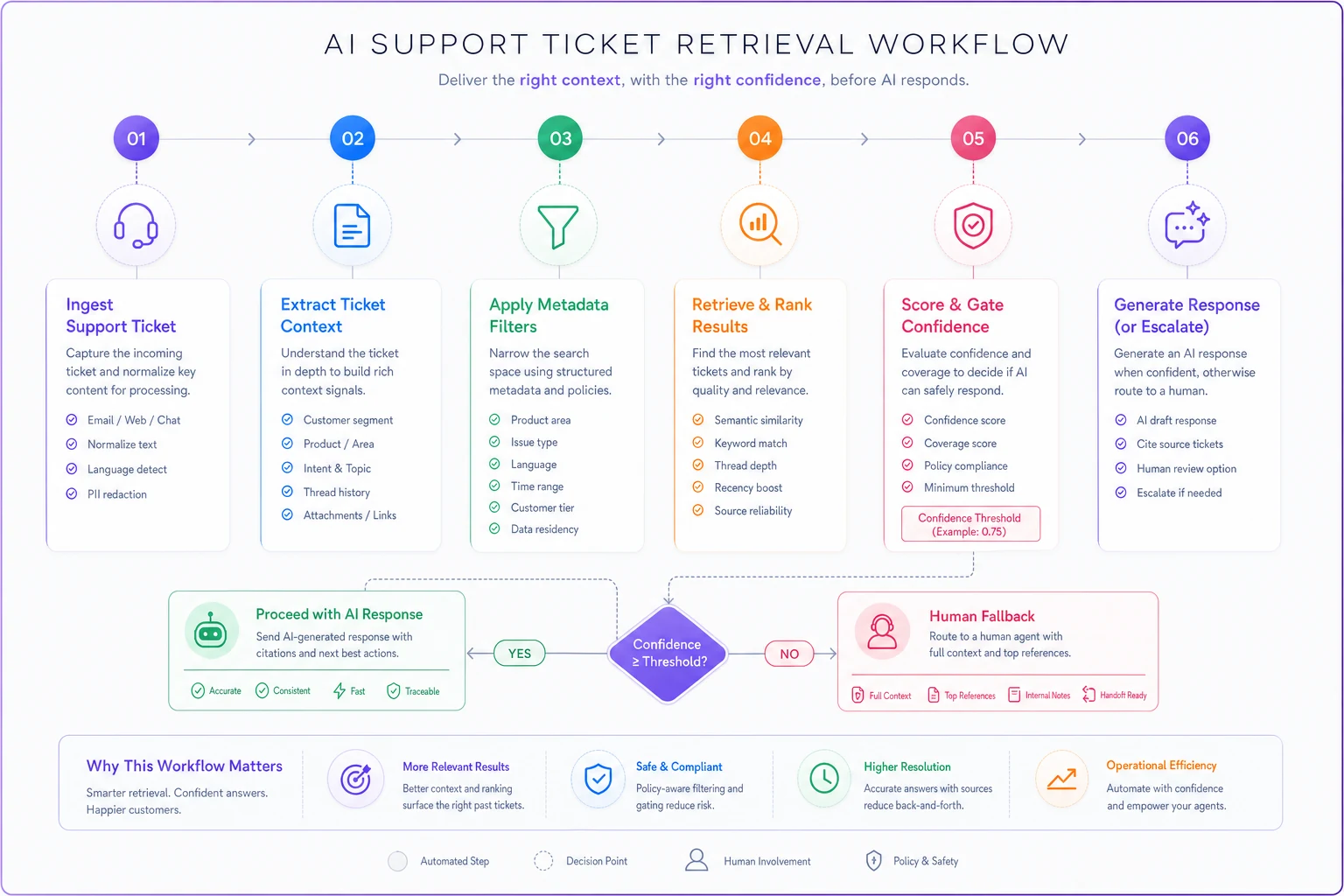
A simple diagram showing context extraction, filtering, ranking, and fallback makes the workflow easier to audit and explain to stakeholders.
Phase 4: Human-in-the-loop thresholds
The whole game is deciding, per ticket, whether the AI answers directly, drafts for a human to approve, or steps aside entirely. Get the thresholds wrong in one direction and you've built an expensive autocomplete no agent trusts. Wrong in the other direction and you're sending wrong answers to customers.
Thresholds should be driven by two dimensions at once: retrieval confidence and blast radius (how much damage a wrong answer does).
| Situation | Retrieval Confidence | Blast Radius | Mode |
|---|---|---|---|
| Password reset steps | High | Low | AI answers directly |
| Feature how-to, common | Medium–High | Low | AI answers directly |
| Billing / refund question | Any | High | AI drafts, human approves |
| Cancellation, security, legal | Any | High | Human only, AI assists silently |
| Weak or contradictory matches | Low | Any | Human only, no AI answer shown |
The pattern worth internalizing: high blast radius overrides high confidence. Even when the AI is very sure about a refund policy, a wrong refund answer is expensive enough that a human approval step is worth the seconds it costs. Confidence is not the same as being safe to be wrong.
These thresholds are the same species of control discussed in automation governance for support — safety gates and human-in-the-loop lines aren't AI-specific inventions. AI just needs them tuned tighter, because it scales mistakes faster than any macro or workflow rule ever could.
One more thing worth noting: thresholds drift. What's "high confidence" today shifts as the corpus grows and the model updates. Treat threshold settings as living configuration with an owner and a review cadence, not a set-and-forget config file.
Phase 5: Safety audits and rollback controls
This is the phase teams skip because everything is working. Then a bad deploy — a corpus update, a prompt change, a model version bump — quietly degrades answer quality, and nobody notices until the escalations pile up a week later.
You need two things: a way to catch degradation fast, and a way to undo it cleanly.
Safety audits are recurring checks that don't rely on customer complaints as your alarm system:
-
A golden question set — a fixed list of real, high-stakes questions with known-correct answers. Run it after every corpus or model change. If the AI's answers drift from the known-good ones, you catch it before customers do.
-
Sampled human review of a slice of AI-handled tickets, scored against a simple rubric: correct / partially correct / wrong / harmful. Track the "wrong + harmful" rate as your primary safety metric.
-
Citation checks for Tier 1 answers — did the answer cite a currently-verified source, or something stale?
Rollback controls are what let you move fast without fear:
-
Version everything. Corpus snapshots, embedding versions, prompts, and model versions all get version tags. You can't roll back what you didn't version.
-
One-switch fallback to human. A single control that routes all AI-eligible tickets back to humans, instantly, without a deploy. This is your fire alarm — and it must be reachable by a support lead, not just engineering.
-
Defined rollback triggers. Decide in advance what conditions trigger a rollback: golden-set failure rate over a threshold, a spike in "AI said" complaints, a harmful-answer incident. Documenting these before an incident prevents the panicked "should we turn it off?" debate at the worst possible moment.
A short runbook every team should have written down:
-
Detection
golden-set alarm, complaint spike, or agent report.
-
Immediate action
flip AI-eligible tickets to human-only via the fallback switch.
-
Contain
identify what changed last (corpus / prompt / model version).
-
Roll back to the last known-good version.
-
Re-run the golden set to confirm recovery.
-
Post-incident
log root cause, add the failed question to the golden set permanently.
That last step is the one people forget. Every incident should make your safety net slightly larger. Over time, your golden set becomes a map of every way the AI has ever been wrong — which is exactly what you want.
A real scenario
A B2B SaaS company with a six-person support team rolled out an AI answer layer across their web help center and chat. First attempt, no corpus tiering, everything ingested, AI answering roughly 60% of incoming questions directly.
Within a month, reopen rates on AI-handled tickets crept up noticeably, and the team started seeing a steady drip of "the answer I got was wrong" escalations — enough that a couple of agents quietly told the manager they didn't trust the bot's drafts.
They pulled it back and rebuilt around the phased approach: tiered the corpus (which cut it by roughly a third once duplicates and stale docs were removed), added metadata filtering by plan, and set blast-radius thresholds so billing and cancellation questions always went to a human. AI direct-answer coverage dropped to around 40% — lower on paper.
But the reopen rate on AI-handled tickets fell back in line with human-handled ones, the "wrong answer" escalations became rare instead of daily, and agents started actually using the AI drafts because they trusted them. Lower coverage, higher trust, fewer downstream tickets. That trade is almost always the right one early on.
When this makes sense — and when it doesn't
When a phased AI rollout is worth it: You have real ticket volume (enough that automation moves the needle), a knowledge base that's at least maintainable, and someone who can own corpus health. High-repetition, low-blast-radius questions — how-tos, account basics, common troubleshooting — are where this pays off first.
When it's a bad idea right now: Your documentation is a contradictory mess and nobody owns it. If the corpus is broken, AI will amplify the mess faster than you can clean it. Fix knowledge governance first, AI second. Doing it in the other order is the most expensive mistake in this whole space.
Who should not do this yet: Teams whose answers are mostly high-blast-radius and judgment-heavy — think complex account changes, security-sensitive work, or heavily regulated responses. If almost every ticket needs a human anyway, an AI layer adds governance overhead without much coverage benefit. Use AI to assist agents behind the scenes, not to answer customers directly.
The point to take away
An AI rollout in support succeeds or fails long before the model generates its first answer. It's decided in how you shape the corpus, how fresh you keep it, how you retrieve against messy ticket context, where you draw the human line, and whether you can roll back when something drifts.
Do those in order and the model almost takes care of itself. Skip them and no amount of prompt tuning will save you — you'll just be shipping confident wrong answers at scale, which is worse than shipping nothing. Start small, gate hard on blast radius, version everything, and let coverage grow as trust earns it.
Ready to transform your support operations?
Join 500+ support teams using Servyly to reduce resolution times, improve customer satisfaction, and boost team productivity.