
Your support team's automated reply system just sent 847 password reset instructions to customers asking about billing issues. The workflow trigger misread "can't access" as a login problem instead of a payment portal question. By the time someone noticed, you had confused customers, reopens spiked 40%, and CSAT dropped 12 points overnight.
This happens more than support managers want to admit. Automation governance isn't about slowing things down—it's about building safety mechanisms that prevent cascading failures while keeping the efficiency gains that made automation worth pursuing in the first place.
The measurement window problem
Most support teams measure automation success wrong. They check monthly metrics, celebrate the reduced response times, then get blindsided when something breaks on day 29.
Governance needs measurement windows at three levels:
Immediate detection (1–10 replies) Track the first batch of automated responses in real-time. If sentiment analysis shows negative reactions above 30%, or reply engagement drops below normal patterns, flag it for review. A subscription box company caught a pricing error in their auto-response template after just 7 messages because they were watching immediate customer reactions.
Pattern validation (50–100 replies) Once you hit statistical significance, check if the automation is actually performing as intended. Are customers marking issues resolved? Are they immediately replying with confusion? One B2B software support team found their technical troubleshooting workflow was auto-closing tickets that needed engineering escalation—but only discovered it after looking at the 50-reply mark.
Stability confirmation (500+ replies) This is where you verify long-term performance. Does the automation degrade over time? Are edge cases accumulating? The patterns here tell you whether the workflow needs refinement or a complete rebuild.
The mistake most teams make: treating all automations equally. A password reset workflow can run with loose measurement windows. A refund processing automation needs tight monitoring at every stage.
Human-in-the-loop thresholds that actually work
Setting blanket thresholds like "flag everything above priority 2" creates alert fatigue. Your team starts ignoring warnings, which defeats the whole purpose.
Never lose track of a customer request again.
Servyly helps you track, assign, and resolve every ticket quickly and efficiently.
- Centralized ticket management
- Automated response workflows
- Team collaboration tools
No credit card required
Build dynamic thresholds based on risk and confidence scoring instead:
Risk scoring factors:
-
Customer tier (enterprise vs. free)
-
Issue complexity (password reset vs. data deletion)
-
Financial impact (refund amount, contract value at risk)
-
Regulatory exposure (GDPR requests, compliance issues)
Confidence scoring factors:
-
Historical accuracy of similar automations
-
Clarity of the customer message (ambiguity score)
-
Presence of escalation keywords
-
Customer sentiment indicators
A home services platform implemented this approach and cut false-positive escalations by around 65% while still catching the vast majority of high-risk situations before they became problems.
The threshold logic becomes: if (Risk Score × Inverse Confidence) > Threshold Value, trigger human review.
Start conservative—around 35 on a 100-point scale.
After 500–1,000 interactions, you'll have enough real data to optimize based on actual outcomes rather than guesses.
Rollback scripts that don't create more chaos
When automation fails, the rollback often causes more damage than the original problem. Generic "we're sorry" messages feel hollow. Over-correcting with manual responses creates bottlenecks. Neither is a great outcome.
Build rollback scripts with three components:
Immediate containment Stop the problem first. Your script should pause the problematic workflow, queue affected tickets for manual review, and send a brief acknowledgment to customers still in the queue: "We're taking a closer look at your request to make sure you get the right solution."
Targeted correction Don't blast apologies to everyone. Segment affected customers:
-
Those who haven't opened the automated response yet (replace the message)
-
Those who opened but haven't responded (send a clarification)
-
Those who already replied with confusion (priority manual intervention)
Process preservation Keep non-affected automations running. A medical supplies distributor shut down all automation when their shipping status workflow failed, which created a 3-day backlog across every support channel. Don't do that. Isolate the problem without disrupting what's working.
Audit trails that tell the real story
Standard audit logs show what happened. Useful audit trails explain why it happened and what to do differently next time.
Structure yours to capture:
Decision points
-
What triggered the automation
-
Which conditions were evaluated
-
Why this specific response was selected
-
What alternatives were considered and rejected
Modification history
-
Who changed the workflow and when
-
What prompted the change
-
Testing performed before deployment
-
Performance before and after
Failure analysis
-
When something breaks, the audit trail should show the first sign of trouble, the escalation path, human interventions attempted, and how long it took to resolve.
A retail support team cut repeat automation failures by around 78% after implementing detailed audit trails. Most failures traced back to undocumented workflow changes made during busy periods without proper testing—exactly the kind of thing that's invisible without a real paper trail.
Real scenario: E-commerce platform prevents a holiday disaster
An outdoor gear retailer with 12 support agents handled roughly 450 tickets daily. Black Friday meant expecting 3x that volume.
They deployed automated responses for common questions: shipping times, return policies, size guides. Early results were strong—70% deflection rate, response time dropped from 4 hours to about 3 minutes.
Then their "order status" automation started pulling bad data from the inventory system. Customers asking about delayed orders received cheerful "Your order shipped today!" messages when items were actually backordered until January.
Their governance caught it after 23 messages:
-
Measurement window flagged unusual customer response patterns (immediate negative replies)
-
Risk threshold triggered human review for orders over $200
-
Rollback script queued 76 affected tickets for priority handling
-
Audit trail revealed the inventory API had changed its response format overnight
Without those guardrails, they would've sent wrong information to an estimated 1,400 customers during their busiest weekend. Instead, they corrected course within 40 minutes, handled affected tickets manually, and updated the automation to handle the new API format.
The operational reality of automation boundaries
Some workflows shouldn't be fully automated regardless of technical capability. The question is always operational risk versus reward.
Never fully automate:
-
First-contact resolution for enterprise customers
-
Anything involving financial adjustments over $500
-
Legal or compliance-related requests
-
Escalations mentioning lawyers, media, or executives
-
Issues with more than 2 previous failed resolution attempts
Partially automate with tight governance:
-
Technical troubleshooting beyond basic steps
-
Subscription modifications
-
Partial refunds or credits
-
Priority routing decisions
-
Cross-department handoffs
Safe for broader automation:
-
Status updates and tracking information
-
Knowledge base article suggestions
-
Appointment scheduling
-
Basic password resets
-
FAQ responses
The pattern across teams that do this well: start conservative, expand gradually, and keep kill switches on everything.
Building your measurement framework
Skip the complex enterprise frameworks. Small support teams need practical governance that works with limited resources.
A simple scorecard is enough:
| Metric | Red Flag Threshold | Check Frequency | Owner |
|---|---|---|---|
| Failed auto-response rate | >15% | Every 50 responses | Team lead |
| Customer confusion indicators | >20% | Daily | QA agent |
| Immediate reopens | >10% | Real-time | System alert |
| Sentiment degradation | -10 points | Daily | Team lead |
| Manual intervention rate | >25% | Weekly | Operations manager |
One SaaS support team running 8 automated workflows uses almost exactly this. They spend about 30 minutes weekly reviewing metrics and catch most issues before customers ever complain.
Here's a simple workflow for continuous measurement.
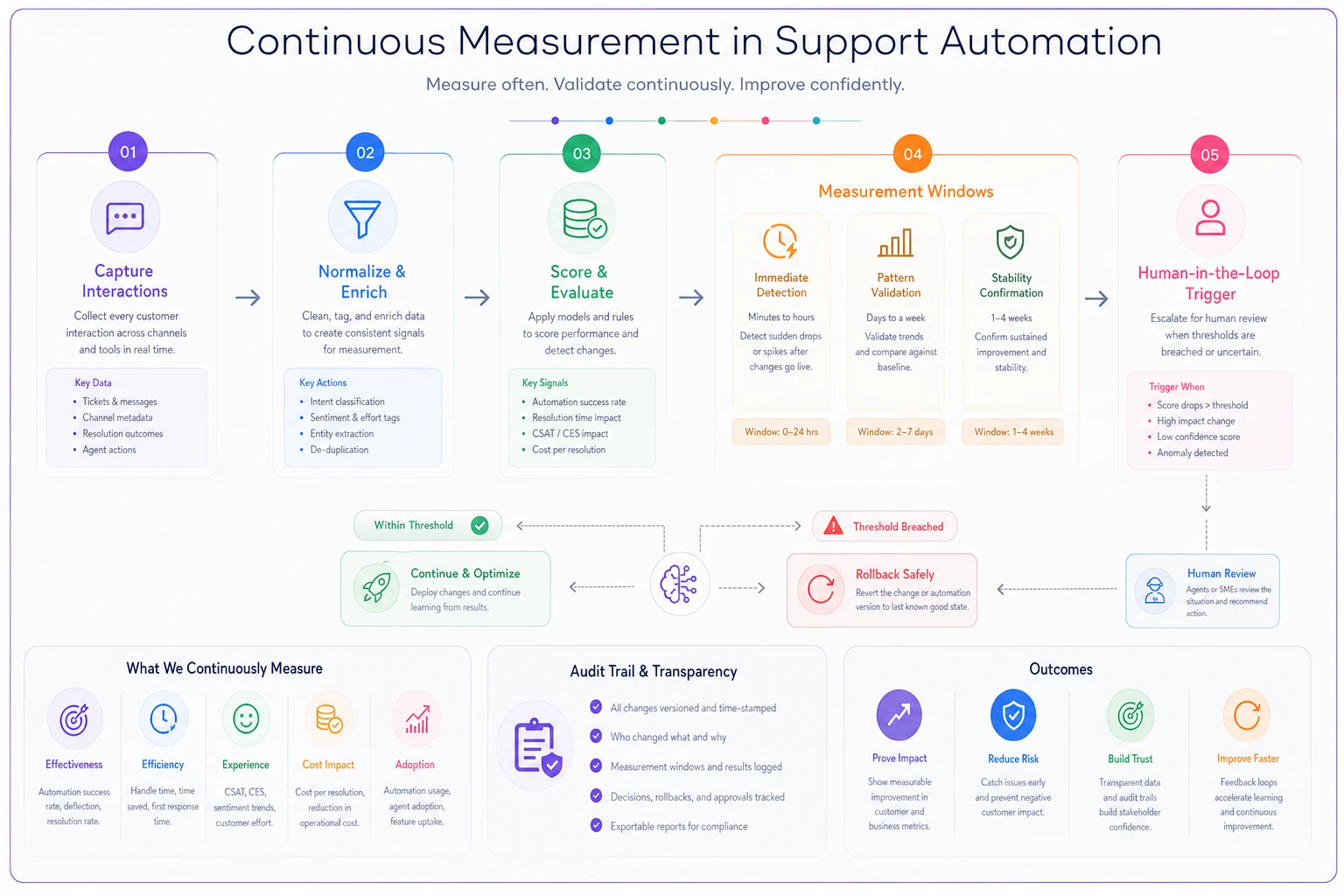
Use this visual to align your team on who checks what and when.
The platform consideration
Modern support platforms handle some governance automatically, but most teams need additional layers. Whether you're using traditional help desk software or building custom workflows, automation governance stays critical regardless of what's underneath it.
AI-powered operational software can help by providing built-in measurement windows, confidence scoring, and automatic rollback triggers. The key is choosing platforms that actually expose these controls rather than burying them behind "smart" defaults you can't touch.
Also worth remembering: personalization and automation aren't mutually exclusive. Good governance is what lets you keep both.
Making governance stick without crushing momentum
The biggest governance failure isn't bad thresholds or missing audit trails—it's creating processes so heavy that teams stop experimenting. Guardrails should enable confident deployment, not slow everything down.
Prioritize high-impact protections first:
-
Start with customer-facing automations
-
Add measurement windows before building complex thresholds
-
Build rollback capabilities before worrying about audit trails
-
Test governance on low-risk workflows first
A subscription service with 6 support agents rolled out basic governance in stages over about 8 weeks. They kept their automation deployment pace while cutting automation-related complaints by over 80%.
What actually breaks, based on real implementations
Teams that skip measurement windows average around 3–4 major automation failures per quarter. Those with basic windows see closer to one. The difference works out to roughly a few hundred confused customers and a lot of cleanup time each time it happens.
Human-in-the-loop thresholds without risk scoring generate far more false positives than necessary—sometimes 5x. Agents start ignoring alerts, which creates the exact blind spot governance was supposed to prevent.
And rollback without segmentation can make things worse. One team's blanket apology email confused customers who hadn't experienced any problems, which generated new tickets about issues that didn't exist.
Governance enables scale
When your team knows guardrails will catch problems, they deploy more automations, iterate faster, and deliver better customer experiences. The teams succeeding with automation aren't the ones with perfect workflows—they're the ones with structures that catch imperfection before it reaches customers.
Your automation will break at some point. The question is whether you catch it at 10 responses or 1,000. Whether you fix it in 20 minutes or 2 days. Whether customers see a minor glitch or a full-blown failure.
That's what good governance actually does. It's not the exciting part of building automated support operations, but it's what separates sustainable efficiency from the kind of spectacular failure that ends up in a postmortem doc.
Build your guardrails before you need them—because when automation breaks, it breaks fast.
Ready to transform your support operations?
Join 500+ support teams using Servyly to reduce resolution times, improve customer satisfaction, and boost team productivity.