



Your knowledge base probably has three types of articles right now: the ones agents bookmark because they actually work; the zombie articles from 2019 that reference deprecated features; and well-meaning articles written last quarter that no longer match how your product works.
Support teams build elaborate knowledge bases with hundreds of articles, then watch agents ignore them and keep asking the same questions in Slack. The problem isn't laziness or bad writing — knowledge management without governance is like maintaining a garden without ever pulling weeds.
The Hidden Cost of Knowledge Decay
Knowledge rot happens faster than most support managers realize. A typical 200-article knowledge base loses accuracy at roughly 2–3% per month from product updates, plus process and policy changes, producing substantial inaccuracy within a year.
Agents stop trusting the knowledge base long before it becomes mostly wrong. After encountering a few outdated articles, they rely on ticket comments, personal notes, and shadow documentation — multiplying operational overhead and increasing resolution times.
Why Traditional Knowledge Management Fails Small Teams
Enterprise playbooks assume dedicated writers, quarterly audits, and slack to manage updates. Small teams don't have that luxury: subject-matter experts are busiest on tickets, product changes slip by support, and knowledge flows through Slack and ticket comments instead of formal channels.
Never lose track of a customer request again.
Servyly helps you track, assign, and resolve every ticket quickly and efficiently.
- Centralized ticket management
- Automated response workflows
- Team collaboration tools
No credit card required
The real knowledge base for small teams is the collective memory of the people doing the work — and that memory usually has no backup unless you design governance that fits day-to-day operations.
Building a Lightweight Governance System
A governance-first approach treats knowledge like a monitored system: set up lightweight detection signals and fix problems before they cascade, rather than relying on infrequent audits.
-
Ticket deflection dropping below 20% for an article category
-
Agents spending more than 30 seconds on article pages without copying or using content
-
The same article getting linked in tickets with different resolutions
-
Customers replying “this doesn't work” to article links
-
Product release notes mentioning features covered in existing articles
-
Spike in questions about topics that already have documentation
-
New agents asking documented processes in Slack
-
Increase in ticket transfers for supposedly simple issues
Integrate these signals into daily operations: when an agent marks a ticket "resolved with article," trigger a lightweight verification — check customer response, reopen events, and whether the agent added clarifying text.
The Article Lifecycle That Actually Works
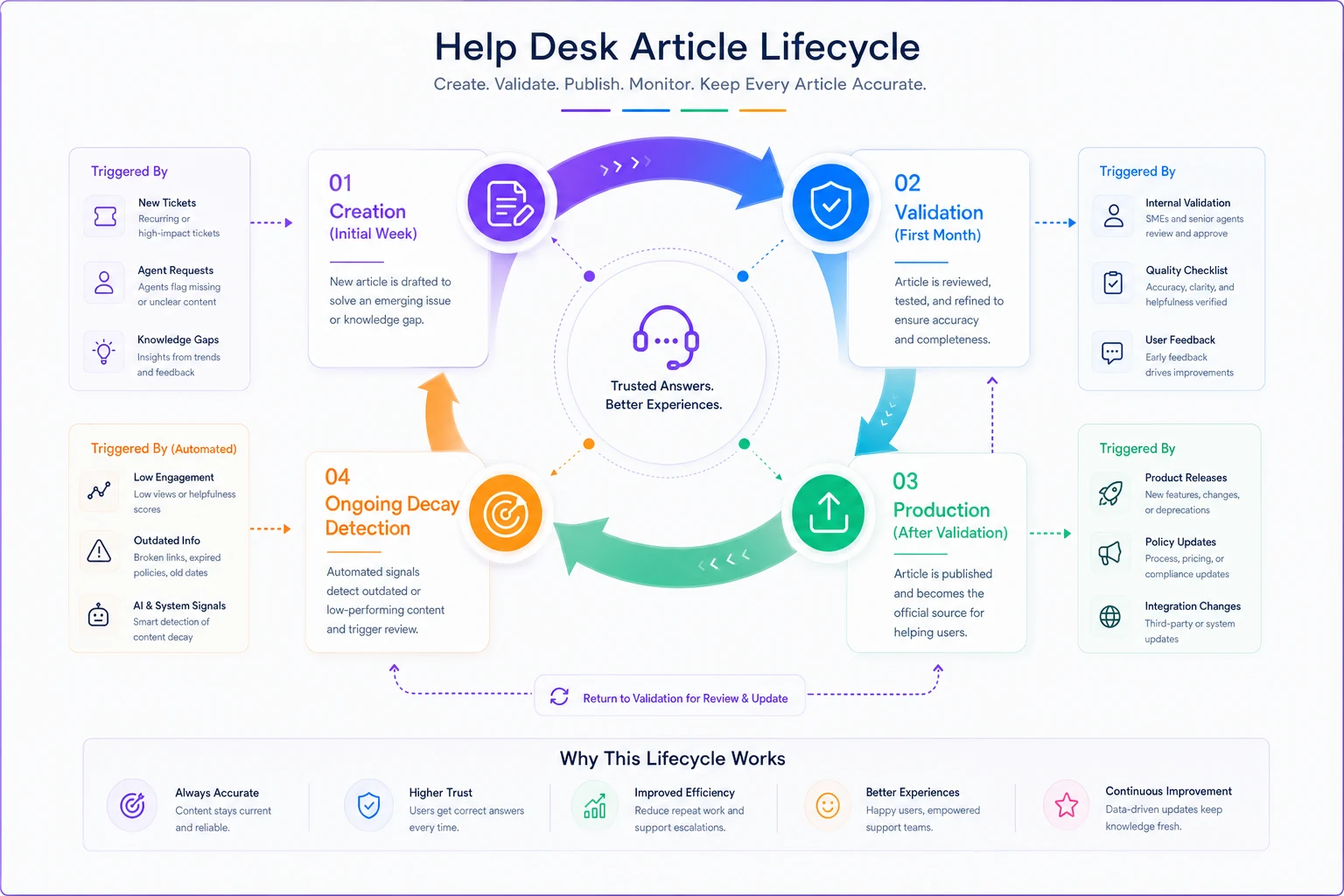
Design a simple lifecycle that matches operational reality. Avoid complex approval trees — focus on quick creation, short validation, and production with automatic revalidation when dependencies change.
Creation Phase (Day 0–7): Draft articles directly from ticket explanations. Capture the working solution quickly without perfect formatting.
Validation Phase (Day 7–30): Soft-launch internally. Let agents use the article on real tickets and flag gaps, unclear steps, and edge cases before customer publication.
Production Phase (Day 30+): Publish to customers with metadata tags for last review date, product version, and dependencies. When dependencies change, automatically return the article to validation.
Standardizing Article Metadata
A consistent header across drafts prevents orphan documents and clarifies ownership. Structured metadata helps track article health and lifecycle. See Beefed.ai's guide on knowledge base structure for more context.
-
Title
[Action-oriented problem summary]
-
1-Line Summary
[Brief description of what this article resolves]
-
Owner
[Named agent or category SME]
-
Product / Version
[Applicable product tier and software version]
-
Status
[Draft | In Validation | Published | Deprecated]
-
Created / Last-Reviewed
[YYYY-MM-DD / YYYY-MM-DD]
-
Priority
[P1 - Critical | P2 - Core | P3 - Low Volume]
-
Tags
[Topic, Feature, Error Code]
-
Linked Tickets
[Ticket IDs or reference links]
| Field | Value |
|---|---|
| Title | Resolving 402 Payment Required Errors on Checkout |
| 1-Line Summary | Steps to diagnose gateway declines, retry failed card charges, and issue invoices. |
| Owner | Alex Rivera (Senior Billing Specialist) |
| Product / Version | Billing Portal v2.4+ |
| Status | Published |
| Created / Last-Reviewed | 2026-02-15 / 2026-03-20 |
| Priority | P1 - Critical |
| Tags | billing, payment-gateway, checkout-error, invoice-retry |
| Linked Tickets | #48102, #48231 |
Decay Detection
Don't rely on arbitrary review schedules. Monitor articles continuously with operational signals: low usage might be fine, but high usage with poor outcomes requires immediate attention.
Lightweight Experiments to Catch Problems Early
Small teams can run low-overhead experiments that reveal documentation gaps without disrupting tickets.
-
Shadow Article Test
duplicate an article with slight wording differences and compare performance across agents for a week.
-
New Agent Probe
track which articles new hires struggle with during their first month.
-
Ticket Tag Analysis
tag tickets lacking documentation and review patterns after two weeks to prioritize content work.
-
Link Decay Check
monthly 30-minute link-and-screenshot verification to catch technical decay early.
Role-Based Review Cadences That Don't Overwhelm
Make review part of existing workflows so it doesn't feel like extra work. Different roles surface different problems; capture those encounters as lightweight feedback.
-
Tier 1 Agents
flag issues during ticket resolution using a simple "this article has issues" button.
-
Senior Agents
note which articles junior agents should have used during escalations.
-
Team Leads
include article performance in weekly metrics reviews to connect knowledge to outcomes.
-
Product Liaisons
scan potentially affected articles before releases and flag changes.
Metrics That Predict Knowledge Health
Move beyond vanity metrics. Track measures that connect articles to ticket outcomes so you can prioritize governance where it matters.
-
Resolution Velocity
how much faster agents resolve tickets when using articles versus not; target ≥30% improvement.
-
Deflection Rate
percent of users who don't create tickets after viewing articles; healthy range 40–60%.
-
Trust Score
percentage of available articles agents actually use; low usage signals trust problems.
-
Decay Velocity
how quickly articles become outdated after product changes; helps focus governance effort.
-
Coverage Gaps
percent of tickets resolvable with docs but not resolved; indicates needed new articles.
The Compound Effect of Good Governance
Good governance multiplies benefits: trusted articles increase usage, which surfaces issues faster, improving content and reducing resolution time — freeing capacity to maintain documentation.
Without governance, the reverse happens: trust erodes, articles are ignored, decay accelerates, and teams rebuild the same knowledge repeatedly in ticket threads.
Automation's Role in Knowledge Governance
AI can amplify governance by continuously monitoring article performance, flagging decay signals, and suggesting updates based on ticket patterns — but it should assist detection and alerting, not replace human judgment.
Use automation for detection and routing; keep humans responsible for final content decisions and edits.
Practical automations include detecting repeated agent clarifications to article links, spotting divergent ticket language, and flagging articles that lead to reopened tickets so humans can prioritize fixes.
Making Governance Sustainable
Sustain governance by embedding it in daily habits: make feedback as easy as marking ticket priority, connect reviews to existing meetings, and accept that the goal is a reliable core of trusted articles, not exhaustive coverage.
Small teams benefit most from fixing and governing existing articles rather than writing many new ones. Trusted core documentation reduces ticket volume and creates capacity for continual improvement.
A governance-first strategy keeps your knowledge base a living operational tool rather than a museum of past practices. Start with lightweight signals, simple lifecycle rules, and role-aligned reviews to build trust over time.
When agents trust documentation, usage grows, decay is detected earlier, and your knowledge base becomes the foundation for better automation and lower ticket volume — but only if you govern it to stay trustworthy as you scale.
Ready to transform your support operations?
Join 500+ support teams using Servyly to reduce resolution times, improve customer satisfaction, and boost team productivity.