
Most support teams are sitting on a goldmine of knowledge that never makes it into documentation. Every ticket contains potential articles, but the actual process of capturing that knowledge is usually so cumbersome that nothing ever gets written.
The typical workflow requires someone to notice a pattern, draft an article from scratch, route it through multiple reviewers, argue about formatting, and eventually publish something that's already outdated by the time it goes live. Meanwhile, agents keep answering the same questions manually while customers wait.
What actually works is a ticket-to-knowledge capture system that pulls content directly from resolved tickets, uses lightweight templates, and publishes automatically when patterns emerge. No committees, no month-long review cycles—just operational documentation that practically writes itself.
The Knowledge Gap Nobody Talks About
Support teams resolve thousands of tickets containing perfect documentation material. Password reset procedures, integration troubleshooting, billing explanations—all of it sitting in closed tickets while agents retype the same answers and customers struggle through outdated help centers.
The disconnect happens because traditional knowledge management treats documentation like a separate project. Someone has to notice a trend, assign a writer, create content from memory, then shepherd it through approvals. By the time anything publishes, agents have already developed their own workarounds and customers have moved on to calling instead.
Small teams feel this worse than anyone. There's no dedicated technical writer or content manager. Agents barely have time to handle tickets, let alone write articles. The few pieces that do get published are created during slow periods and immediately fall behind when things get busy again.
What makes this particularly frustrating is that the content already exists. Agents write detailed explanations in tickets every single day. They refine those explanations based on customer feedback. They know exactly which phrasings work and which confuse people. But instead of capturing this battle-tested content, we ask them to start fresh in a documentation tool.
Why Manual Knowledge Capture Fails
The traditional approach assumes documentation is a creative process requiring careful thought and multiple perspectives. That might work for product announcements or marketing content, but operational documentation needs different treatment.
Never lose track of a customer request again.
Servyly helps you track, assign, and resolve every ticket quickly and efficiently.
- Centralized ticket management
- Automated response workflows
- Team collaboration tools
No credit card required
When agents are forced to context-switch from tickets to documentation tools, quality drops immediately. They're writing from memory instead of real interactions. They guess at customer language instead of using proven explanations. They create generic content because they can't remember specific edge cases from last week.
Review processes make things worse. A simple how-to article bounces between team leads, product managers, and legal. Each reviewer adds their perspective—usually making content longer and less clear. Technical accuracy might improve while usefulness plummets.
Publishing delays compound everything. Articles sit in draft status for weeks while reviewers debate screenshots or worry about obscure edge cases. Meanwhile, agents keep copying the same responses from personal notes, each version slightly different, none of them matching what eventually gets published.
Small teams can't afford this overhead. You need documentation that captures real solutions as they happen, not committee-designed content that arrives months late.
Building a Ticket-Derived Template System
The most effective ticket-to-knowledge capture happens at the source. Instead of separate documentation projects, you extract content directly from resolved tickets using templates agents already understand.
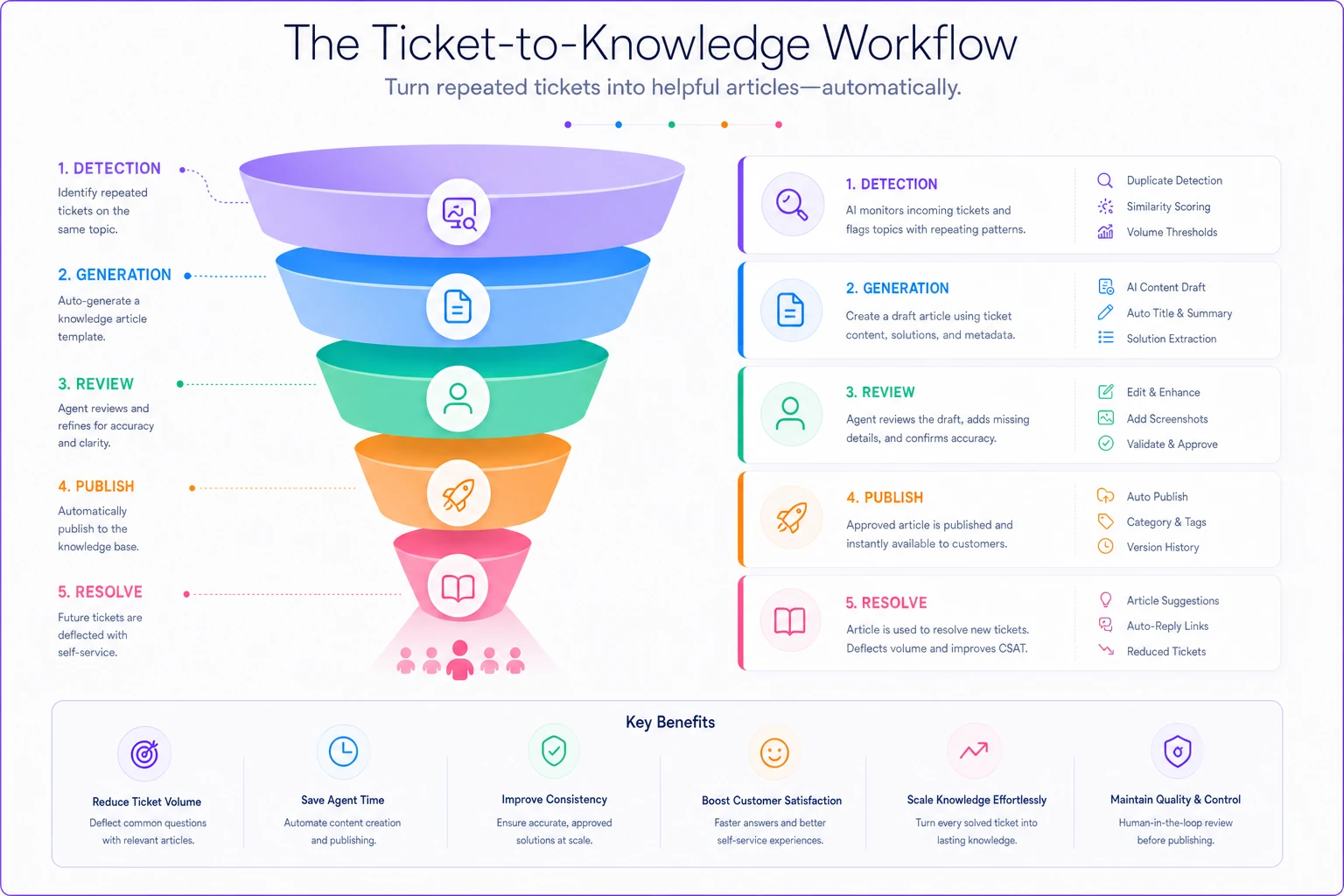
Start with trigger patterns. When three tickets ask about the same issue within 48 hours, the system flags it for documentation. Not a vague "maybe we should write something" reminder—an actual template pre-populated with the resolution that worked.
-
Problem Statement (pulled from ticket subject lines)
-
Symptoms (extracted from customer descriptions)
-
Solution Steps (copied from agent responses)
-
Common Variations (noted in follow-up messages)
-
Related Issues (linked from ticket tags)
Templates should mirror ticket structure. If agents explain solutions in numbered steps, the article template uses numbered steps. If they include warnings about common mistakes, the template has a warnings section. The goal is zero cognitive load—agents see familiar formats, not unfamiliar documentation requirements.
The interesting thing that happens is agents realize they're not writing documentation—they're just solving tickets. The system captures their natural explanations and formats them for publishing.
Here's a quick visual of that flow.
Consider how a billing team handles invoice questions. Instead of writing a formal article about "Invoice Download Procedures," they just resolve tickets:
"Click your account name → Billing → Past Invoices. If you're seeing a loading error, try clearing your browser cache first. The system generates PDFs on-demand, so large invoices might take 10–15 seconds to appear."
That response, repeated across multiple tickets, becomes your article. No creative writing, no committee wordsmithing—just operational truth captured in real time.
Minimal Review Without Sacrificing Quality
Traditional review processes assume every piece of content needs multiple approvals. For operational documentation pulled from tickets, that's backwards. The content is already validated—customers confirmed it solved their problem.
Instead of pre-publication review, use pattern-based quality checks. When the same solution appears in five resolved tickets with positive outcomes, it's ready to publish. No meetings, no approval chains.
| Review Trigger | Action |
|---|---|
| Technical changes | If the solution involves product features, flag engineering for a quick accuracy check. Not a full review—just "is this still true?" Five minutes, not five days. |
| Compliance mentions | Anything touching data, privacy, or regulations gets legal eyes. Again, not a full review—just verification you're not promising something problematic. |
| Revenue impact | Billing, refunds, or account changes need finance awareness. They don't edit the content, just confirm the process matches current policy. |
Everything else publishes automatically. Typos get fixed post-publication. Formatting improvements happen iteratively. Perfect documentation that never ships helps nobody.
Pro-tip: prioritize pattern-based publication for operational fixes—if a solution reliably resolves tickets, publish it and iterate.
Teams that commit to this approach can reduce documentation time from a couple of weeks down to under an hour. Articles publish while issues are still relevant. Customers find answers immediately. Agents stop repeating themselves.
Publication Triggers That Actually Work
The biggest mistake teams make is waiting for "enough" signals before publishing. They want statistical significance, comprehensive coverage, perfect timing. Meanwhile customers struggle and agents burn out.
-
Repetition threshold
Three similar tickets in 48 hours triggers documentation. Not three identical tickets—three tickets where agents give similar answers. The variation actually improves content by capturing edge cases naturally.
-
Resolution success
Solutions that resolve tickets on first contact get prioritized. If customers keep responding with "that didn't work," hold publication until you find what does.
-
Escalation patterns
When Level 1 agents consistently escalate specific issues, documentation helps everyone. The escalation itself proves the knowledge gap exists.
-
Search failures
Track what customers search but don't find. When five people search "cancel subscription" and no article exists, that's a screaming publication trigger.
A subscription box company implemented these triggers and found something worth noting: their highest-value documentation came from their newest agents. Senior agents had internalized solutions so thoroughly they forgot customers still needed explanations. New agents remembered the confusion and documented accordingly.
Timing matters too. Publish immediately when patterns emerge, not after quarterly reviews. If ten customers hit the same bug Monday morning, they need documentation Monday afternoon—not next month's knowledge base update.
Real Implementation: 47 Articles in Two Weeks
A B2B software company with eight support agents is a decent example of how this plays out. They'd managed three documentation updates in the previous year, all outdated within weeks of publishing. Customer satisfaction sat around 72%, with "couldn't find answer" as the top complaint.
They implemented ticket-derived templates with simple rules: any solution used three times becomes documentation. No review unless it touches billing or data. Publish immediately, improve iteratively.
Week one produced 31 articles. Not comprehensive guides or philosophical explainers—just straightforward solutions to real problems. "How to export reports with custom date ranges." "Fixing synchronization errors after password changes." "Why invoices show pending after payment."
Week two added 16 more articles plus improvements to the first batch. Agents started linking articles in responses instead of retyping. Customers found answers before creating tickets. The end-to-end support operations system that previously struggled now had real self-service options.
Three months later: ticket volume down 34%, first-contact resolution up from 67% to 81%, agent satisfaction improved because repetitive questions dropped significantly. The documentation wasn't perfect. But it existed and it helped.
Automation Without Losing Agent Voice
The temptation with ticket-to-knowledge capture is full automation—let AI extract patterns, generate articles, and publish everything. That path leads to generic content that sounds robotic and misses crucial context.
Use automation for the mechanical parts while keeping agent expertise in the loop. Auto-populate templates with ticket content. Flag patterns for review. Format articles consistently. But keep agents in control of what actually gets published.
AI-powered operational software can identify when multiple tickets share themes, extract common resolution steps, and suggest article structures. But agents decide what actually helps customers. They know which explanations confuse people, which screenshots matter, which warnings prevent follow-up tickets.
Think of automation as your documentation assistant, not your documentation writer. It handles the boring parts—copying ticket content, checking for duplicates, formatting headers—while agents focus on clarity and accuracy.
A property management platform tried full automation and saw documentation quality drop fast. Articles were technically accurate but practically useless. They switched to assisted documentation where AI suggested content but agents refined it. Quality improved immediately while time investment stayed minimal.
The balance point: automate detection and formatting, not creation and judgment.
Maintaining Momentum Without Dedicated Resources
The hardest part isn't starting a ticket-to-knowledge capture system—it's maintaining it when things get busy. Support volumes spike, agents get overwhelmed, and documentation becomes "something we'll fix later."
Build maintenance into your operational flow instead of treating it as extra work. When agents resolve tickets, the documentation check happens automatically. When patterns emerge, templates appear without anyone asking. When articles need updates, the system flags them based on ticket feedback.
Link documentation health to metrics that actually matter. Track how often agents link to articles versus retyping answers. Monitor which articles deflect tickets versus sitting unused. Measure time-to-resolution for documented versus undocumented issues.
Some teams gamify this lightly—not heavy-handed leaderboards, but simple recognition. "Sarah's article about API limits prevented 47 tickets this month." Agents see direct impact, not abstract documentation goals.
Keep the feedback loop tight. When customers say "this article didn't help," that feedback routes directly to the agent who wrote it. They update based on real confusion, not hypothetical edge cases.
The key is making documentation feel like part of support work, not separate from it. Agents aren't writers taking time away from tickets—they're support professionals whose solutions happen to help multiple customers at once.
Integration with Your Existing Chaos
Every support team runs differently. Some use comprehensive ticket taxonomies, others rely on agent memory. Some have structured workflows, others adapt constantly. Your documentation system needs to work with your reality, not some theoretical ideal.
If you're already drowning in tickets, don't add complex documentation workflows. Start with one trigger: when agents paste the same response three times, it becomes an article. Nothing fancy—just copy, paste, publish.
For teams with more structure, integrate documentation triggers into existing workflows. When tickets get specific tags, documentation templates appear. When escalations happen, knowledge gaps get flagged. When customers rate responses highly, that content gets captured.
The tools matter less than the process. Whether you're using Help Scout, Zendesk, or something cobbled together, the principle holds: capture knowledge where it naturally occurs, not in separate documentation sessions.
Connect documentation to your existing metrics. If you track first-contact resolution, measure how documentation affects it. If you monitor agent productivity, show how articles save time. If customer satisfaction drives decisions, demonstrate how self-service improves scores.
What This Looks Like Day-to-Day
Monday morning, three customers report login issues after a weekend update. By lunch, agents have documented the fix and published it. Tuesday brings questions about a new feature—documented by end of day. Wednesday's billing confusion gets captured before Thursday's billing cycle starts.
Agents spend maybe five minutes per article because they're not creating content—they're reformatting solutions they already wrote. Review takes another couple of minutes for technical accuracy. Publishing is instant.
Customers start finding answers immediately. Not perfect, comprehensive documentation—but real solutions to current problems. The knowledge base grows based on actual needs, not imagined use cases.
After three months you'll have 100+ articles covering your most common issues. After six months, ticket deflection becomes noticeable. After a year, new agents onboard faster because documentation actually reflects how the team operates.
Each article prevents future tickets. Each prevented ticket frees agent time. Each free moment allows better documentation. The cycle builds without requiring heroic effort or dedicated resources.
When This Approach Breaks Down
This system isn't universal. Complex technical documentation needs deeper review. Legal or medical content requires careful vetting. Enterprise customers sometimes demand formal documentation processes.
If your product changes daily, ticket-based documentation becomes outdated fast. If your support team has high turnover, maintaining consistent voice gets hard. If your tickets are mostly unique edge cases, patterns never emerge.
Some organizations need comprehensive documentation strategies with style guides, approval workflows, and dedicated writers. That's fine. This approach is for teams who need something functional now, not something perfect eventually.
The judgment call: if customers are struggling while you plan perfect documentation, switch to ticket-based capture. You can always improve later. Bad documentation that exists beats perfect documentation that doesn't.
Bottom Line on Ticket-to-Knowledge Capture
Stop treating documentation like a separate project requiring special skills and dedicated time. Your agents already write great explanations—capture them. Your tickets already contain solutions—extract them. Your customers already show you knowledge gaps—fill them.
The shift from planned documentation to ticket-derived content feels uncomfortable at first. You're publishing imperfect articles, skipping reviews, and trusting patterns over committees. But the alternative—maintaining outdated documentation while agents retype solutions—helps nobody.
Build from there based on what actually happens in your queue, not what should theoretically exist in your knowledge base.
Start with one simple rule: when agents solve the same problem three times, it becomes documentation. Build from there based on what actually happens in your queue, not what should theoretically exist in your knowledge base.
The goal isn't comprehensive documentation covering every scenario. It's operational documentation that prevents tickets, saves time, and helps customers right now. Everything else is just process for process's sake.
Your tickets contain the documentation your customers actually need. Stop planning the perfect knowledge base and start capturing the knowledge you already have.
Ready to transform your support operations?
Join 500+ support teams using Servyly to reduce resolution times, improve customer satisfaction, and boost team productivity.