



Three months ago, a B2B software company with 1,200 customers shut down their support line completely. Not because they wanted to—they literally couldn't handle another ticket. Their team of eight support reps was drowning in a backlog of 400+ unresolved tickets, response times had stretched to 72 hours, and their biggest enterprise client had just threatened to pull out of a $180k annual contract.
The crazy part? They had all the right tools. Zendesk for ticketing. Slack for internal communication. Confluence for documentation. Salesforce for customer data. But nothing talked to anything else, and every ticket felt like starting from scratch.
This wasn't a staffing problem or a tools problem. It was a support operations system problem—and it's way more common than you'd think.
Why support teams end up in operational chaos
Support operations break down in predictable ways. Not because teams are bad at their jobs, but because most support systems grow accidentally rather than intentionally.
A typical progression: Company launches with founder handling all support emails. Then they hire their first support person who inherits the founder's Gmail inbox. That person gets overwhelmed, so they add a ticketing tool. More volume comes in, they hire two more people. Those people create their own workflows. Someone suggests adding tags. Another person starts a spreadsheet for tracking escalations. Before long, you've got five different processes running simultaneously with no clear handoff points.
The breaking point usually hits around 50-100 tickets per day. That's when informal systems completely collapse. Tickets get lost between team members. Nobody knows who owns what. Escalations happen through random Slack DMs. Customer context disappears every time a ticket moves between people.
What makes this worse is that support teams rarely have time to stop and fix the system while they're actively drowning in tickets. It's like trying to rebuild a plane while flying it.
Mapping the four critical support workflows
A functional support operations system needs four distinct workflows that connect seamlessly. Miss any one of these, and the whole thing falls apart.
Never lose track of a customer request again.
Servyly helps you track, assign, and resolve every ticket quickly and efficiently.
- Centralized ticket management
- Automated response workflows
- Team collaboration tools
No credit card required
Intake workflow determines how tickets enter your system and get initial categorization. This isn't just about having a help desk email—it's about creating consistent entry points that capture the right context upfront. Most teams mess this up by having too many entry points (email, chat, phone, social media, Slack) without standardizing how information flows from each channel into the queue.
Triage workflow sorts incoming tickets by urgency, complexity, and required expertise. This is where most support operations completely break down. Teams either over-triage (spending 10 minutes categorizing a 2-minute fix) or under-triage (everything gets marked "urgent"). The key is creating simple decision trees that anyone can follow in under 30 seconds.
Resolution workflow defines how tickets actually get solved. This includes who can resolve what types of issues, what resources they need access to, and how they document solutions. Without clear resolution paths, every ticket becomes an adventure in figuring out who knows what.
Escalation workflow handles tickets that can't be resolved at the first level. Most teams treat escalation as "throw it over the wall to someone senior" without defining clear handoff protocols, context requirements, or feedback loops.
Here's a simple visual of how intake, triage, resolution, and escalation should connect in a single flow.
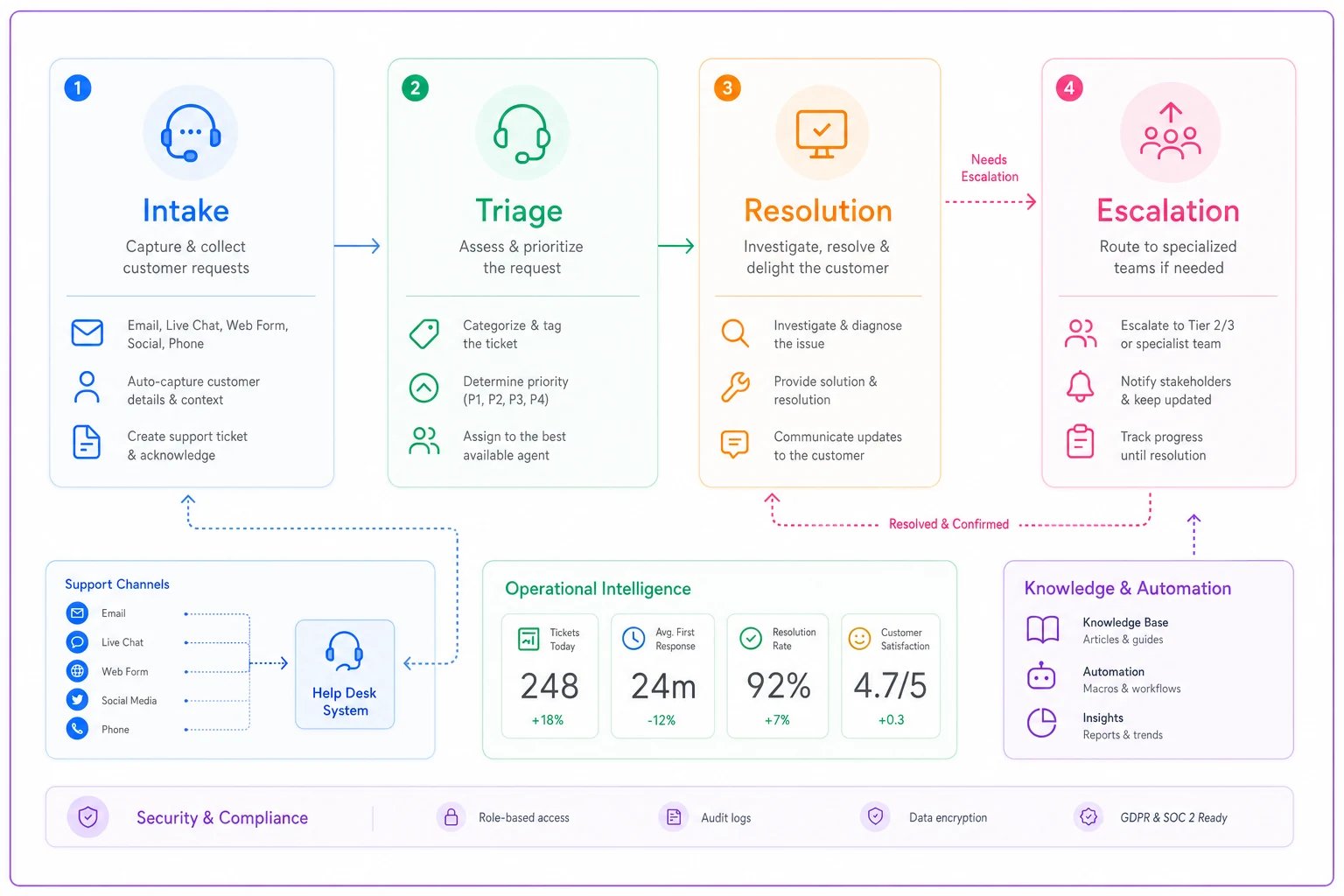
Miss one of these and the whole system trips up—intake without triage buries your queue, triage without resolution creates handoff loops, and broken escalation turns seniors into routers, not solvers.
The RACI matrix that actually works for support teams
RACI matrices usually fail because they're too complicated. For support operations, you need something simpler that people will actually follow.
| Ticket Type | Responsible | Accountable | Consulted | Informed |
|---|---|---|---|---|
| Password resets | L1 Support | Support Lead | - | - |
| Billing issues | L1 Support | Finance Lead | Accounting | Sales (if enterprise) |
| Technical bugs | L2 Support | Engineering Lead | Product | L1 Support |
| Feature requests | Support Lead | Product Manager | Engineering | Original rep |
| Angry executives | Support Lead | VP Customer Success | Account Manager | CEO (if >$100k account) |
The trick is keeping it to 5-7 common ticket types. Anything more and people stop referencing it. Also notice how "Consulted" and "Informed" are used sparingly—most RACI matrices fail because everyone wants to be consulted on everything.
For this to work operationally, you need to embed these assignments directly into your ticketing workflow. When a billing issue comes in, the system should automatically loop in the Finance Lead for accountability, not rely on reps remembering to do it manually.
Building decision trees that don't require a PhD to follow
Decision trees fail when they try to account for every possible scenario. You end up with 47-step flowcharts that nobody uses.
Instead, build simple 3-5 step trees for your most common issues. Here's one that handles about 40% of typical B2B software tickets:
-
No → Send password reset link, wait 10 minutes, verify resolution
-
Yes → Continue to Step 2
-
No → Mark as incident, escalate to engineering immediately
-
Yes → Continue to Step 3
-
No → Schedule 15-minute onboarding call, send help docs
-
Yes → Continue to Step 4
-
Trial/Free → Point to self-service resources, offer upgrade
-
Paid → Escalate to L2 support with full context
That's it. Four decisions that route 40% of tickets to the right resolution path. Build 4-5 trees like this for your most common ticket types, and you've covered 80% of your volume.
Cross-team handoffs that preserve context
The average support ticket touches 2.7 different people before resolution. Every handoff loses roughly 30% of the original context. By the third handoff, the new person is basically starting fresh.
This happens because teams focus on moving tickets instead of moving information. They'll assign a ticket to engineering with a note like "customer having issues with export feature" and expect magic to happen.
Structured context templates. Don't make people write novels. Create fill-in-the-blank templates for common handoff scenarios. For technical escalations: Customer name, account tier, specific feature affected, exact error message, steps to reproduce, what the customer is trying to accomplish.
Use fill-in-the-blank templates for technical escalations to preserve critical context.
Ownership acknowledgment. The receiving team member must explicitly accept the handoff within a defined timeframe (usually 2-4 hours for standard priority). No acceptance means the ticket stays with the original owner.
Feedback loops. When engineering fixes a bug, they need to tell support what was wrong and how to identify it in the future. When support escalates incorrectly, they need to know why so they can handle it themselves next time.
One insurance software company reduced their average resolution time from 31 hours to 11 hours just by implementing structured handoff templates. They didn't hire anyone new or buy any new tools—they just stopped losing context between teams.
The feedback loop everyone forgets about
Most support teams collect customer satisfaction scores and call it a day. But that's not the feedback loop that actually improves operations.
The critical feedback loop is internal: What happens after a ticket closes? Who learns what from that interaction?
Every resolved ticket contains operational intelligence. A password reset that took 45 minutes instead of 5 minutes tells you something. A billing question that required three escalations reveals a process gap. A feature request from multiple customers highlights a product opportunity.
But this intelligence usually dies when the ticket closes. The rep moves on to the next fire, and the pattern never gets addressed.
What should happen instead:
Weekly ticket review sessions where teams analyze outliers. Not every ticket—just the ones that took unusually long, required multiple escalations, or generated customer frustration. The goal isn't blame; it's pattern recognition.
For every pattern identified, create either a new decision tree branch, a knowledge base article, or a process improvement. If five customers hit the same confusing billing flow, don't just help those five customers—fix the flow or create a standard response that prevents future confusion.
Tag tickets not just by category but by resolution type. Did it require special knowledge? Was it a process failure? Was it a product bug? This metadata becomes invaluable for identifying what's actually breaking in your operations.
Setting up escalation paths that don't create bottlenecks
Traditional escalation usually means "pass it to someone more senior," which creates instant bottlenecks. Your senior people become ticket routers instead of problem solvers.
Better escalation systems distribute load horizontally before going vertical. Instead of L1 → L2 → L3 → Engineering, try L1 → Specialized L1 → L2 → Engineering.
For example, instead of escalating all technical issues to L2, create specialized L1 roles: someone who handles all API questions, someone who owns integration issues, someone who becomes the billing expert. These people stay at L1 pay grade but develop deep expertise in specific areas.
-
Customer threatening to cancel (→ Customer Success)
-
Bug affecting multiple customers (→ Engineering on-call)
-
Billing dispute over $1,000 (→ Finance lead)
-
Feature request from enterprise account (→ Product manager)
This approach does three things. First, it resolves tickets faster because the specialist already knows the answer. Second, it creates career development paths within L1 (people can grow expertise without needing promotion). Third, it keeps L2 focused on truly complex issues rather than routine escalations.
The key is defining clear escalation triggers. Not "when the rep doesn't know the answer" but specific conditions. Without specific triggers, reps either escalate everything (creating bottlenecks) or nothing (creating angry customers).
Building capacity planning into daily operations
Support teams typically plan capacity like this: divide expected ticket volume by tickets-per-rep-per-day. So if you expect 200 tickets and each rep handles 25, you need 8 reps. Simple math, consistently wrong.
This approach ignores ticket complexity variation. Monday mornings bring password resets from people who forgot over the weekend (quick fixes). Friday afternoons bring complex technical issues from customers trying to finish projects (slow resolution). End of month brings billing questions (medium complexity, high emotion).
Real capacity planning requires understanding your ticket mix. Track not just volume but time-to-resolution by ticket type. A password reset might take 5 minutes while a data migration issue takes 3 hours. Twenty password resets equals roughly two complex technical issues in terms of capacity.
Build your schedule around this reality. Staff heavy on Monday mornings for volume. Keep your technical experts available Friday afternoons. Have finance-savvy reps during the last week of the month.
Also factor in invisible work. Reps spend roughly 35% of their time on non-ticket work: team meetings, documentation updates, training, bathroom breaks, mental recovery from difficult customers. Plan for 5-6 productive hours per 8-hour shift, not 8.
The metrics that predict system failure
Everyone tracks average response time and resolution time. Those are lagging indicators—they tell you the system already failed.
Reassignment rate. If tickets get reassigned more than once, your triage is broken. Track what percentage of tickets get reassigned and why. High reassignment means reps don't know where tickets should go.
First-contact resolution rate by category. Not overall FCR, but FCR for specific ticket types. If password resets aren't getting resolved on first contact, something's fundamentally broken.
Escalation percentage by rep. If one rep escalates 40% of their tickets while others escalate 15%, they either need training or are getting incorrectly routed tickets.
Time-to-first-assignment. How long do tickets sit before someone claims them? Growing queue time means your intake workflow is breaking down.
Context completeness score. Randomly audit escalated tickets. What percentage have all required context? Low scores predict resolution delays.
A SaaS company tracking these metrics noticed their reassignment rate creeping from 12% to 23% over two months. Investigation revealed their newest hire was routing tickets based on customer name rather than issue type (sending all of Apple's tickets to their enterprise rep, even password resets). One training session fixed a problem that would have eventually crashed their entire support system.
When humans and automation work together effectively
Pure automation fails in support because edge cases destroy customer relationships. Pure human support fails because repetitive tasks destroy team morale. The balance point is automating information flow, not decision-making.
Automation should handle:
-
Ticket routing based on keywords
-
Context gathering from multiple systems
-
SLA tracking and alerting
-
Follow-up scheduling
-
Knowledge base searching
Humans should handle:
-
Interpreting customer emotion
-
Making exceptions to policies
-
Identifying patterns across tickets
-
Building customer relationships
-
Handling complex technical issues
The most effective implementation is invisible automation. Reps shouldn't have to think about the automation—it should just make their job easier. When a ticket comes in, AI-powered tools should automatically pull the customer's purchase history, recent tickets, and current subscription status. The rep sees complete context without hunting through three different systems.
This type of AI-assisted workflow reduces average handle time by 30-40% without removing the human element that customers value. It's not about replacing support reps; it's about letting them focus on actually helping customers instead of searching for information.
One mid-sized retail software company implemented this approach and saw their ticket resolution time drop from around 4 hours to 90 minutes. They didn't lay off any support staff—instead, those reps could handle more complex issues and provide better service. Customer satisfaction actually went up because reps had more mental energy for empathy and problem-solving.
The support operations system in action
A 50-person marketing agency with 200 active clients gets about 75 support tickets daily across email, Slack, and phone. Before implementing a proper support operations system, tickets would pile up in individual inboxes, urgent issues got buried under routine requests, and clients would message multiple team members trying to get faster responses.
They implemented a four-phase system rollout:
Phase 1: Consolidated all support channels into a single queue with automatic tagging based on keywords and client tier. This alone cut response time from 6 hours to 2 hours because tickets stopped getting lost.
Phase 2: Created five simple decision trees covering 80% of their ticket types. New reps could now resolve common issues without constantly asking for help. First-contact resolution jumped from 34% to 61%.
Phase 3: Built RACI matrices for the remaining 20% of complex tickets. Clear ownership meant senior staff spent less time in "who should handle this?" discussions and more time actually solving problems.
Phase 4: Implemented weekly pattern reviews and feedback loops. Issues that appeared three times got documented solutions. Problems requiring multiple escalations got process fixes.
The result after 90 days: average resolution time dropped from 31 hours to 8 hours. Customer satisfaction improved from 72% to 89%. Most surprisingly, support team overtime decreased by 60% because efficient systems meant less firefighting.
Making it stick when everything's on fire
The biggest challenge isn't designing a support operations system—it's implementing it while actively drowning in tickets. You can't pause support to fix operations, but you can't fix operations without some breathing room.
Start with the smallest possible improvement that creates time for the next improvement. Usually, this means fixing intake first. If you can stop tickets from getting lost or misdirected, you immediately reduce duplicate work and customer frustration.
Pick one ticket type that causes disproportionate pain. Maybe password resets take 30 minutes but should take 5. Fix just that workflow. Use the time saved to fix the next most painful ticket type. This incremental approach means you're always making progress without requiring a massive operational pause.
Document as you go, but don't over-document. A simple one-page decision tree beats a 50-page process manual that nobody reads. Focus on clarity over completeness.
Most importantly, involve your front-line team in designing solutions. They know exactly where the system breaks because they deal with it every day. Their buy-in determines whether new processes actually get followed or just become another ignored policy document.
Building a support operations system isn't about having perfect processes or the latest tools. It's about creating clear pathways for tickets to flow from intake through resolution without losing context, creating bottlenecks, or frustrating customers.
The companies that get this right aren't necessarily the ones with the biggest support teams or most expensive tools. They're the ones who've mapped their actual workflows, identified where handoffs break down, and built simple systems that regular humans can follow consistently.
Every support team thinks their situation is uniquely chaotic. But operational failures follow patterns. Tickets get lost between teams. Context disappears during handoffs. Escalations create bottlenecks. Feedback loops don't exist. These aren't unique problems—they're what happens when support operations grow without intentional design.
The framework outlined here—intake, triage, resolution, escalation, feedback—works whether you're handling 50 tickets or 5,000. The specifics change, but the fundamental need for clear workflows, ownership, and context preservation remains constant.
Start where you are. Map what actually happens to tickets today, not what should happen. Identify the biggest source of friction. Fix that one thing. Use the time and energy saved to fix the next thing. Within a few months, you'll have transformed chaos into a system that scales.
Ready to transform your support operations?
Join 500+ support teams using Servyly to reduce resolution times, improve customer satisfaction, and boost team productivity.