


Support managers usually discover their tagging system has failed when they spot tags like "urgentcustomerissue", "urgent-customer-problem", and "URGENTCUSTISSUE" all being used simultaneously by different team members. By that point, you're typically staring at 300-400 tags where maybe 50 actually serve a purpose.
Everyone started with good intentions. Tags were supposed to make ticket analysis easier, help identify patterns, and improve routing. Instead, you've got a graveyard of abandoned tags that makes reporting useless and confuses new team members who don't know whether to use "billingquestion" or "paymentinquiry" (spoiler: both exist, neither gets used consistently).
The real cost of tag proliferation
Tag chaos creates three operational failures that compound over time.
First, your reporting becomes meaningless. When half your tickets are tagged "misc" or "general" because agents can't find the right tag among 400 options, you lose visibility into what's actually happening in your support queue. A medium-sized SaaS company discovered they had been missing a major product bug for three months because tickets were scattered across 12 different bug-related tags, none of which individually triggered their alert thresholds.
Second, ticket routing breaks down. Auto-routing rules based on tags fail when agents use inconsistent variations. One team had set up routing for "enterprisecustomer" tickets to their senior support tier. But agents were also using "enterprise-client", "entcustomer", and "ENTERPRISE", which meant roughly 60% of enterprise tickets went to the wrong queue initially, adding 2-3 hours to resolution times.
Third, knowledge base connections fail. Most help desk platforms can suggest relevant articles based on tags. But when your "passwordreset" issues are spread across "password", "loginissue", "cantaccess", "resetpassword", and a dozen other variations, your automation essentially becomes decorative. Agents waste time manually searching for articles that should have appeared automatically.
Why standard tag management approaches fail
Most support teams try to solve tag chaos with a one-time cleanup and a naming convention document. Six months later, they're back to 400 tags.
Never lose track of a customer request again.
Servyly helps you track, assign, and resolve every ticket quickly and efficiently.
- Centralized ticket management
- Automated response workflows
- Team collaboration tools
No credit card required
The fundamental mistake is treating tags as a documentation problem rather than an operational workflow problem. Creating a perfect naming convention doesn't matter if nobody follows it during a busy shift when they need to close tickets quickly. Quarterly tag audits sound responsible but they're too infrequent to catch proliferation before it spreads.
An agent needs to tag a ticket about a customer who can't export their data. They search for "export" but only find "dataexporterror" which doesn't quite fit. Under time pressure, they create "exportproblem" and move on. Next week, another agent creates "exportissue" for a similar ticket. Within a month, you have five export-related tags, none used consistently.
Most help desk systems make tag creation too easy and tag selection too hard. Creating a new tag takes two seconds. Finding the right existing tag among hundreds takes 30 seconds of scrolling or searching. When you multiply that by 50 tickets per day, agents naturally take the faster path.
Building a tag taxonomy that stays clean
A working tagging system needs four interconnected components that operate continuously, not just during audits.
Component 1: Hierarchical naming with clear ownership
productbug[specific] productfeature[specific] customerbilling[specific] customeraccount[specific] technicalintegration[specific] technicalperformance[specific]
Each prefix category needs a designated owner from that team. The product team owns all "product" tags. The billing team owns "customerbilling_" tags. This isn't gatekeeping—it's about having someone who understands the actual use cases for those tags and can spot redundancy.
Critical part most teams miss: limit each category to 15-20 tags maximum. If you need more, you probably need better sub-categories, not more tags. When the billing team wanted to add their 21st tag, they had to either retire an unused one or prove why the new tag captured something the existing 20 couldn't.
Enforce the 15-20 tag limit per category early to encourage sensible sub-categorization.
Component 2: Pre-approved tag creation workflow
-
Agent encounters a ticket that doesn't fit existing tags
-
Agent uses a general category tag temporarily ("productother" or "customerother")
-
Agent submits a 30-second tag request form
proposed name, example tickets, why existing tags don't work
-
Category owner reviews within 24 hours
-
If approved, the new tag gets added and recent "other" tickets get retroactively tagged
This sounds bureaucratic but it takes less time than cleaning up tag chaos later. One B2B software company reduced their tag count from 380 to 85 using this system while actually improving categorization accuracy.
Component 3: Automated hygiene checks
Manual tag audits are theater. By the time a human notices a problem, it's already entrenched. Instead, use automated checks that run continuously:
Daily duplicate detection: A simple script that flags tags with similar names. When it finds "customer-refund" and "customer_refund", it automatically merges them (following your naming convention) and notifies the category owner.
Weekly usage reports: Every Monday, category owners get a report showing:
-
Tags used fewer than 5 times in the past month
-
Tags that haven't been used in 30 days
-
New unofficial tags that appeared (agents typing custom tags)
-
Tags being used outside their intended category (like billing agents using technical tags)
Monthly similarity analysis: More sophisticated checks that identify conceptually similar tags. If "loginerror", "authenticationfailed", and "cantsignin" all get applied to similar tickets, the system flags them for consolidation.
Component 4: Regular pruning cadence
Weekly (5 minutes): Category owners review their usage reports. Tags used fewer than 5 times get flagged for next week's review. If still unused, they're archived.
Monthly (30 minutes): Full team reviews similarity analysis. Overlapping tags get merged. Category owners can trade tags if usage patterns show a tag belongs in a different category.
Quarterly (2 hours): Complete taxonomy review. Are the categories still right? Do high-usage tags need to be split? Do low-usage categories need to be consolidated?
You're making small adjustments continuously rather than massive overhauls that disrupt workflows.
A simple workflow for tag creation requests looks like this.
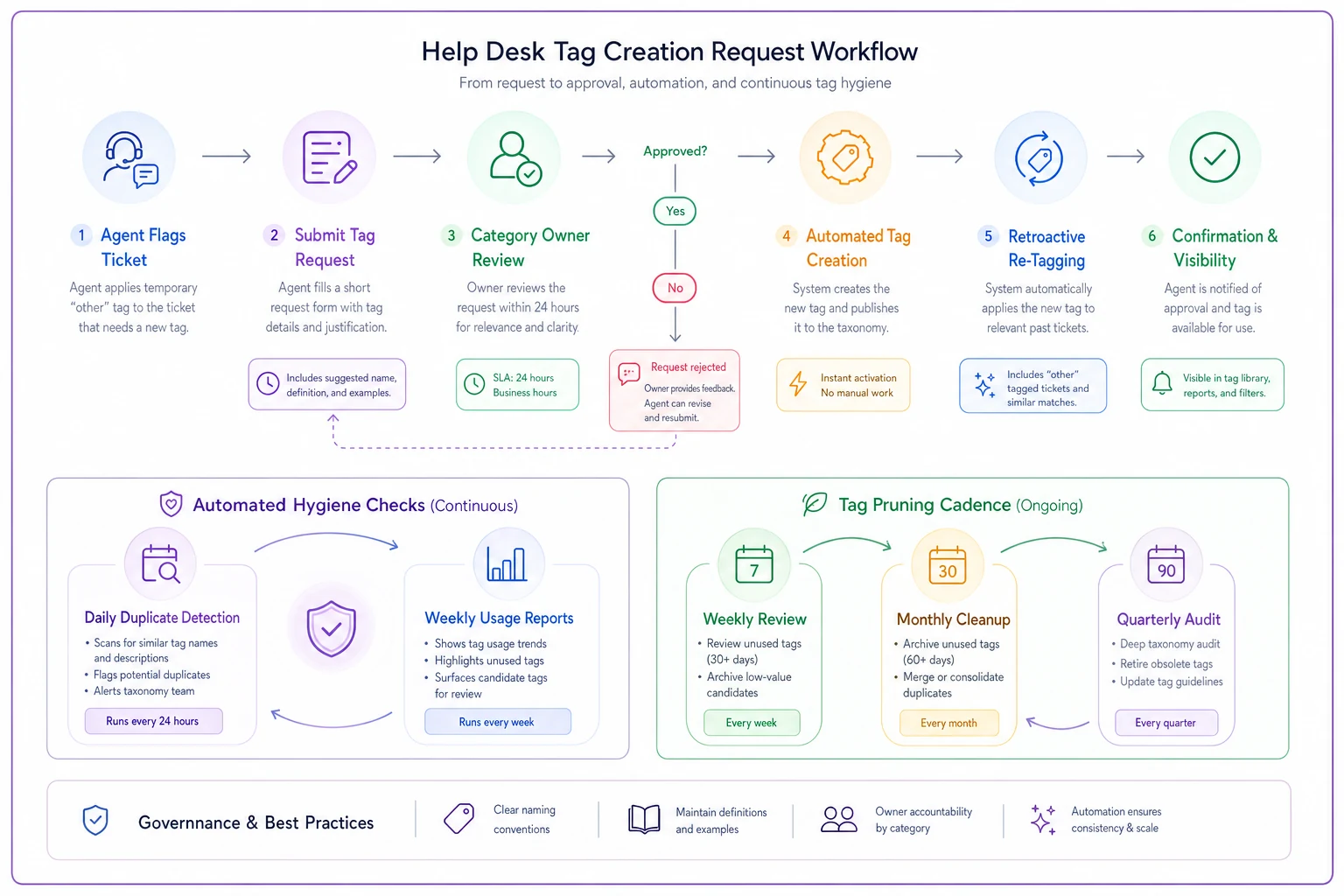
This fits into the broader system: pre-approval stops on-the-fly creation, automation enforces hygiene, and pruning keeps tag count bounded.
Real implementation: TechFlow's tag transformation
TechFlow, a project management software company, had 420 tags accumulated over three years. Their support team of 15 agents was spending roughly 45 seconds per ticket just figuring out which tags to use, and their reporting showed 60% of tickets tagged as "general_issue" or "other".
They started by analyzing their existing tags and found:
-
120 were duplicates or near-duplicates
-
85 hadn't been used in six months
-
45 were typos or test tags
-
Only about 80 tags saw regular, meaningful use
Rather than trying to clean everything at once, they implemented the four-component system:
Week 1-2: Established five main categories (product, account, billing, technical, operations) with designated owners. Created the hierarchical naming structure.
Week 3-4: Built simple automation using their help desk's API to run daily duplicate detection and weekly usage reports. Nothing fancy—just Python scripts running on a scheduler.
Week 5-6: Migrated the 80 commonly-used tags to the new structure. Everything else went into an "archive" status—still searchable for historical tickets but not available for new ones.
Week 7-8: Trained agents on the new tag request process. Initially, they got 30-40 requests per week as agents adjusted. By week 12, this dropped to 5-10 per week.
Results after six months:
| Metric | Before | After |
|---|---|---|
| Total tag count | 420 | 95 |
| "General_issue" usage | 60% | 8% |
| Ticket routing accuracy | Baseline | +40% |
| Time spent tagging per ticket | 45 seconds | 8 seconds |
| Report generation time | 2 hours | 5 minutes |
Results after six months:
Common pitfalls and how to avoid them
The "perfect taxonomy" trap: Teams spend months designing the perfect tag structure before implementing. Start with 80% accuracy and refine based on actual usage. TechFlow's initial categories weren't perfect—they moved 15 tags between categories in the first quarter—but starting imperfect beat endless planning.
Over-specific tags: "productbugexportcsventerprise_windows" might seem precise but agents won't use it consistently. Keep tags at the level of specificity your team can realistically maintain. Usually, that's 2-3 levels deep, not 5.
Ignoring agent feedback: Your taxonomy might make perfect sense to management but if agents find it confusing during actual ticket processing, it'll fail. Run weekly 5-minute feedback sessions during the first month. What tags are agents searching for but not finding? What naming conventions trip them up?
All-or-nothing automation: Some teams try to automate everything immediately. Start with simple duplicate detection, then add usage reports, then similarity analysis. Building incrementally lets you adjust based on what actually helps versus what sounds helpful in theory.
Building versus buying tag management
Many help desk platforms claim to have tag management features, but most just offer basic auto-complete and bulk editing. For true taxonomy management, you typically need to build some custom automation.
The minimal viable system requires:
-
API access to your help desk platform
-
A way to run scheduled scripts (cron jobs, cloud functions, etc.)
-
Basic scripting knowledge (Python, JavaScript, etc.)
-
10-15 hours of initial setup
-
2-3 hours monthly maintenance
Some teams integrate this into their existing operational software. If you're already using AI-powered platforms for ticket routing or analysis, adding tag management workflows makes sense. The same system analyzing ticket patterns can identify tag redundancy and suggest consolidations.
For smaller teams (under 10 agents), manual management with clear ownership and weekly reviews might suffice. But once you pass 15-20 agents or 1,000 tickets per month, automation becomes essential. The time saved on accurate reporting alone justifies the investment.
Making it stick
The difference between tag systems that stay clean and those that devolve into chaos isn't the initial setup—it's the ongoing operational rhythm. Tags need to be someone's actual responsibility, not a side project. Automation needs to run continuously, not just during audits. And the system needs to make good tagging easier than creating new tags.
Treat your tagging system as operational infrastructure, not documentation. It directly impacts ticket routing speed, reporting accuracy, and agent efficiency. When agents can find the right tag in 8 seconds instead of 45, when reports reflect reality instead of requiring hours of cleanup, when routing rules actually work—that's when tags transform from overhead into operational advantage.
The teams succeeding with tag management aren't the ones with perfect taxonomies. They're the ones with sustainable systems that prevent chaos from accumulating in the first place. Start small, automate the repetitive checks, maintain steady pruning rhythm, and give your categories real owners with real authority. Your future self trying to generate quarterly reports will thank you.
The teams succeeding with tag management aren't the ones with perfect taxonomies. They're the ones with sustainable systems that prevent chaos from accumulating in the first place. Start small, automate the repetitive checks, maintain steady pruning rhythm, and give your categories real owners with real authority. Your future self trying to generate quarterly reports will thank you.
Ready to transform your support operations?
Join 500+ support teams using Servyly to reduce resolution times, improve customer satisfaction, and boost team productivity.