
Most support teams treat incident reviews like damage control meetings. Everyone shows up, talks about what broke, documents some vague lessons learned, then goes back to fighting the same fires the following week. The incident report gets filed away, and three months later you're dealing with the same type of outage creating the same ticket surge.
What makes this worse is when support teams run these reviews without any real authority to fix anything. You identify that a confusing checkout flow caused a few hundred tickets last Tuesday—but then what? You can't change the product. You can't force engineering to prioritize it. You end up with a growing collection of incident reports that read like wish lists nobody grants.
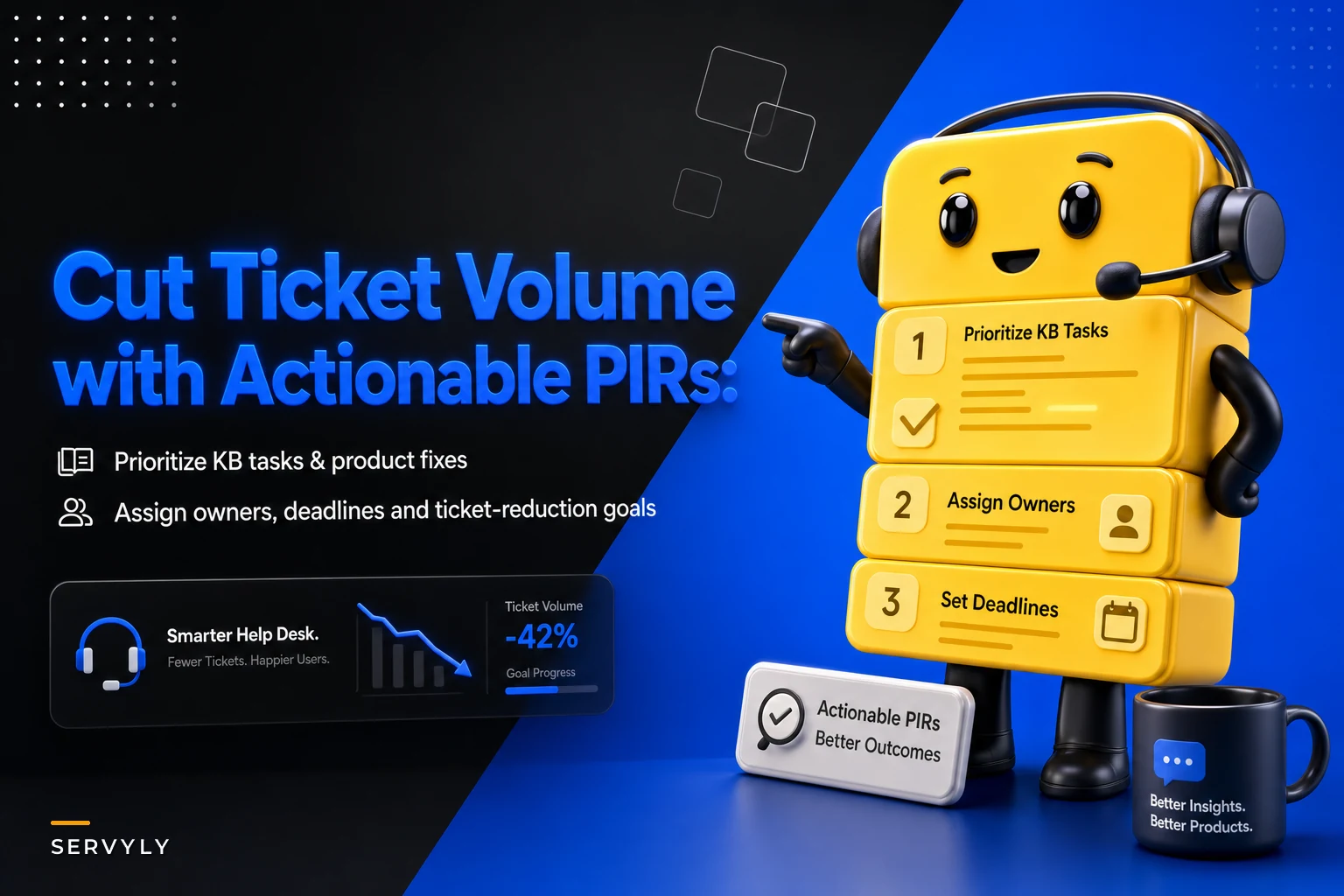
Teams that actually see ticket volume drop after PIRs don't just document what happened. They create specific work items with owners, deadlines, and measurable impact targets. Not vague "improve documentation" tasks, but "Sarah writes KB article on payment retry settings by Friday, targeting a 30% reduction in billing error tickets."
The Problem with Traditional PIRs
Traditional post-incident reviews focus heavily on root cause analysis and timeline reconstruction. Support manager runs through the timeline, engineering explains what broke, someone scribbles action items, and everyone leaves feeling productive. Except ticket volume doesn't move.
The core issue is that these reviews optimize for understanding rather than prevention. Knowing that a database timeout caused yesterday's outage doesn't automatically translate into fewer tickets tomorrow. Support teams need a different framing—one that treats every incident as an opportunity to systematically reduce future ticket load.
Think about your last major incident. How many resulting tickets could have been prevented with better self-service content? How many came from customers just not knowing there was a workaround? How many were the same question repeated forty-something times, the kind a well-placed KB article would've handled? Traditional PIRs miss this entirely because they're designed for engineering post-mortems, not support operations.
When support owns the PIR process, the focus shifts. Instead of dwelling on technical root causes you can't control, you identify every lever available to reduce ticket impact. Maybe you can't fix the underlying bug, but you can set up automated status page updates, get proactive customer communications out faster, and create self-service resources that cut ticket volume significantly during the next similar incident.
Building Your Action-Oriented PIR Template
A support-focused PIR template needs to capture different information than engineering post-mortems. Start with ticket impact metrics, not system metrics. How many tickets did this incident generate? What percentage increase over baseline? Which customer segments were most affected? This becomes your benchmark for measuring improvement.
Never lose track of a customer request again.
Servyly helps you track, assign, and resolve every ticket quickly and efficiently.
- Centralized ticket management
- Automated response workflows
- Team collaboration tools
No credit card required
The template should force specificity around ticket patterns. During a payment processing incident one team I worked with reviewed, they found that roughly three-quarters of tickets were asking the same three questions about transaction status. That's not a training problem—it's a clear signal that customers needed better visibility into payment processing states. The PIR output: create a real-time transaction status page, write three targeted KB articles, and surface payment status in the customer portal. Each task had an owner, a deadline, and an expected ticket reduction attached.
Your PIR template needs sections for:
-
Immediate ticket deflection opportunities What can you implement right now to reduce tickets if this happens again? Auto-responses, status page updates, temporary banner messages. Don't wait for the perfect solution—identify what you can control today.
-
Knowledge base gaps List the exact articles needed, not generic topics. "How to check payment status when processing is delayed" beats "payment documentation." Include search terms customers actually used when creating tickets. Assign each article to a specific person with a publication deadline.
-
Product fix requirements Even if support can't implement product changes, documenting specific fixes with ticket reduction estimates gives you real ammunition for prioritization conversations. "Adding retry status to order confirmation emails would prevent roughly 400 tickets a month" carries more weight than "improve the payment flow."
-
Communication triggers Define exactly when and how to communicate during similar incidents. If payment processing delays exceed ten minutes, automatically email affected customers with expected resolution time and self-service options. This prevents panic tickets and sets realistic expectations before customers start wondering what's going on.
Don't wait for the perfect solution—identify what you can control today.
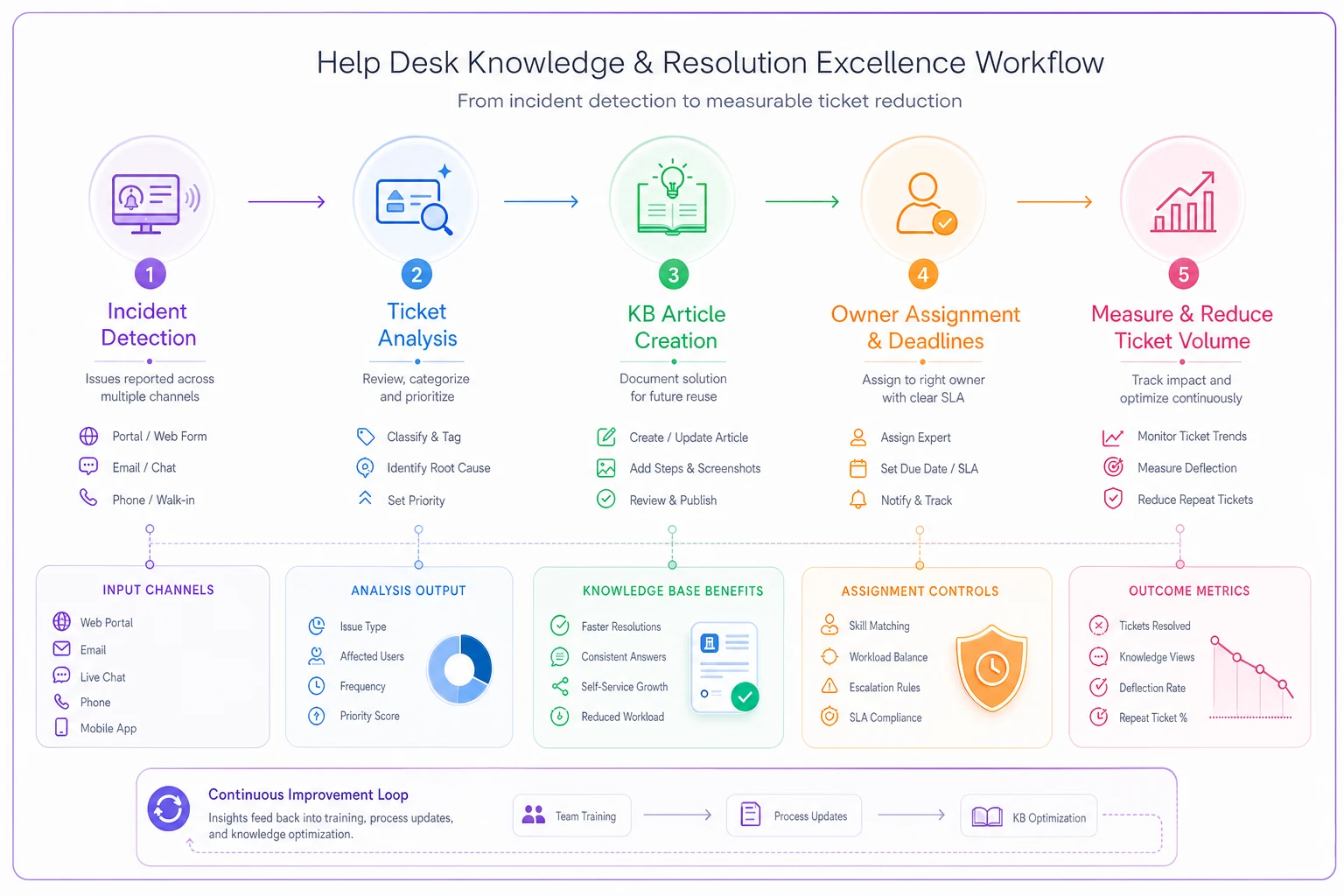
A simple workflow like this helps teams visualize handoffs from incident to KB to owner to measurement.
The template should force specificity around ticket patterns and make outputs directly actionable: owner, deadline, and an expected impact metric.
Assigning Real Owners with Real Deadlines
The biggest PIR failure point is unclear ownership. "The team will improve documentation" means nobody improves documentation. Every action item needs a specific person's name attached, and that person needs to agree to the deadline during the PIR meeting itself—not via Slack later, not implied.
Support teams often struggle here because they feel uncomfortable assigning work outside their department. You can't force engineering to fix bugs or make marketing update website copy. But you can own what you control and clearly document what you need from others.
The person who spent two days answering payment status tickets probably has the clearest picture of what customers are confused about.
For KB tasks, rotate ownership among team members who actually handle those ticket types. The person who spent two days answering payment status tickets probably has the clearest picture of what customers are confused about. Give them dedicated time to write the article—don't expect quality documentation to happen between incoming tickets.
Set aggressive but realistic deadlines. KB articles that address active ticket flow should go live within 48 hours, even if they're not polished. You can refine later. Product fix requests should have a "needed by" date based on expected incident recurrence. If this type of outage happens monthly, you need the fix within two weeks, not somewhere vague on the roadmap.
Track completion rates honestly. If PIR action items consistently miss deadlines, you're either setting unrealistic timelines or you don't have real organizational commitment to ticket reduction. Both need to be addressed before the PIR process loses credibility with your team.
Measuring Ticket Reduction Impact
Every PIR action item needs a measurable ticket reduction target. This feels uncomfortable at first—how do you predict that a KB article will reduce tickets by 25%? You're estimating, and you'll be wrong sometimes. But without targets, you have no way to evaluate whether your PIRs actually work or just feel productive.
Start with historical patterns. If password reset issues generated around 800 tickets last month and you're adding a self-service password reset tool, estimate conservatively. Maybe 40% of customers use self-service initially. That's roughly 320 fewer tickets. Document the estimate in your PIR and compare to actual results after a few weeks.
Create a simple tracking table:
| Action Item | Owner | Deadline | Target Reduction | Actual Reduction |
|---|---|---|---|---|
| KB: Payment retry status | Sarah | March 3 | 150 tickets/month | 187 tickets/month |
| Auto-reply: Shipping delays | Marcus | March 1 | 75 tickets/week | 62 tickets/week |
| Product fix: Show processing time | Engineering | March 15 | 400 tickets/month | Pending |
| Status page: Payment warnings | Devon | Feb 28 | 200 tickets/incident | 234 tickets/incident |
When Sarah's KB article exceeds its target, make that visible. When the auto-reply underperforms, dig into why. Maybe the article is buried. Maybe the auto-reply fires too late. You can't fix what you don't measure, and the gap between estimate and actual is usually the most useful data you have.
Creating KB Tasks That Actually Get Done
The typical PIR generates vague documentation tasks like "improve payment documentation" that sit in backlog purgatory for months. Effective KB tasks are specific, bounded, and immediately actionable.
Instead of "document API errors," write "troubleshooting guide for 'Invalid API key' error—third most common ticket cause last week." Include the exact search terms customers used, a few example tickets showing the confusion, and the specific resolution steps to cover. That level of detail means anyone can pick up the task without additional research.
Build templates for common PIR-generated articles. If payment incidents always generate the same types of questions, create a fill-in-the-blank template covering status checking, timeout handling, and retry logic. During the PIR, you just identify which sections need customization for that specific incident.
The best PIR-driven KB articles anticipate the next incident, not just document the last one. After a shipping delay incident, don't just write "what to do during shipping delays." Write "how shipping estimates work," "why tracking might not update immediately," and "getting refunds for late shipments." These preemptive articles reduce tickets even when everything is working normally.
Don't negotiate on publication deadlines. If the PIR says the article goes live Thursday, it goes live Thursday—not perfect, not fully reviewed, but live and helping customers. You can iterate on quality later.
Connecting PIRs to Product Fixes
Support teams often feel powerless to drive product changes, but PIRs can shift that dynamic when you connect fixes directly to real ticket costs. Engineering might ignore "this confuses customers," but "this creates roughly 500 tickets per month at around $3,750 in support time" lands differently.
Frame product issues in engineering-friendly terms. Instead of "customers hate the checkout flow," write "users can't see the total price until after entering payment info, causing about 200 'surprise charge' tickets monthly." Include example tickets, the exact user paths, and proposed solutions.
Your PIR template should include a standard escalation format that engineering can directly convert to tickets. Reproduction steps, impact metrics, success criteria. The easier you make it for engineering to understand and act on the issue, the better your odds of it getting prioritized.
Create a "PIR fix request" label in your engineering ticketing system to distinguish reactive incident fixes from proactive ticket reduction work. Track how many PIR fix requests actually get implemented and what impact they have. That data, built up over six months, becomes a real argument for dedicating engineering time to support-identified improvements.
Some teams set up a monthly "PIR fix budget" where engineering commits to addressing a set number of support-identified issues. Even one or two fixes per month adds up fast when you're targeting your highest-volume problems.
The "Next Time" Protocol
Every PIR should produce a "next time" protocol—specific steps to follow when similar incidents occur. Not high-level guidance, but actual playbook material with trigger conditions and exact actions.
A payment processor outage protocol might say: "When payment success rate drops below 85% for five or more minutes: Devon posts a status page update using template #4, Sarah activates auto-reply rule #12, Marcus publishes KB article #471 to the homepage banner, team switches to macro set B for payment tickets."
This protocol development naturally emerges from PIR discussions. As you review what went wrong, you document what should happen instead. Who notices the incident first? How do they alert the team? What's the first customer communication? Which self-service resources get promoted?
Test these protocols during slow periods. Run a simulated payment outage and execute your playbook. Did the status page update quickly? Did the auto-reply actually help? Were team members clear on their roles? Gaps are much easier to fix in practice runs than mid-incident.
Store protocols where your team will actually find them during a crisis—in your ticketing system's admin panel, bookmarked on every support machine. Not buried in a wiki page nobody visits under pressure.
Running Effective PIR Meetings
The meeting itself determines whether your PIR generates real action or just documentation. Limit attendance to people who can actually own action items. Include frontline agents who handled the tickets, not just managers—they have the clearest picture of where customers were confused.
Start with ticket analysis, not incident timeline. Show the actual tickets, categorize them by root cause, identify patterns. This keeps focus on ticket reduction rather than technical troubleshooting. Engineering can run their own post-mortem for system issues—this meeting is about support operations.
Strict format: 15 minutes on what happened, 15 minutes on ticket patterns, 30 minutes generating specific action items. Longer meetings produce discussion, not decisions. If you can't agree on an action item in five minutes, table it for a separate conversation.
Ownership assignment has to happen in the room. "Sarah, can you write the payment status KB article by Thursday?" gets an immediate yes or no. Don't leave with "someone should" items. Every action needs a name and a date before people walk out.
End with success metrics. What does winning look like for this specific incident type? Something like "next similar incident generates half as many tickets" or "customers self-serve this issue 40% of the time." Post these targets in your team channel and reference them in standups.
Scaling PIR Processes
Small support teams can run PIRs for every significant incident. Larger teams need to be selective or risk PIR fatigue. Focus on incidents that generated three times or more normal ticket volume, or revealed systematic issues affecting multiple customer segments.
Consider running "mini-PIRs" for smaller incidents—15-minute reviews focused solely on KB gaps, happening immediately after incident resolution. No formal meeting, no comprehensive documentation. Just quick identification of missing self-service resources while the experience is still fresh.
Rotate PIR leadership among senior agents. It builds incident response skills across the team and prevents single points of failure. Different facilitators also catch different patterns—someone who mostly handles billing tickets notices things that a shipping-focused agent might miss.
Create a PIR action item dashboard visible to the whole company. Show what support identified, what got fixed, and the resulting ticket reduction. This transparency makes it harder to ignore PIR recommendations and does more for support's credibility with other departments than any quarterly report.
Track meta-metrics on your PIR process. What percentage of action items complete on time? How accurate are your ticket reduction estimates? Are certain types of actions consistently more successful? This is how the process gets better over time instead of just more routine.
Common PIR Pitfalls
The blame game kills PIR effectiveness fast. The moment someone says "if engineering had just tested this properly," you've lost the thread. Keep discussions centered on customer impact and support optimization.
Avoid scope creep. That interesting product idea might be worth discussing somewhere, but not during incident review. PIRs should generate specific, achievable action items that directly reduce tickets from similar incidents.
Don't let perfect block good. A basic KB article published today beats a comprehensive guide published next month. You can iterate on quality, but you can't recover tickets lost to missing documentation.
Watch for action item inflation. If your PIR generates 20 tasks, nothing gets done. Cap it at five to seven high-impact items. Better to complete a few meaningful improvements than abandon an overwhelming list after two weeks.
Pay attention to recurring action items. If "improve payment documentation" shows up in three separate PIRs over six months, you have a systematic problem that individual incident reviews aren't going to solve. That pattern needs escalation to leadership with a real plan behind it.
Technology and Automation Support
PIR processes don't require sophisticated software, but the right tools do reduce friction in execution and follow-through. Ticket analysis gets much more manageable when your system can automatically categorize and pattern-match incident tickets—instead of manually reading through hundreds of tickets, you get a clearer starting point for the conversation.
Setting up automated PIR triggers is worth the setup time. When ticket volume exceeds a meaningful threshold or certain critical tags spike, automatically generate a PIR task with pre-populated data on ticket patterns, affected customers, and suggested KB topics. It removes the friction of deciding whether to run a review.
Some teams use AI-powered analysis to surface documentation gaps from incident tickets. The system scans ticket content, identifies common questions, and suggests specific KB articles to write. It's not a replacement for human judgment, but it accelerates the most time-consuming part of PIR analysis and occasionally catches patterns that are easy to miss when you're deep in it.
Automation also helps with measurement and accountability. Automated reports showing ticket volume for previously reviewed incident types make it easy to see whether your action items actually moved the numbers—without someone having to manually pull that data every month.
For distributed teams, asynchronous PIR tools let members contribute insights without coordinating schedules across time zones. Members review tickets, suggest action items, and claim ownership on their own time. The facilitator synthesizes and confirms assignments. This works particularly well for follow-the-sun support operations.
What This Actually Looks Like in Practice
A mid-sized SaaS company I know of transformed their incident response by shifting PIRs toward ticket reduction. Before the change, their monthly authentication service degradation was generating somewhere around 850 tickets each time it happened.
During their first focused PIR, they found that the majority of tickets were asking essentially one question: "Why does it say my password is wrong when I know it's right?" The team built three targeted responses: a real-time system status indicator on the login page itself, an auto-reply for login-related tickets during active incidents, and a KB article about authentication delays with clear workarounds.
Each task went to a specific person with a 48-hour deadline. The status indicator needed engineering involvement, but framing it as preventing 500-plus tickets monthly got it into the next sprint. The support team owned the KB content and auto-reply setup entirely.
The next authentication incident generated a little over 300 tickets—roughly a 63% drop. The status indicator prevented most of the confusion before it started, the auto-reply handled the basic questions, and the KB article gave customers a self-service path. Support costs for those incidents dropped from around $6,400 to somewhere near $2,300.
What made it work wasn't the tools or the process framework. It was the shift from documenting problems to creating specific, owned solutions with targets attached. The team knew what winning looked like and could actually prove it happened.
Conclusion
Post-incident reviews that reduce ticket volume don't happen by accident. They require a shift from understanding what went wrong to systematically preventing future ticket load—templates that capture ticket patterns instead of just technical timelines, real ownership with real deadlines, and measurable reduction targets.
Teams that get results from PIRs treat them as operational improvement workshops, not incident autopsies. Every incident becomes a chance to identify and eliminate friction in your support operations. Sometimes that's a KB article, sometimes a product fix request, sometimes just a better macro. But always specific, always owned, always measured.
Your next incident is coming regardless. The question is whether you'll handle the same predictable tickets again or use your PIR process to systematically chip away at that volume. The framework isn't complicated—identify patterns, assign owners, set deadlines, measure impact. The hard part is maintaining discipline to execute consistently after the crisis passes and other priorities start competing for attention.
Start with your next incident. Run a focused PIR, pick your five highest-impact action items, assign real owners, set aggressive deadlines. Measure the ticket reduction from those specific changes. Once your team sees that PIRs can actually reduce their daily volume rather than generate more busywork, the process earns its place on its own.
Ready to transform your support operations?
Join 500+ support teams using Servyly to reduce resolution times, improve customer satisfaction, and boost team productivity.