


Support teams track first response times religiously. They monitor resolution rates, CSAT scores, and handle times. But there's one metric that quietly destroys everything else: reopened tickets.
A reopened ticket means you failed the first time. The customer comes back frustrated, your agent loses momentum, and that "resolved" status you celebrated becomes meaningless. Worse, these repeat contacts often escalate — turning a simple password reset into a complaint about your entire service.
The real damage shows up in your operational flow. An agent closes 40 tickets today, feels productive, then sees 12 bounce back tomorrow. Now they're juggling angry follow-ups while new tickets pile in. Queue explodes, SLAs slip, and suddenly everyone's in firefighting mode again.
Why closure quality breaks down when volume spikes
Most support teams operate on a dangerous assumption: that agents naturally know when a problem is truly solved. They don't.
During normal volume, experienced agents take time to verify fixes. They'll test the customer's account, double-check settings, maybe send a quick follow-up. But watch what happens during a product launch or seasonal rush — that careful verification disappears. Agents start speed-closing tickets just to keep queue times manageable.
The pattern looks like this: Monday morning brings 180 new tickets instead of the usual 110. By noon, agents are skipping normal verification steps. They paste solution links without confirming the customer can even access them. They mark billing issues "resolved" without checking if the refund actually processed. They close technical tickets after sending instructions but never confirm the customer got it working.
Three days later, those rushed closures return as reopened tickets. Now you're handling 180 new tickets plus 35 angry reopens. The cycle compounds until the whole operation starts breaking down.
Standard QA catches maybe 5% of these premature closures. Manual reviews happen weekly at best, focusing on tone and grammar rather than actual resolution quality. By the time QA flags a pattern of bad closures, dozens of customers have already churned.
The operational patterns that predict reopens
After digging through ticket data across different support operations, clear patterns emerge around which closures actually fail.
Never lose track of a customer request again.
Servyly helps you track, assign, and resolve every ticket quickly and efficiently.
- Centralized ticket management
- Automated response workflows
- Team collaboration tools
No credit card required
Technical issues reopen at roughly 3x the rate of other categories when agents don't verify the fix worked. A customer reports their API key isn't working. The agent regenerates it, sends the new key, marks it resolved. But they never check if the customer's integration actually connects. Two days later: "Still broken, this is the third time I'm contacting you."
| Ticket Type | Reopen Risk Without Verification | Primary Failure Point |
|---|---|---|
| Technical / API issues | Very High | Fix sent, integration never tested |
| Billing / Refunds | High | Refund promised, processing failure undetected |
| Account access | Very High | Reset sent to inaccessible email |
| Multi-step solutions | High | Customer stuck mid-process, ticket already closed |
| General inquiries | Low | Usually informational, less follow-up needed |
Billing and refund tickets create a different problem. Agents promise refunds will "process in 3-5 days" then close the ticket — no calendar reminder, no follow-up scheduled, no verification system. The refund fails due to a payment processor issue, but nobody notices until the customer writes back furious about missing money.
Account access issues generate the most explosive reopens. Password resets seem simple until you realize customers often can't access the email account they registered with. The agent sends reset instructions to an address the customer can't open, marks it resolved, moves on. The customer tries for days, gets increasingly frustrated, then reopens with "YOUR SUPPORT IS USELESS."
Multi-step solutions fail predictably too. An agent provides a numbered list — update your browser, clear cache, try the beta URL, re-authenticate — closes after sending instructions. The customer gets stuck on step 2, but the ticket's already marked complete. When they write back, they get a different agent who starts the whole diagnosis over.
Building systematic closure verification
The fix isn't telling agents to "be more careful." That's what everyone tries first, and it never sticks. You need systematic verification built directly into your workflow.
Start with categorized checklists that trigger based on ticket type. Not generic "did you solve it?" prompts — specific verification steps tied to what actually goes wrong in each category.
Here's how a staged verification workflow typically looks in practice:
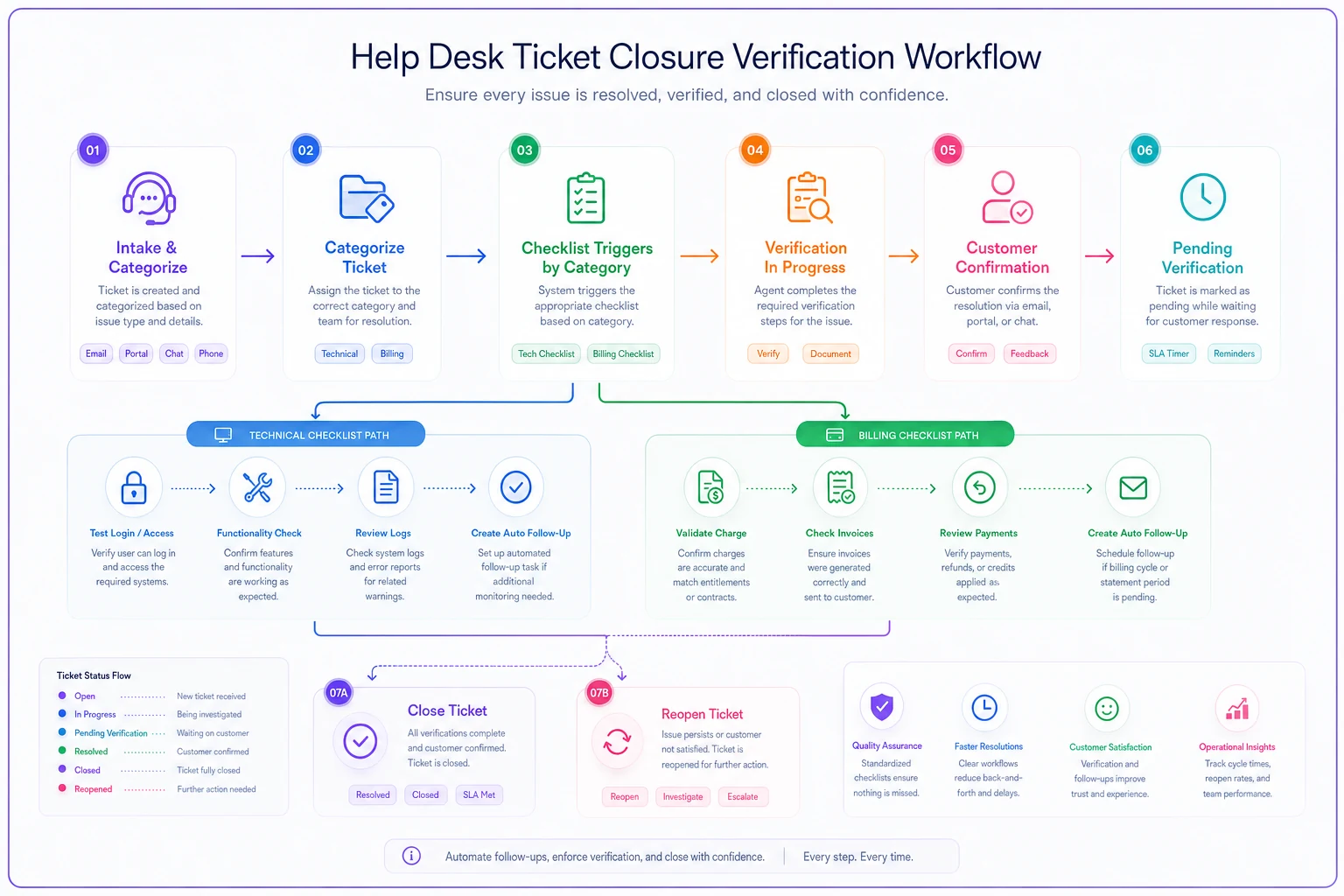
For technical issues, require confirmation that the solution actually worked. Test login credentials, verify API connections, or have the customer confirm functionality before closing. Build this into your ticketing system as a required field — the agent literally cannot close without completing verification.
-
Categorize the ticket at intake using predefined labels
-
Load the category-specific closure checklist automatically
-
Complete all required verification fields before the close option activates
-
Send the appropriate verification message or trigger follow-up task
-
Move ticket to "pending verification" status if customer confirmation is required
-
Auto-close after confirmed resolution, or escalate if no response within the defined window
Billing issues need automated follow-up triggers. When an agent promises a refund, your system should automatically create a task to verify it processed. If the refund fails, the ticket reopens before the customer even notices — catching payment failures, wrong amounts, and processing delays that normally create repeat contacts.
Account access problems require success confirmation. Instead of closing after sending password reset instructions, keep tickets in a "pending verification" status until the customer confirms they're back in. Set a 24-hour auto-follow-up asking if they were able to log in. No response after 48 hours? Escalate to a senior agent who proactively reaches out.
Make verification fields required in the ticket UI so agents cannot bypass category-specific checks when closing.
For complex multi-step solutions, use staged closures. Close step 1 only after the customer confirms it worked, then move to step 2. This takes longer initially but prevents the frustration of failed solutions bouncing back as angry reopens.
QA triggers that catch problems before customers notice
Traditional QA randomly samples closed tickets weekly or monthly. By then, the problems have already multiplied.
Set up real-time flags for suspect closures. Any ticket closed in under 2 minutes gets flagged. Tickets closed without any customer response get flagged. Multiple tickets from the same customer closed rapidly get flagged. These aren't necessarily wrong, but they need a quick look before they compound.
Create pattern detection for individual agents. When someone's reopen rate exceeds 15%, trigger immediate coaching. When an agent closes 50% more tickets than usual in a shift, review their last 10 closures. These patterns reveal rushed work before it becomes a customer satisfaction crisis.
Monitor language patterns in final responses too. Phrases like "should be working now" or "try again in a few hours" signal uncertain resolutions — agents use hedging language when they're not actually confident the problem is solved. Flag these for supervisor review before the customer discovers it's still broken.
Build escalation triggers for high-risk closures: tickets with low sentiment scores, customers who've contacted you three or more times this month, anyone who used words like "lawyer," "cancel," or "refund." These need senior agent review, not a quick close.
Templates that actually prevent repeat contact
Generic templates create more problems than they solve. "We've resolved your issue" means nothing when the customer's still locked out of their account.
Build templates that force verification instead. For password resets: "I've sent reset instructions to j\\\\@gmail.com. This email should arrive within 5 minutes. Once you've successfully logged in, please confirm by replying 'I'm in' so we can close this ticket with confidence."
For refunds, acknowledge the wait but commit to verification: "Your refund of $47.82 has been submitted to our payment processor. This typically completes within 3 business days. I've set a reminder to verify it processed successfully on Thursday. If you don't see it by then, I'll investigate immediately."
For technical fixes, require explicit confirmation: "I've updated your API rate limit to 1,000 requests per hour. Please test your integration now and let me know if you're seeing the new limit. I'll keep this ticket open until you confirm everything's working."
These templates do three things: set clear expectations, create verification loops, and show customers you're actively tracking their resolution — not just closing and moving on.
The proactive follow-up system that stops escalations
Most teams wait for customers to complain again. Following up before problems escalate is the smarter approach, even if it takes more effort upfront.
Build automatic check-ins for different closure types. Technical issues get a 24-hour follow-up: "Just checking that yesterday's fix is still holding up." Billing issues get a verification message after processing time: "Your refund should have posted yesterday — can you confirm you received the $47.82?"
Create escalation prevention workflows. When a ticket reopens once, assign it to a senior agent. Reopens twice, trigger a supervisor call within 2 hours. A third reopen generates an account manager intervention. This costs more per ticket but prevents the viral complaints and negative reviews that do real lasting damage.
Timing matters for follow-ups. Don't send them at closure — customers haven't had time to verify anything yet. Don't wait a week either. The sweet spot is 24-48 hours for technical issues, 3-5 days for billing, and immediately after promised resolution dates.
Track follow-up responses carefully. When customers don't respond to verification requests, don't assume everything's fine — no response often means they've given up on your support entirely. Flag these for proactive outreach.
A real support team's transformation
A SaaS company's support team was handling around 2,400 tickets monthly with a 22% reopen rate. That's over 500 tickets bouncing back every month, creating chaos in the queue and wrecking customer satisfaction scores.
They started with categorized closure checklists. Technical tickets required functionality verification. Billing tickets triggered automatic follow-up tasks. Account access issues stayed open until customers confirmed they could log in. Just those checklists dropped reopens to 14% within three weeks.
Next came QA triggers — flagging tickets closed in under 3 minutes, coaching agents whose reopen rates climbed above 15%, routing high-risk phrases to supervisor review. This started catching problems before customers even noticed them.
The proactive follow-up system made the biggest difference. Instead of waiting for complaints, they checked in within 24 hours on technical issues and after refund processing windows. Customers started responding with "Thanks for checking!" instead of "This is still broken."
After two months, their reopen rate hit 7%. Average handle time went up by roughly 90 seconds per ticket, but total ticket volume dropped by about 340 per month. Agents spent less time on frustrated reopens and more time actually resolving new issues properly.
The unexpected benefit was morale. Agents stopped dreading their queue each morning, knowing yesterday's work might boomerang back. They started taking real pride in resolution quality instead of racing to hit close counts.
Modern platforms handle this automatically
Setting up these systems manually — across help desk tools, spreadsheets, and calendar reminders — creates its own operational burden pretty quickly.
Modern support platforms with AI automation built in can handle the entire verification workflow without the manual overhead. AI-powered operational software tracks closure patterns in real-time, flagging suspect resolutions before they turn into reopened tickets. Instead of agents trying to remember to check on refunds or follow up on technical issues, the system creates tasks and triggers automatically based on ticket type and customer history.
The automation extends to customer communication too. Personalized follow-ups go out consistently, verifying fixes worked, confirming refunds processed, checking that customers completed multi-step solutions. When something surfaces, the system escalates to a human agent before frustration has time to build.
It's not about replacing agents — it's giving them a structure that prevents repeat contacts systematically, so they can focus on solving problems right the first time instead of cleaning up rushed closures.
Start with your highest-volume ticket types
Don't try to fix every closure at once. Start with your top three ticket categories by volume — usually password resets, billing questions, and basic technical issues.
Build one solid checklist for each. Test it for a week. Measure reopen rates before and after. Once you see improvement, expand to the next category.
Add QA triggers gradually. Start by flagging super-fast closures, then layer in pattern detection for individual agents. Build your trigger library based on actual reopen patterns in your own data, not generic best practices pulled from a blog.
Launch proactive follow-ups on a small scale first — pick your most critical customer segment or highest-value tickets, get the timing and messaging right, then roll out more broadly.
Even dropping your reopen rate from 20% to 15% means hundreds fewer frustrated customers and hours of saved agent time every month.
The compound effect of quality closures
Every prevented reopen creates a positive cascade. The customer stays happy, avoiding negative reviews and social media complaints. Your agent maintains momentum instead of context-switching to an angry reopened ticket. Your queue stays workable, and people can operate at a sustainable pace.
Quality closures also build customer trust in a way that's hard to manufacture otherwise. When someone sees you proactively following up to make sure their problem is actually solved, they remember it. They're more patient with future issues, more likely to recommend you despite occasional bumps, and far less likely to become the person leaving a two-star review about your support team.
The investment in verification systems, QA triggers, and proactive follow-ups pays off within weeks — fewer total tickets, happier customers, and a support operation that can actually scale. Not through hope or harder work, but through systematic quality built into every single closure.
Ready to transform your support operations?
Join 500+ support teams using Servyly to reduce resolution times, improve customer satisfaction, and boost team productivity.