


Support teams waste hours playing telephone between frustrated customers and engineering teams who need completely different information to actually fix things. The customer describes symptoms, support translates to tickets, engineering asks for logs, support goes back to the customer, and meanwhile the bug is affecting more users.
The real problem isn't communication skills or technical knowledge gaps. It's the absence of a structured support to engineering escalation playbook that captures the right information the first time.
The broken escalation pattern destroying your support metrics
Picture your support queue right now. A customer reports their checkout flow breaks after entering a promo code. Your agent creates a ticket: "Customer can't complete purchase with discount code SAVE20." Engineering responds three hours later asking for browser console logs, the exact timestamp, what payment method they selected, and whether they were logged in or guest checkout.
Your agent messages the customer, who's already moved on. Two days pass. They finally respond but can't reproduce the issue anymore. Engineering closes the ticket as "cannot reproduce." Next week, three more customers hit the same problem.
This repeats across dozens of escalations every month. Each incomplete handoff adds 2-3 days to resolution time. Engineering spends a significant chunk of debugging time just gathering missing context. Support agents feel helpless when engineers ask technical questions they can't answer.
The fix isn't training support agents to become junior developers. You need an escalation packet template that captures engineering-ready information from the start.
Required fields that turn vague reports into actionable tickets
Most support teams send engineering tickets that read like customer complaints rather than technical issues. "The app is slow" or "payments aren't working" give engineers nothing to work with.
Never lose track of a customer request again.
Servyly helps you track, assign, and resolve every ticket quickly and efficiently.
- Centralized ticket management
- Automated response workflows
- Team collaboration tools
No credit card required
Environment Details
-
User ID or account identifier
-
Exact timestamp (with timezone)
-
Application version or release number
-
Browser/device type and version
-
Network type (wifi, cellular, corporate VPN)
Issue Classification
-
Feature area affected (authentication, payments, search, etc.)
-
Error type (functional bug, performance issue, data inconsistency)
-
User impact scope (single user, user segment, all users)
-
Business impact (revenue loss, blocked workflows, cosmetic)
Reproduction Context
-
User action that triggered the issue
-
Expected behavior vs actual behavior
-
Frequency (always, intermittent, first occurrence)
-
Any recent changes (new feature rollout, account modifications)
These fields transform "checkout broken" into "Guest checkout fails with a 500 error when applying percentage-based promo codes to carts over $200 on mobile Safari 15.2, occurring since release 3.4.2 deployed Tuesday."
Engineering can start investigating immediately instead of playing twenty questions.
Reproduction steps that actually reproduce the problem
Generic repro steps waste everyone's time. "1. Go to website 2. Try to checkout 3. See error" helps nobody. Engineering needs precise steps that recreate the exact conditions triggering the bug.
Strong reproduction steps include:
-
Starting state (logged in/out, specific account type, existing cart contents)
-
Exact navigation path (not just the destination)
-
Specific data inputs (which promo code, what product SKUs)
-
Environmental conditions (time of day if relevant, geographic location for region-specific features)
-
Clear success criteria (what should happen vs what does happen)
Here's what this looks like in practice:
Weak repro steps:
-
Add items to cart
-
Apply discount
-
Checkout fails
Engineering-ready repro steps:
-
Start logged out in Chrome incognito mode
-
Add 3x SKU-4521 (Blue Widget - Large) to cart
-
Navigate to checkout via cart dropdown (not checkout button)
-
Enter guest email
test@example.com
-
Apply promo code
SAVE20
-
Select PayPal as payment method
-
Click "Continue to Payment"
-
Expected
PayPal popup appears
-
Actual
White screen with console error "Uncaught TypeError: Cannot read property 'discount' of null"
The second version lets any engineer reproduce the issue in under two minutes. The first requires multiple back-and-forth exchanges just to understand what's happening.
The logs checklist that captures evidence before it disappears
Support agents often screenshot error messages but miss the technical data engineering actually needs. A solid logs checklist ensures teams capture diagnostic information while the issue is still active.
Browser Issues Checklist:
-
Browser console logs (full output, not just red errors)
-
Network tab showing failed requests (with request/response headers)
-
Browser version from Help > About
-
Screenshots showing full URL and any error messages
-
HAR file export if dealing with complex multi-step flows
Mobile App Issues Checklist:
-
App version from Settings screen
-
Device logs (iOS
Console app, Android: adb logcat)
-
Crash reports if app terminated
-
Screen recording showing the issue occurring
-
Network proxy capture if API-related
Backend/API Issues Checklist:
-
Request IDs or correlation IDs from headers
-
Full request payload (sanitize sensitive data)
-
Response status codes and error messages
-
Timestamps for each failed attempt
-
Rate limit headers if applicable
This checklist works best when it's built directly into your ticketing system as a form. Agents check off what they've collected, which makes it obvious when critical logs are missing before the escalation goes out.
Severity expectations that align support and engineering priorities
Support often marks everything urgent because every customer thinks their issue is critical. Engineering ignores severity labels because they've stopped meaning anything. Real critical issues sit untouched while engineers work on lower-impact bugs.
| Severity | Definition | Response Time | Example |
|---|---|---|---|
| Critical (P0) | Production down, >30% users affected, data loss occurring | 15 minutes | Payment processing completely broken |
| High (P1) | Key feature broken for segment, workaround exists but painful | 2 hours | Checkout fails for mobile users only |
| Medium (P2) | Feature degraded, reasonable workaround available | 24 hours | Search filters not persisting between pages |
| Low (P3) | Cosmetic issues, edge cases, minor inconvenience | 72 hours | Button text truncated on German locale |
Definitions alone aren't enough though. You need objective triggers:
Auto-escalate to Critical when:
-
Error rate spikes >10% in any 5-minute window
-
Payment failures exceed $5,000 in lost transactions
-
Login success rate drops below 95%
-
Core API endpoints return 5xx errors
Auto-escalate to High when:
-
Three customers report the same issue within 2 hours
-
Issue affects any customer on an Enterprise plan
-
Workaround requires support intervention for each case
These automatic escalations take the subjectivity out of severity decisions. Support knows exactly when something qualifies as critical, and engineering starts trusting the classification again.
Triage filters that route issues to the right engineering team instantly
Generic engineering queues create bottlenecks. The payments team shouldn't have to wade through login bugs to find their issues. Smart triage filters route escalations automatically based on packet data.
Build routing rules from your required fields:
Feature Area Routing:
-
Authentication issues → Identity team
-
Payment/billing → Payments team
-
Search/catalog → Discovery team
-
Mobile app crashes → Mobile platform team
Error Pattern Routing:
-
500-series errors → Backend oncall
-
JavaScript exceptions → Frontend team
-
Database timeouts → Infrastructure team
-
Third-party API failures → Integrations team
Customer Segment Routing:
-
Enterprise accounts → Dedicated enterprise engineering queue
-
Beta features → Feature team's experimental queue
-
Legacy system issues → Maintenance team backlog
Layer these filters with auto-assignment logic. If an issue matches multiple criteria, route to the most specific team. A payment error from an enterprise customer on mobile goes to the enterprise queue first, then payments team if no enterprise engineer is available.
Here's a simple workflow showing how triage filters route issues from support to specific engineering teams based on packet fields.
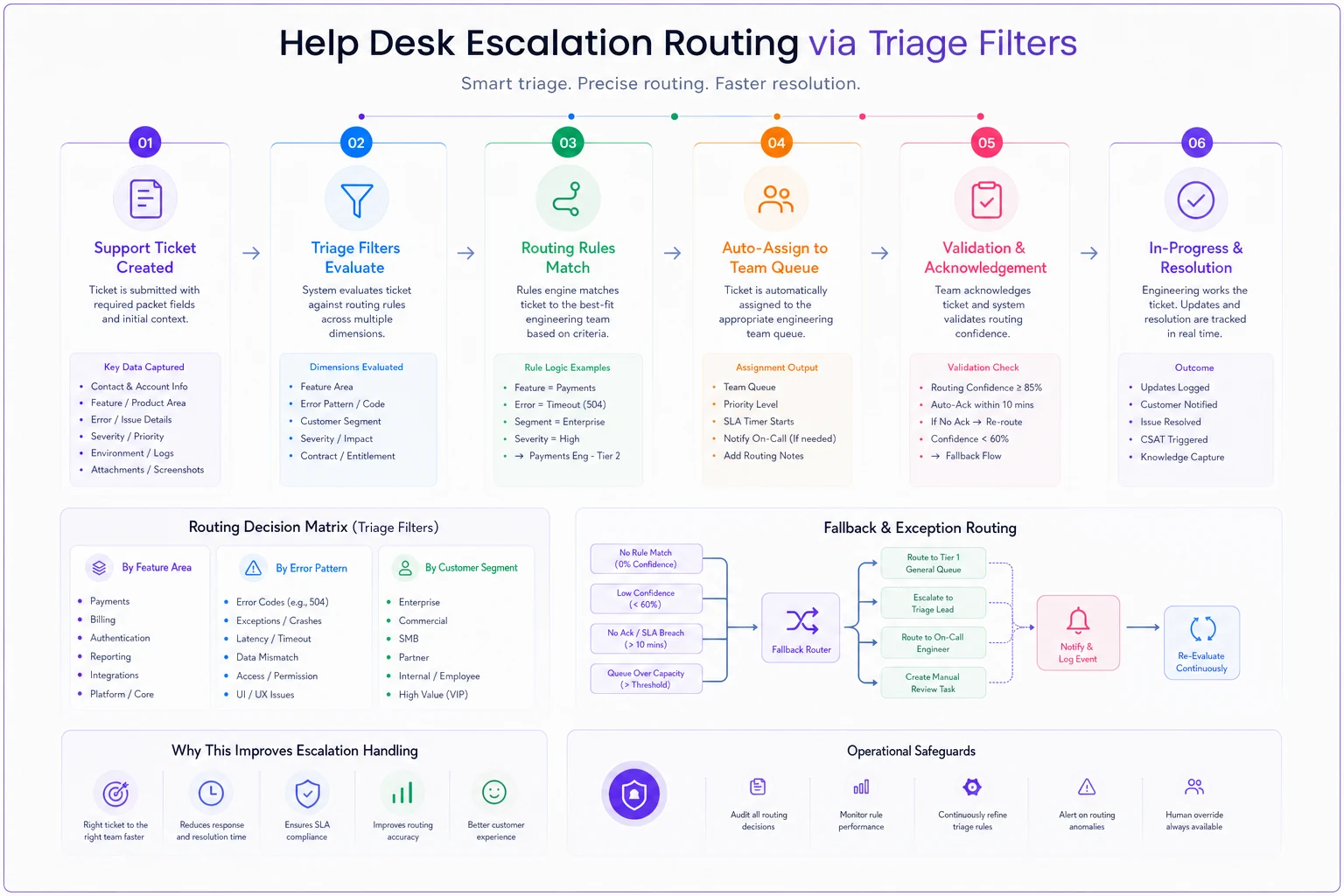
This diagram helps visualize how issues flow through rules so you can tune filters and assignment priorities.
The template in action: From vague complaint to fixed bug
Original customer complaint:
"Your stupid app deleted my entire inventory list! I spent three hours entering products yesterday and now everything is GONE. This is costing me real money!!!"
Traditional support escalation:
"Customer reports inventory data missing. High priority - affecting business operations."
With the escalation packet:
Required Fields:
-
User ID
merchant_8834
-
Timestamp
2024-01-15 14:32 PST
-
App version
iOS 4.2.1
-
Feature area
Inventory Management
-
Error type
Data inconsistency
-
Impact
Single user, ~340 products affected
Reproduction Steps:
-
Login as merchant account with >300 inventory items
-
Navigate to Inventory > Bulk Edit
-
Select all items via checkbox
-
Change category from "Clothing" to "Apparel"
-
Tap "Save Changes"
-
Expected
All items update category, remain in inventory
-
Actual
Progress spinner appears, then inventory list shows empty
Logs Captured:
-
Screenshot showing empty inventory screen
-
Network log showing 200 OK response from PUT /inventory/bulk-update
-
Database query log showing UPDATE statement affected 340 rows
-
User audit log showing bulk operation at 14
31:45
Severity Assessment:
High (P1) - Data appears intact in database but UI not displaying. Workaround: access inventory via CSV export
Auto-routed to:
Mobile team queue (iOS-specific issue) with CC to Database team (potential sync problem)
The mobile team immediately spots it: the iOS app's local cache isn't refreshing after bulk operations. They push a hotfix within 4 hours. The customer's data reappears after a force-refresh.
Without the packet, this bounces between teams for days while the customer's frustration compounds.
Building your own escalation packet without starting from scratch
You don't need six months and a committee to get this running. Start with the highest-volume issue category in your support queue and build one template for that.
Pick your most common escalation type — maybe login problems or checkout errors. Create required fields specific to that issue type. Your authentication template needs different fields than your reporting template.
Test it with one engineering team for two weeks. Track how many follow-up questions they ask. Each question is a missing required field. After five or six escalations, your template will capture the vast majority of necessary information upfront.
Once one template works, expand gradually. Don't try to build packets for every possible issue type at once. Let templates evolve based on actual escalations, not theoretical scenarios.
Integration opportunities that eliminate manual packet creation
Manual escalation packets still require agents to copy-paste between systems. Modern support platforms can auto-populate a lot of this data, cutting a 15-minute process down to two minutes or less.
Your ticketing system probably already knows the user's account ID, subscription level, and recent activity. Browser extensions can capture console logs automatically when agents view error reports. Mobile SDKs can bundle device logs with bug reports.
The key is connecting these data sources to your escalation workflow. When an agent clicks "Escalate to Engineering," the system should pre-fill every field it can access. The agent only needs to add reproduction steps and context.
Some operational software platforms now use AI automation to extract reproduction steps from customer conversations — identifying action sequences in messages like "I clicked the blue button then selected my address and hit save" and formatting them into structured steps. Agents verify and refine rather than writing from scratch.
This matters because complete packets directly affect resolution speed. Engineering teams resolve issues with complete information substantially faster than those where they're still chasing context. Every field you auto-populate saves real time per escalation.
Who shouldn't use rigid escalation packets
Strict escalation templates don't fit every operation. Early-stage startups where engineers directly monitor support channels don't need formal packets. The overhead of maintaining templates isn't worth it when you're handling a handful of escalations weekly.
Companies with dedicated technical support tiers might need a different approach too. If your L2 support includes former developers who can gather debugging information dynamically, rigid templates might actually slow them down.
And businesses with simple products may find comprehensive packets overkill. If your entire application is a single-page contact form, you don't need network logs and device specs. A screenshot and description might genuinely be enough.
But once you're handling 20+ escalations weekly, or your support and engineering teams work across different time zones, or you're watching customers churn because bugs take too long to fix — structured escalation packets stop being optional.
Making engineering handoffs actually work
The best escalation packet means nothing if nobody uses it. Agents skip required fields when they're rushing through queues. Engineers ignore packets that bury useful information in walls of text.
Success comes from making packets easier to complete correctly than to skip. Put required fields directly in your ticket form, not in a separate document. Use dropdown menus for classification fields. Add validation that blocks escalation without minimum information.
Give engineers a reason to trust the process by maintaining quality standards. Review escalations weekly and identify which packets led to quick resolutions versus those that needed follow-up anyway. Share examples with support teams. Show them how complete packets translate to faster fixes and less customer escalation.
And treat the packet format as a living document. Every month, ask engineering which fields they never use and which information they constantly still have to request. Cut unnecessary fields. Add new ones as your product grows.
Put required fields directly in your ticket form with dropdowns and validation to make correct completion easier than skipping.
The goal isn't perfect documentation of every issue. It's giving engineering enough context to start investigating immediately. When handoffs include the right information upfront, support stops playing messenger, engineering stops asking the same questions repeatedly, and customers get fixes days faster.
A solid support to engineering escalation playbook becomes the operational bridge between customer problems and technical solutions. Build it deliberately, and both teams will wonder how they managed without it.
Ready to transform your support operations?
Join 500+ support teams using Servyly to reduce resolution times, improve customer satisfaction, and boost team productivity.