
Most support tech stacks don't get built. They accumulate. Someone buys a chat widget in year one, a knowledge base gets bolted on because the old one was clunky, a QA tool sneaks in through a team lead's free trial, and then a "temporary" survey tool becomes load-bearing three years later. Nobody decided this. It just happened, one reasonable-at-the-time decision at a time.
The result is predictable: a stack where half the tools overlap, two of them are the "source of truth" for the same metric (and they disagree), and every integration is one API change away from silently dropping ticket data. When an SLA breach happens, the first 40 minutes of any investigation is just figuring out which system is lying.
A support technology roadmap isn't a shopping list. It's the governance layer that decides what gets in, how it connects, what it's allowed to touch, and — the part everyone skips — how it leaves. Get the last part wrong and you end up paying for tools nobody uses, each one quietly holding a copy of your customer data.
Why tool sprawl is a governance failure, not a purchasing failure
The instinct is to blame procurement. "We need tighter buying approval." That helps at the margins, but it misdiagnoses the problem. Sprawl doesn't come from buying too much. It comes from never deciding what a tool has to prove, and what happens when it stops earning its place.
In practice, this plays out in a pretty specific sequence. A team adopts a tool to solve one sharp pain. The tool does that job. Then it slowly grows tentacles — it becomes the place agents check for one weird workflow, it starts feeding a dashboard someone in leadership glances at, it gets wired into an automation. By the time anyone questions whether it's still worth it, ripping it out feels riskier than keeping it. The switching cost was never measured, so it was never contained.
The tools causing the most SLA risk usually aren't the flashy ones. They're the boring middleware — sync jobs, field-mapping tools, the Zapier connections held together with hope between your ticketing system and everything else. Those break quietly. A field renames, a sync fails at 2 a.m., and nobody notices until reopen rates spike or a customer segment's tickets stop routing.
Treat every tool decision as a lifecycle with gates, not a one-time yes/no. Selection, integration, operation, and sunset all need explicit criteria. Without sunset criteria especially, you're building a stack that can only grow.
Vendor evaluation: score the operational reality, not the demo
Demos are designed to look good. The vendor drives, the data is clean, and the edge cases never show up. A scorecard that just rates "features" is close to useless — every serious tool will check every box on a features list.
Never lose track of a customer request again.
Servyly helps you track, assign, and resolve every ticket quickly and efficiently.
- Centralized ticket management
- Automated response workflows
- Team collaboration tools
No credit card required
A better evaluation scores how the tool behaves inside your actual operation. That means weighting things vendors don't love talking about: data portability, API rate limits, how failures surface, and what it costs to leave.
Here's a scorecard structure that's held up well across different team sizes. Weight the categories based on your situation, but keep operational and exit criteria heavy — that's where the long-term pain lives.
| Category | What you're actually scoring | Weight | Red flag |
|---|---|---|---|
| Core fit | Does it solve the specific workflow, not a generic version | 20% | Only works for the "happy path" |
| Data access | Can you export everything, on your schedule, in usable formats | 20% | Export is CSV-only, or gated behind support tickets |
| Integration health | Webhooks, rate limits, error visibility, retry behavior | 15% | Silent failures, no dead-letter handling |
| Observability | Can you see what it's doing and prove it to an auditor | 15% | No audit log, no per-action timestamps |
| Automation compatibility | Plays cleanly with your existing automation and guardrails | 10% | Automations can't be scoped or rolled back |
| Total cost of exit | Time and money to migrate off it | 10% | Proprietary data model, contract lock-in |
| Vendor stability | Roadmap, support responsiveness, financial signals | 10% | Vague roadmap, slow support during eval |
One thing worth calling out: the "data access" score predicts future misery better than almost anything else. A tool that makes it hard to get your data out has already decided you're never leaving. That's a governance problem you're signing up for on day one.
Score at least two or three candidates the same way, with the same people, ideally on the same day. Scoring them weeks apart is how the last-seen tool wins by recency bias.
The integration-priority matrix: not everything should connect to everything
Once a tool is in, there's always pressure to integrate it with everything, because integration feels like value. It's also where fragility comes from. Every connection is a dependency, and every dependency is somewhere SLAs can break.
Sort integrations along two axes: how much it improves the workflow and how much risk the connection introduces. High value, low risk is an easy yes. High value, high risk needs real design work — retries, monitoring, fallbacks. Low value, high risk should never get built, regardless of how easy the vendor makes it look.
-
High value / low risk → build it, keep it simple
-
High value / high risk → build it, but with monitoring and a rollback plan
-
Low value / low risk → optional; skip unless it's trivial
-
Low value / high risk → decline; this is where sprawl breeds
The mistake teams make is treating integrations as free once the initial setup works. Every connection you own is something you have to maintain, monitor, and eventually migrate. A stack with fifteen integrations isn't more capable than one with six — it's usually just more brittle. Before wiring anything into your ticketing core, decide who owns that connection's health and how you'll know when it breaks. If nobody owns it, don't build it.
This is also where your data architecture decisions come home to roost. If you've already invested in a trustworthy source of truth — the kind of setup covered in Designing Support Data Architecture: SLIs, Event Pipelines and a Trustworthy Single Source of Truth — integrations should flow through that spine rather than creating point-to-point connections between every tool. Point-to-point works fine at three tools. At eight, it becomes the thing that keeps breaking.
Contract must-haves that protect you later
Contracts are where the exit ramp gets built — or doesn't. Most support tool contracts are optimized for the vendor's renewal, not your operational safety. A few clauses are worth pushing for, and they cost nothing to ask about during the sales process, which is the only time you have real leverage.
-
Data export rights
full export, in a documented format, on demand, including after cancellation. Get a defined post-termination window (30–90 days) where you can still pull your data.
-
Rate limit and uptime commitments in writing, not just marketing pages. If the tool feeds your SLA-critical routing, its downtime is your downtime.
-
Breaking-change notice
a minimum notice period before API or data-model changes. Vendors that rename fields without warning have caused more silent SLA misses than actual outages.
-
Price protection
a cap on renewal increases. Sprawl gets expensive partly because year-three price hikes hit tools you're now too entangled to leave.
-
No data hostage clause
explicit confirmation they won't withhold export access during a billing dispute.
The time to negotiate your exit is before you're dependent. Once a tool is embedded in your workflows, the vendor knows the switching cost, and every conversation tilts their way.
Data and observability requirements: if you can't see it, you can't govern it
A tool you can't observe is a tool you're trusting on faith. In support, faith breaks SLAs.
Before anything goes into production, it should be able to answer three questions: what did it do, when did it do it, and can you prove it later. Practically, that means audit logs with timestamps, per-action visibility, and the ability to trace a ticket's path through the tool. If a customer disputes something, or you're trying to figure out why a segment's response times drifted, you need the receipts.
Observability also means you can detect failure without a customer telling you. The worst integration failures are quiet ones — a sync that stops writing but doesn't error, a webhook returning 200s while silently dropping the payload. Require that critical integrations emit something you can actually monitor: a heartbeat, a success/failure count, anything. "We'll notice when it breaks" isn't a monitoring strategy. You'll notice when the reopen rate climbs three days later.
Teams that stay out of trouble treat observability requirements as non-negotiable acceptance criteria, the same way they'd treat a security review. A tool that can't be observed doesn't get to touch SLA-critical flows.
Automation compatibility: does it play nicely with your guardrails?
Every new tool that can trigger actions is a new place automation can go wrong. Before adopting anything that resolves, routes, or automates, check that it fits inside the guardrails you already have — not the other way around.
That means asking: can the tool's actions be scoped and limited? Can they be rolled back? Do they log in a way your existing controls can audit? A tool that automates aggressively but can't be reined in isn't a productivity win — it's a liability waiting to resolve a batch of tickets it shouldn't have touched, and you'll spend a week cleaning up the damage.
The compatibility check that gets skipped most often: does the new tool's automation conflict with an existing one? Two tools both trying to set ticket status, both trying to route, both firing on the same trigger — that's how tickets end up ping-ponging between states. Map what each tool is allowed to act on, and make sure no two tools own the same field or the same trigger. Overlapping automation ownership is subtle, and it doesn't announce itself until it causes a mess.
When adding a tool actually makes sense — and when it doesn't
Not every gap needs a new tool. Sometimes a workflow fix or a config change solves the problem without adding something else to maintain.
Adding a tool makes sense when:
-
The gap is a genuinely distinct capability, not an overlap with something you already own
-
You've defined what "success" looks like and what would trigger removal
-
Someone will own its integration health and its data
-
The exit cost is understood and acceptable
Adding a tool is a bad idea when:
-
It duplicates 70% of something you already pay for
-
You're buying it to fix an adoption problem (nobody used the last one either)
-
No one can articulate how you'd remove it later
-
It becomes a second source of truth for a metric you already track
That last one is worth sitting with. The fastest way to destroy trust in your metrics is to have two tools reporting the same number differently. When that happens, people stop trusting both, and then they start keeping private spreadsheets — which is sprawl of a different, worse kind.
If tool decisions are distributed across whoever felt the pain that week, no roadmap survives. Someone has to own the lifecycle, or the governance is theater.
A real scenario: the mid-size help desk drowning in overlap
A B2B SaaS support team, around 14 agents, had accumulated nine tools over four years. Ticketing, chat, a standalone knowledge base, two survey tools (one abandoned but still active), a QA tool, a reporting layer, and two integration utilities gluing it all together.
The visible symptom was SLA drift on their mid-tier customer segment — response times slowly creeping past target with no obvious cause. The investigation found the culprit was a "temporary" sync job that had been silently failing to route about 8% of tickets from a specific intake channel for roughly three weeks. Nobody owned that connection. It had been set up by someone who'd since left.
They ran a full lifecycle review. Two tools were retired outright — the abandoned survey tool and one redundant automation utility — cutting somewhere in the range of $900–$1,100 a month in licensing, plus the maintenance overhead nobody had been accounting for. More importantly, they consolidated routing so a single system owned it, added heartbeat monitoring on the surviving critical integrations, and wrote down owners for each connection.
The outcome wasn't dramatic on paper, but it mattered: the mid-tier segment's SLA attainment recovered within about two weeks, and the next time a sync degraded, they caught it in hours instead of weeks because something was finally watching. The sprawl hadn't just cost money. It had cost visibility.
The time-boxed sunset checklist
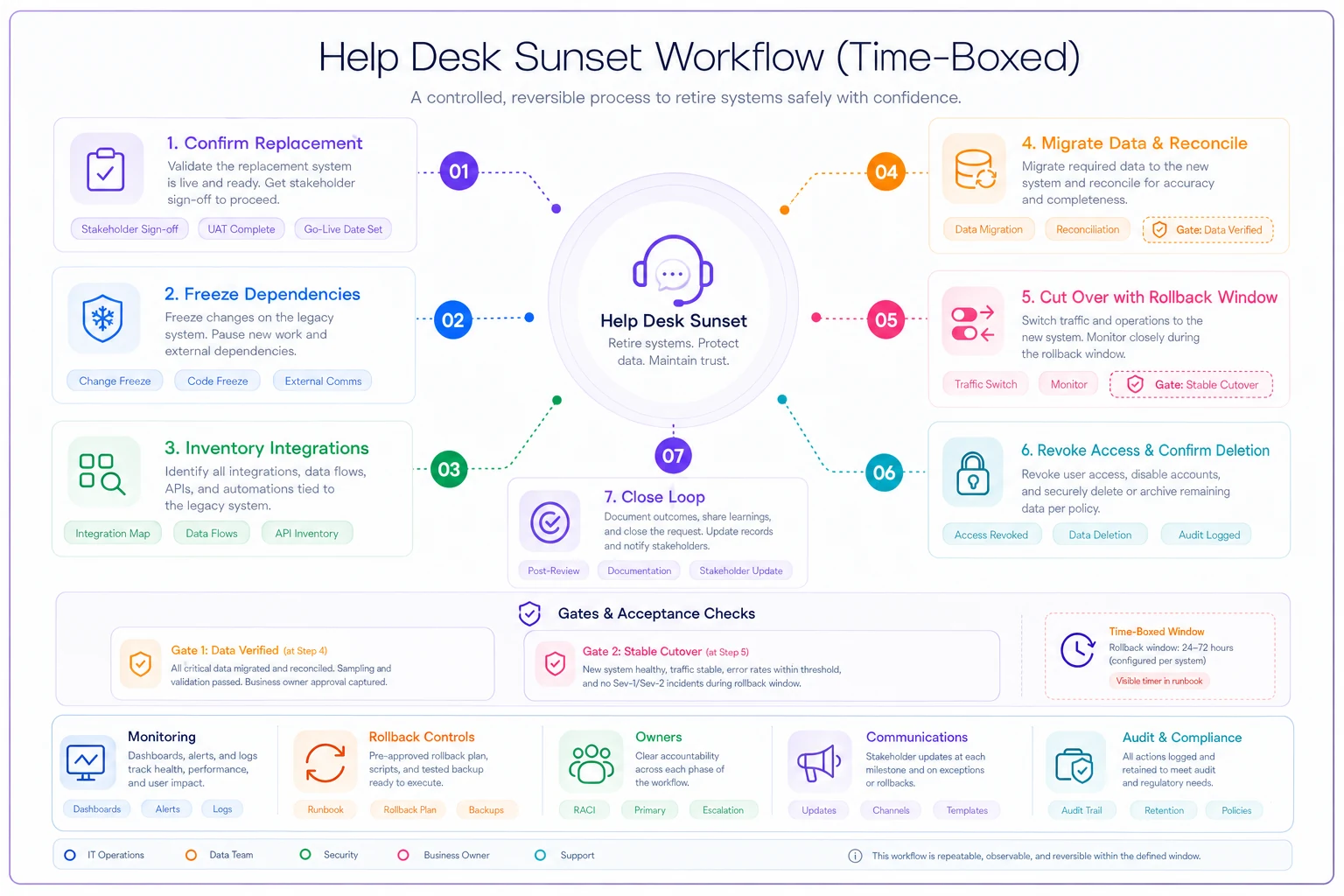
Retiring a tool is where governance either exists or doesn't. Most teams never formally sunset anything, which is exactly why the stack only grows. A sunset needs to be time-boxed with acceptance gates, so a half-finished migration can't leave you running two overlapping systems indefinitely.
Here's a sequence that keeps SLAs protected through the transition:
-
Confirm the replacement (or confirm removal). Decide whether the capability moves elsewhere or disappears entirely. Document where each function lands.
-
Freeze new dependencies. No new integrations or automations against the tool being retired. This stops the entanglement from deepening mid-sunset.
-
Inventory everything that touches it. Integrations, dashboards, automations, saved views, the one weird workflow one agent relies on. Miss this and the sunset breaks something you didn't know existed.
-
Migrate data and verify it. Export, import, and reconcile. Confirm counts and spot-check records. This is an acceptance gate — you don't proceed until the data matches.
-
Cut over with a rollback window. Run parallel for a defined, short period. If SLA metrics on the affected flows hold steady, proceed. If they degrade, roll back — that's the gate.
-
Revoke access and confirm data deletion. Turn off the tool, revoke API keys, and get written confirmation the vendor has deleted your data per contract.
-
Close the loop. Update the stack inventory, note the actual switching cost incurred (for next time), and confirm no dangling references remain.
The acceptance gates in steps 4 and 5 are the whole point. Without them, sunsets stall halfway — the old tool stays "just in case," and now you're paying for and maintaining two things. A time-box forces a decision: it either migrates cleanly by the deadline, or you consciously decide to extend with a reason, not by default.
A visual workflow for the sunset checklist can help teams follow the gates.
Schedule the cutover during a low-traffic window and communicate it widely.
The acceptance gates in steps 4 and 5 are the whole point. Without them, sunsets stall halfway — the old tool stays "just in case," and now you're paying for and maintaining two things. A time-box forces a decision: it either migrates cleanly by the deadline, or you consciously decide to extend with a reason, not by default.
How this connects to the bigger cost picture
A support technology roadmap doesn't exist in isolation. It sits inside the broader question of how you deliver support cost-effectively — the same trade-offs that come up when you're deciding whether to insource, outsource, or automate a given workflow, which is the territory covered in Support Cost-to-Serve: A Portfolio Framework to Decide When to Insource, Outsource or Automate. Every tool you keep is a recurring cost-to-serve line item. Every one you retire cleanly frees up both budget and attention.
The stacks that stay healthy over time aren't the ones with the best individual tools. They're the ones where someone owns the lifecycle — where getting in requires proving value, staying in requires observability and clear ownership, and leaving is a defined process rather than an abandonment. Tool sprawl isn't inevitable. It's what happens when you make dozens of entry decisions and zero exit decisions. Balance those two, and the stack starts working for your SLAs instead of quietly threatening them.
The stacks that stay healthy over time aren't the ones with the best individual tools. They're the ones where someone owns the lifecycle — where getting in requires proving value, staying in requires observability and clear ownership, and leaving is a defined process rather than an abandonment. Tool sprawl isn't inevitable. It's what happens when you make dozens of entry decisions and zero exit decisions. Balance those two, and the stack starts working for your SLAs instead of quietly threatening them.
Ready to transform your support operations?
Join 500+ support teams using Servyly to reduce resolution times, improve customer satisfaction, and boost team productivity.