
Most support leaders make the insource/outsource/automate decision one contact type at a time, usually under pressure. Ticket volume spikes, budget gets frozen, a vendor pitches hard, or someone on the exec team watches a bot demo and asks why you still have humans handling password resets. A decision gets made in isolation — outsource tier-1, deploy a bot on billing questions — and six months later you're untangling what it broke somewhere else.
The problem isn't any single decision. It's that support gets treated as one blob with one cost number, when it's actually a portfolio of very different work streams, each with its own economics. A refund request and a data-migration escalation don't belong in the same bucket, and running them through the same decision logic is how teams end up overpaying on the cheap stuff while under-resourcing the things that actually matter.
This piece lays out a portfolio approach: a cost-to-serve model that gives you a real per-contact number, a vendor scoring grid so you stop picking BPOs on gut feel, switch-over playbooks so transitions don't wreck your CSAT, and thresholds that tell you when each contact type should be insourced, outsourced, or automated. There are worked examples and templates you can lift directly.
Why "support cost to serve" is almost always wrong on the first pass
Ask most SaaS help desk managers what a ticket costs and you'll get something like "$6" or "$12." Push on where it came from and it's usually total support payroll divided by total tickets. That number is close to useless for portfolio decisions because it averages together work that varies by 10x in actual effort.
The average hides the shape. When you look at real contact distributions, a help desk might handle 40% of volume in contact types that take under three minutes and cost almost nothing, while 15% of volume eats 60% of the senior team's time. If you're making outsourcing decisions off a blended $9 average, you'll happily send the wrong work to a vendor and keep the wrong work in-house.
A proper support cost to serve model has to separate a few things:
-
Direct handling cost — loaded agent hourly rate × average handle time for that contact type
-
Rework cost — reopens, escalations, and repeat contacts tied to that type
-
Tooling and licensing — per-seat costs, plus automation infrastructure where it applies
-
Overhead allocation — QA, coaching, scheduling, management time, spread proportionally
-
Failure cost — churn risk or refund exposure when this contact type goes badly
That last one is where portfolio thinking earns its keep. A slow response on a "how do I export a report" ticket costs you almost nothing. A slow response on a "your API broke our production deploy" ticket can cost you the account. Same team, wildly different failure economics.
A typical example of how the average lies
A mid-size B2B SaaS help desk, roughly 8,500 tickets a month, reported a blended cost-to-serve of about $8.40. When volume got split into contact types and remeasured, the picture changed completely:
| Contact type | % of volume | Avg handle | Direct cost | Rework load | True cost-to-serve |
|---|---|---|---|---|---|
| Password / login | 22% | 2 min | ~$1.10 | very low | ~$1.40 |
| Billing / invoice | 18% | 6 min | ~$3.30 | low | ~$4.10 |
| How-to / config | 27% | 9 min | ~$5.00 | medium | ~$7.20 |
| Bug reports | 19% | 18 min | ~$9.90 | high | ~$16.50 |
| Integration / API | 14% | 34 min | ~$18.70 | very high | ~$31.00 |
The blended $8.40 was technically accurate and operationally misleading. The bottom two rows — a third of volume — were where nearly all the money and risk lived. Any outsourcing conversation that started with "let's offload tickets to save money" would have gone after the cheap top rows and left the expensive bottom rows exactly where they were.
The three levers, and what each one is actually good at
Insource, outsource, automate. Everyone knows the words. What gets missed is that each lever solves a different constraint, and picking the wrong one for your actual problem is the most common expensive mistake in this space.
Never lose track of a customer request again.
Servyly helps you track, assign, and resolve every ticket quickly and efficiently.
- Centralized ticket management
- Automated response workflows
- Team collaboration tools
No credit card required
Insourcing buys you context, quality control, and speed of iteration. It's expensive per contact but it's the only real option when the work requires deep product knowledge, touches revenue-critical accounts, or feeds your roadmap. If your engineers rely on support tickets to understand what's breaking, you cannot outsource those tickets without going blind.
Outsourcing buys you volume flexibility and lower per-contact cost on standardized work. It works well when a contact type is high-volume, well-documented, and low-variance — the kind of work where a solid runbook plus decent training gets you 90% resolution without product-team involvement. It falls apart on anything that needs judgment or that changes every few weeks.
Automation gets your marginal cost close to zero on repetitive, deterministic contacts. It's the right lever for high-volume, low-complexity, high-repeatability work — password flows, order status, plan changes, known-answer how-tos. It's the wrong lever for anything ambiguous, emotionally charged, or novel, and deploying it there is how you build the robotic-reply reputation that takes years to undo.
The pattern worth internalizing: volume points you toward automation, variance points you toward insourcing, and standardization-at-scale points you toward outsourcing. Most contact types have one dominant characteristic. Find it before you decide.
When each lever is a bad idea
-
Don't automate a contact type where a wrong answer creates legal, billing, or churn exposure and the system can't reliably flag when it's unsure. Half-confident automation on refunds is worse than a slow human.
-
Don't outsource a contact type that's still changing every sprint. You'll spend more on vendor retraining than you save, and quality will lag your release cycle by weeks.
-
Don't insource a mature, stable, high-volume contact type just because "we've always handled it." That's how senior agents end up burned out doing $1.40 work.
Most contact types have one dominant characteristic. Find it before you decide.
The vendor scoring grid: stop picking BPOs on the sales call
When outsourcing does make sense, the selection process is usually a disaster. Managers compare vendors on price-per-contact and a vibe from the pitch, then act surprised when quality tanks. A scoring grid forces the comparison onto the dimensions that actually predict success.
Score each vendor 1–5 on these, and weight them to your situation:
| Dimension | What you're really measuring | Weight (example) |
|---|---|---|
| Domain ramp speed | How fast they hit target quality on your product | 20% |
| Quality consistency | Variance in QA scores across their agents | 20% |
| Volume elasticity | Can they surge 40% without quality collapse | 15% |
| Data & tooling fit | Do they work inside your stack or bolt on their own | 15% |
| Reporting transparency | Do you get contact-level data or a monthly PDF | 10% |
| Escalation discipline | Do they escalate cleanly or sit on hard tickets | 10% |
| True cost-to-serve | All-in cost including your oversight time | 10% |
The dimension people underweight every time is your oversight time. A vendor at $4/contact who needs 15 hours a week of your QA and coaching attention is not a $4 vendor. Fold the management overhead into the cost line and the cheap option often stops being cheap.
For the coordination side of managing outsourced work — manager ratios, escalation ownership, and the governance layer that keeps a vendor relationship from quietly rotting — the mechanics in Prevent Organizational Breakdowns as You Scale map directly onto vendor governance. The same span-of-control math that applies to your internal team applies to whoever owns the vendor relationship.
Setting your thresholds: the decision logic
Thresholds are what turn this from a philosophy into a repeatable decision. For each contact type, you're checking a few gates in sequence. The order matters — automation gets evaluated first because when it fits, it's cheapest, but it gets rejected fast if the work is risky or ambiguous.
-
Volume gate. Is this contact type above roughly 5% of total volume? Below that, the effort to automate or transition rarely pays back. Keep it insourced.
-
Repeatability gate. Do the top five resolution paths cover 80%+ of tickets in this type? If yes, it's a strong automation or outsourcing candidate. If no, it needs judgment — lean insource.
-
Risk gate. Does a wrong answer create churn, legal, or billing exposure? If risk is high and the automation can't reliably flag its own uncertainty, kill automation for this type.
-
Stability gate. Has this contact type's resolution path held steady for two or more release cycles? Unstable work can't be outsourced effectively — keep it in-house until it settles.
-
Signal gate. Does this work feed your roadmap or surface product problems? High-signal work stays insourced regardless of cost, or you lose visibility.
Here's a simple visualization of the gate sequence.
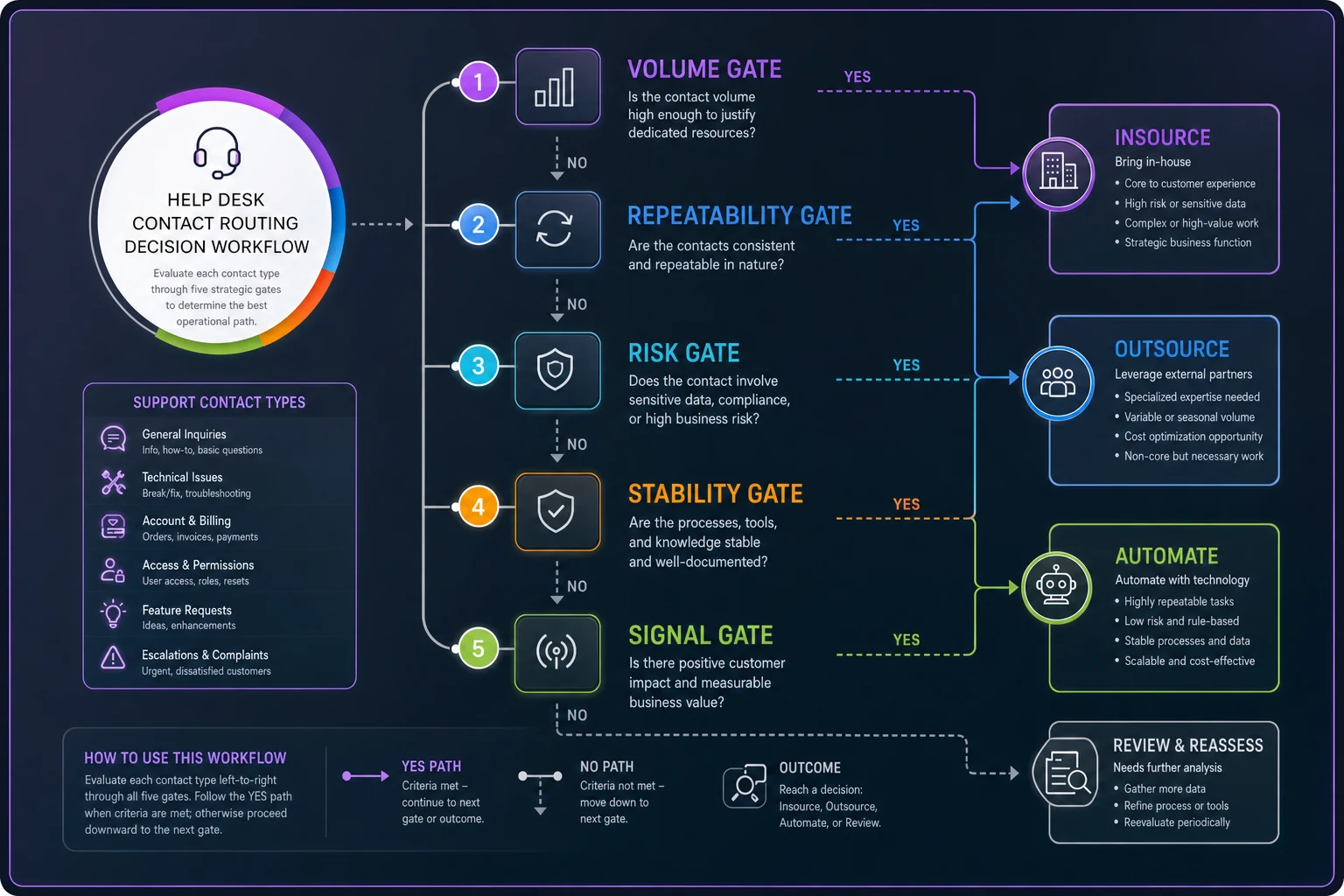
Run every contact type through those five gates and you'll end up with a clear disposition for each. The password/login row from the earlier table sails through as automate. The integration/API row hits the risk and signal gates hard and stays insourced despite being the most expensive to serve — which is exactly right, because that's where your revenue and product intelligence live.
The switch-over playbook: where transitions actually break
Deciding to move a contact type is the easy part. The transition is where CSAT craters and leaders swear off outsourcing forever. Most of that damage is avoidable and comes from moving too fast without a knowledge bridge.
-
Baseline first. Capture current CSAT, resolution rate, handle time, and reopen rate for the specific contact type — not the blended number. You can't detect regression without a per-type baseline.
-
Shadow period. The new handler — vendor or automation — works the contact type in parallel with your team reviewing every response before it ships. Run this until quality holds for at least two weeks.
-
Capped live rollout. Route 10–20% of that contact type to the new handler. Watch reopens and escalations daily, not weekly. Reopens are the earliest honest signal that a transition is going sideways.
-
Escalation lane stays open. The new handler needs a clean, fast path to hand hard tickets back. If that lane is clogged, they'll either guess or sit on tickets, and both destroy quality.
-
Rollback trigger, defined in advance. Decide what number means "pull it back" before you start — for example, reopen rate up more than 30% over baseline, sustained for a week. Pre-committing the trigger prevents the sunk-cost paralysis where everyone watches quality slide because nobody wants to admit the transition failed.
The single biggest transition mistake is skipping the shadow period to hit a cost-savings deadline. The savings show up on a spreadsheet in month one and the churn shows up in the account base by month four, and the two rarely get connected in anyone's reporting.
Don't skip the shadow period to hit a cost-savings deadline.
The single biggest transition mistake is skipping the shadow period to hit a cost-savings deadline. The savings show up on a spreadsheet in month one and the churn shows up in the account base by month four, and the two rarely get connected in anyone's reporting.
A real scenario: rebalancing a support portfolio
A B2B SaaS company in the HR-tech space, support team of 11 handling around 7,000 tickets a month, was staring at a hiring request for three more agents. Costs were climbing faster than revenue and the exec team wanted an outsourcing plan for tier-1.
-
Password, order-status, and plan-change contacts — about 31% of volume — were clear automation candidates. High repeatability, near-zero risk, stable over time. These got automated over roughly six weeks with a hard fallback to a human on any low-confidence case.
-
Standard how-to and basic billing — around 28% — went to a vendor, but only after a three-week shadow period and a capped rollout. Reopen rate ticked up briefly, settled within tolerance, no rollback needed.
-
Bug reports and integration work — the expensive, high-signal third — stayed fully insourced. That's where the three requested hires actually needed to go, except now only one hire was necessary because the senior team was no longer drowning in $1.40 tickets.
Net result over roughly two quarters: the blended cost-to-serve dropped from the mid-$8 range to somewhere around $5.50–$6, the hiring ask went from three heads to one senior head, and CSAT on the high-value contact types went up because the team handling them wasn't context-switching to reset passwords all day. The savings weren't from cutting people — they were from stopping expensive people from doing cheap work.
That reallocation logic connects directly to escalation economics. If you want to pressure-test which contact types are quietly expensive because of where they route, the model in Quantify the Cost of Escalations plugs straight into the rework and failure-cost lines of your cost-to-serve calculation.
Who should not run this framework yet
Portfolio decisions need portfolio data, and some teams aren't there.
If you can't reliably tag contacts by type, you can't build a real cost-to-serve model — any disposition you assign is just a guess dressed up in a table. Fix your taxonomy and handle-time tracking first. If your product is still shifting shape every few weeks, most contact types will fail the stability gate anyway. Keep the work insourced, keep learning, and revisit once things settle. And if your total volume is small enough that a single team handles everything comfortably, the overhead of running transitions will cost more than it saves. This framework earns its keep in the messy middle: enough volume that the wrong allocation is genuinely expensive, enough maturity that the underlying data is trustworthy.
Where tooling actually helps
The hard part of this approach isn't the decision logic — it's keeping the data honest enough to trust the decisions. Per-contact-type cost-to-serve, reopen rates by type, vendor QA variance, transition baselines: that's a lot of measurement that falls apart the moment it lives in spreadsheets someone updates manually once a quarter.
This is the practical case for running your support operation on a platform that captures contact-level data cleanly and lets you slice cost, quality, and rework by type without a data project every time you need an answer. AI-assisted operational tooling helps most on the unglamorous stuff — auto-classifying contacts so your taxonomy stays accurate, flagging when a transitioned contact type drifts past its rollback trigger, surfacing which resolution paths are repeatable enough to automate. None of that replaces the judgment in the framework. It just keeps the numbers underneath the judgment from quietly going stale, which is what causes most portfolio decisions to be made on last year's reality.
Pulling it together
The teams that get insource/outsource/automate right aren't necessarily smarter about any single decision — they've stopped treating support as one thing. They measure cost-to-serve per contact type, run every type through the same gates, score vendors on the dimensions that predict quality rather than the ones that look good on a sales deck, and transition work with a shadow period and a pre-committed rollback trigger.
Do that consistently and the answers stop being ideological. You'll automate the cheap repetitive work because the gates say so, outsource the standardized volume because it clears stability and risk, and defend the expensive high-signal work against every "why is this still insourced" question — because you can show exactly what it costs, exactly what it protects, and exactly why moving it would cost more than it saves. That's what a portfolio gives you that an average never will: the ability to make each decision on its own economics instead of the whole operation on one misleading number.
Ready to transform your support operations?
Join 500+ support teams using Servyly to reduce resolution times, improve customer satisfaction, and boost team productivity.