
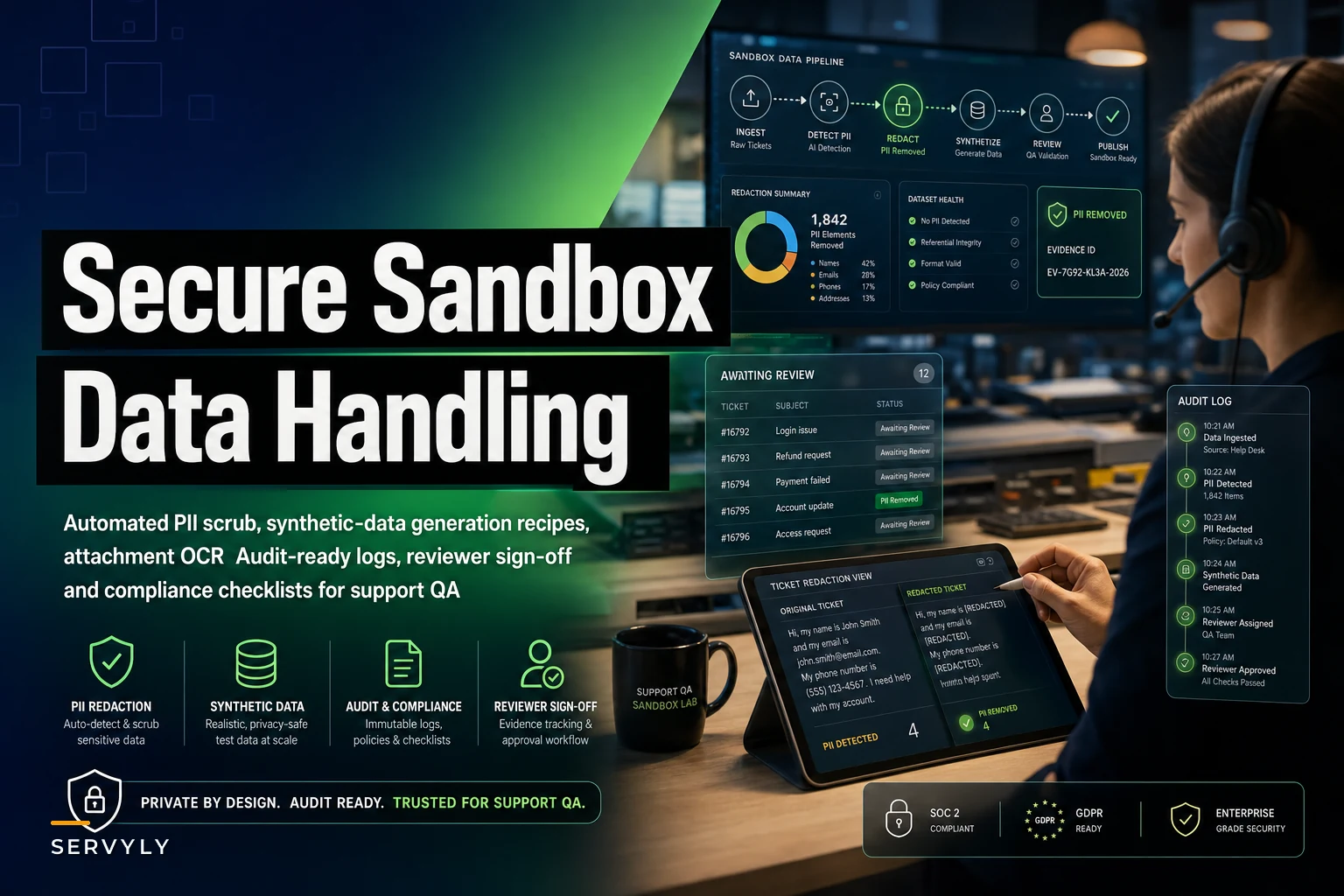

The fastest way to get a support team in regulatory trouble isn't a breach. It's a training exercise. Someone exports 5,000 real tickets into a "sandbox," shares it with three new hires and a QA vendor, and nobody thinks twice because "it's just for practice." Those tickets contain full names, card last-fours, home addresses, health details, account recovery answers, and the occasional screenshot of someone's passport. Now you have production PII sitting in a non-production environment with wide access and zero logging.
This piece is narrowly about one thing: how to handle data in your support sandbox so your QA and training work doesn't quietly become your biggest compliance liability. Not SLAs, not staffing — just the mechanics of redaction pipelines, synthetic ticket generation, evidence logs, and the sign-off checklist that keeps you defensible when an auditor asks "where did this test data come from?"
Why support sandboxes leak more than engineering ones
Engineering teams have spent a decade learning not to copy prod databases into staging. Support teams largely haven't, because the data doesn't look like a database. It looks like conversations. And conversations feel harmless.
-
QA calibration sets. Someone pulls "20 good examples and 20 bad examples" for a calibration session. They're real tickets, pasted into a shared doc.
-
Agent training libraries. A "best replies" folder that's been growing for two years, full of actual customer threads nobody ever scrubbed.
-
Vendor handoffs. A BPO or contractor needs sample tickets to understand your tone and categories, so someone zips up a few hundred and emails them.
The pattern underneath all three is the same: the data was useful precisely because it was real, so nobody wanted to strip the reality out of it. That instinct is the problem. The realism you actually need for QA and training — tone, structure, edge cases, messiness — can be preserved without keeping a single piece of genuine PII.
A useful mental split: structure is what you want to keep, identity is what you want to destroy. A ticket where "Margaret Olsen" can't log in after a password reset is operationally identical to one where "Customer_4471" can't log in. The training value lives in the workflow, not the name.
The two-track approach: redact what's real, generate what's new
There are only two defensible sources of sandbox data, and most mature teams end up using both.
Never lose track of a customer request again.
Servyly helps you track, assign, and resolve every ticket quickly and efficiently.
- Centralized ticket management
- Automated response workflows
- Team collaboration tools
No credit card required
| Approach | What it is | Best for | Main risk |
|---|---|---|---|
| Redaction pipeline | Real tickets with PII algorithmically stripped and replaced | Preserving real edge cases, weird phrasing, genuine ticket distribution | Missed entities — one unredacted field and it's still a leak |
| Synthetic generation | Fully fabricated tickets built from templates or models | Training on high-risk scenarios (fraud, legal, health) with zero source data | Can feel too clean, under-representing messy real behavior |
The decision rule that tends to hold up: use redaction for volume and realism, use synthetic for anything high-sensitivity. If the scenario involves health information, legal threats, account takeover, or payment disputes, don't redact a real one — the cost of a single miss is too high. Generate it from scratch. For ordinary "where's my order" and "how do I change my email" tickets, redaction is faster and more representative.
A redaction pipeline that actually holds up
The mistake most teams make is treating redaction as find-and-replace on names. Real tickets are far messier. The leak is almost never in the "name" field — it's in the free-text body where a customer wrote "you can reach me at my work line, 312-..." or pasted an entire order confirmation email.
-
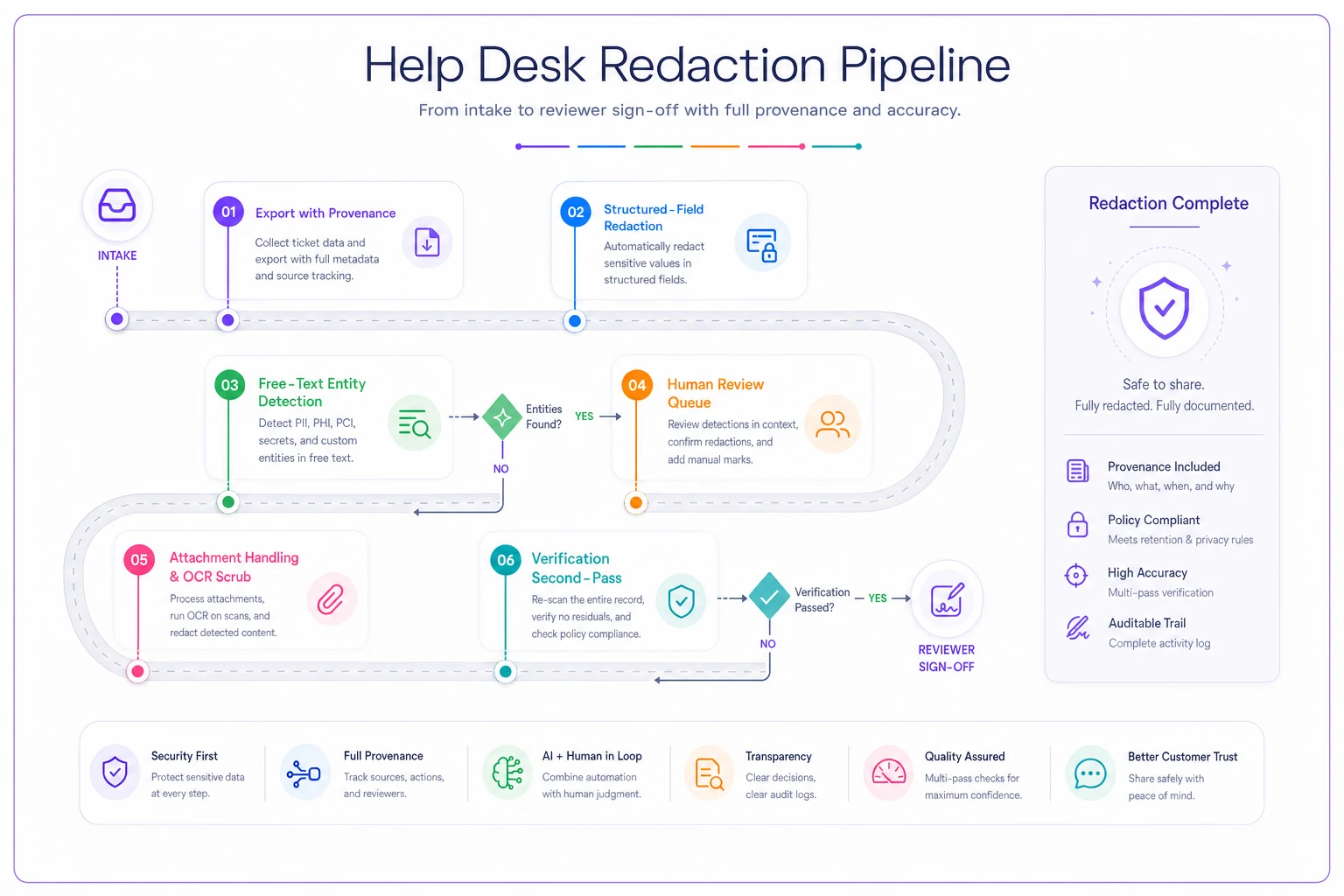
Export with provenance, not just content. Every exported ticket should carry a source ID and export timestamp. You need this later for your evidence log. Don't export loose text.
-
Run structured-field redaction first. Email, phone, address, name, account ID fields are the easy wins. Replace, don't delete — swap in consistent fake values so the ticket still reads naturally (
Margaret Olsen→Dana Whitfield, kept consistent across that ticket's thread). -
Run free-text entity detection on the body. This is where you catch inline phone numbers, emails buried in signatures, order numbers, and the dreaded pasted email chains. Pattern matching for structured PII (card numbers, SSNs, emails) plus named-entity detection for people and places.
-
Flag low-confidence spans for human review. Anything the detector is unsure about goes to a human, not silently through. A redaction pipeline with no human-review queue is a pipeline that will ship a miss.
-
Attachment handling — the step everyone skips. Screenshots and PDFs carry the worst PII and don't get touched by text redaction. Default policy: strip all attachments from sandbox data unless a human has reviewed and OCR-scrubbed them. For most QA and training use, you simply don't need the attachment.
-
Verify with a second pass. Re-run detection on the output. If the second pass finds any high-confidence PII, the ticket fails and goes back to review. Log the result either way.
A small but important detail: keep your fake replacements internally consistent within a ticket. If "Dana Whitfield" appears in the subject, the body, and the agent reply, QA reviewers can still follow the conversation. Random per-mention substitution breaks the thread and makes the data useless for training.
A small but important detail: keep your fake replacements internally consistent within a ticket.
When redaction is a bad idea
-
The ticket category is inherently high-risk (health, legal, security, financial disputes). One miss on a health ticket is a reportable event.
-
The source tickets are so short that removing identity removes all content ("Call me, 555-...").
-
You can't guarantee a human-review step on low-confidence spans. Fully automated with no queue means you're gambling.
In those cases, skip straight to synthetic.
A visual overview of the redaction workflow follows.
If you can't tick all ten, the dataset isn't ready. The two that get skipped most often are attachments and the destroy-by date — and those are exactly the two that show up in incident post-mortems.
Synthetic ticket recipes that don't feel fake
The complaint about synthetic data is always the same: it's too tidy. Real customers write in all caps, forget what they ordered, contradict themselves two messages later, and bury the actual question in paragraph three. If your synthetic tickets read like a textbook, your agents are training on fantasy.
-
Start from a real distribution, not a blank page. Pull the shape of your ticket mix — contact reasons, average length, how often customers include an order number, how often they're frustrated — without pulling the content. You're copying statistics, not sentences.
-
Build scenario skeletons by category. For each contact reason, write the underlying situation ("customer charged twice, second charge is actually a pending auth they don't understand"). The skeleton is the ground truth QA can grade against.
-
Inject realistic mess deliberately. Typos, missing order numbers, wrong assumptions, mid-thread topic changes. This is what makes synthetic data worth training on.
-
Seed the hard cases on purpose. This is the real advantage of going synthetic: you can manufacture the account-takeover attempt, the chargeback threat, the customer claiming a data-privacy right. These are scenarios you can't safely pull from production and the ones agents most need practice on.
A useful side effect: because you authored the scenario skeleton, you already have the correct answer. That makes synthetic tickets ideal for calibration — every grader scores against a known ground truth instead of arguing about what the customer "really" meant.
Evidence logs: the part that makes it audit-ready
Redaction and synthesis protect the data. Evidence logs protect you. When someone asks how your sandbox data was created, "we scrubbed it" is not an answer. A log is.
-
Source and method — redacted-from-production or fully synthetic, and which pipeline version ran it
-
Redaction results — number of entities detected, number auto-redacted, number sent to human review, number that failed verification
-
Reviewer sign-off — who approved the dataset, when, and against which checklist
-
Access scope — who the dataset was shared with and for how long
-
Expiry — sandbox datasets should have a destroy-by date, not live forever
This maps directly onto the kind of operating model described in a proper support compliance program for audit-ready ticketing — the same discipline you apply to production tickets should extend to the copies you make for practice. The copies are where teams get sloppy precisely because they feel low-stakes.
The verification counts matter more than they look. If an auditor sees "4,812 entities detected, 4,800 auto-redacted, 12 sent for human review, 0 failures on second pass," that's a defensible process. No numbers at all means you're asking them to trust you.
The sign-off checklist before any dataset leaves the pipeline
No sandbox dataset should reach a QA session, a training folder, or a vendor without clearing this:
-
[ ] Source documented (redacted-from-prod or synthetic) with pipeline version recorded
-
[ ] All structured PII fields redacted with consistent replacements
-
[ ] Free-text body passed entity detection with a second verification pass
-
[ ] Low-confidence spans reviewed by a named human
-
[ ] Attachments stripped or individually reviewed and scrubbed
-
[ ] High-risk categories sourced synthetically, not redacted
-
[ ] Evidence log completed with detection/redaction counts
-
[ ] Access scope defined — who gets it, why, for how long
-
[ ] Destroy-by date set
-
[ ] Reviewer signed off against this checklist
If you can't tick all ten, the dataset isn't ready. The two that get skipped most often are attachments and the destroy-by date — and those are exactly the two that show up in incident post-mortems.
A real scenario
A mid-sized e-commerce support team — around 18 agents, roughly 9,000 tickets a month — ran agent onboarding off a shared "training examples" drive. About 600 real tickets, collected over two years, no redaction. New hires got full access on day one. A privacy review eventually flagged it: card last-fours, full shipping addresses, and a handful of screenshots showing complete order confirmations including billing info.
They rebuilt it over about three weeks. Around 400 of the ordinary tickets went through a redaction pipeline — structured fields plus free-text detection with a human-review queue for low-confidence spans. The roughly 60 high-sensitivity ones (chargebacks, suspected fraud, a few angry legal-threat messages) were rewritten as synthetic scenarios with known-correct answers for calibration.
The outcome wasn't dramatic, and that's the point. Onboarding quality held steady — new hires couldn't distinguish the redacted tickets from real ones, which was exactly the goal. Calibration sessions actually got easier because the synthetic tickets came with ground-truth answers, so grading disputes dropped noticeably. And the privacy review closed. The number that actually mattered: production PII in the training environment went from several hundred exposed records to zero.
Who should not bother with the full pipeline
If your sandbox needs are genuinely small — a handful of example tickets you write yourself for a once-a-year training — building a six-step redaction pipeline is overkill. Just write synthetic examples from scratch. The pipeline investment makes sense when you're regularly moving volume from production into QA or vendor environments, or when you're in a regulated space where "we were careful" won't survive an audit.
The teams that get burned are almost always in the middle: enough volume that manual handling is tempting to skip, but not enough process maturity to have a pipeline. That's the gap where a shared folder of real tickets quietly accumulates for two years.
Handling test data well is really an extension of how seriously you take your support operation overall — the same principles in a support risk and trust charter apply here. Customers assume their data is used to help them, not copied into a training library a vendor can see. Treating sandbox data with the same seriousness as production data isn't bureaucracy. It's keeping the promise you've already made.
Ready to transform your support operations?
Join 500+ support teams using Servyly to reduce resolution times, improve customer satisfaction, and boost team productivity.