

Here's a failure mode that almost every support team eventually hits: someone tweaks a routing rule on a Friday afternoon, it looks fine in the ticketing tool's preview, and by Monday there are 400 tickets sitting in a queue nobody owns because the rule silently misfired on a ticket type nobody tested. The change technically "worked" — just not in any way anyone predicted.
This keeps happening not because teams are careless, but because most support operations have no real environment to break things in. They test in production, with live customers, because there's nowhere else to go. One ticketing instance. One routing config. You change it, it's live.
This post is about fixing that — building a support sandbox canary environment where automation and routing changes get proven out before a single real customer touches them. How to stand one up cheaply, how to design synthetic scenarios that actually catch problems, how to run a canary cohort instead of a big-bang release, and the exact rollback gates and acceptance criteria that tell you when to proceed or pull back.
Why routing and automation changes are uniquely dangerous
Most support changes are reversible in an obvious way. A bad macro gets noticed by an agent who edits it. A misconfigured SLA shows up in a report the following week.
Routing and automation failures are different — they fail silently and at scale. A ticket routed to the wrong queue doesn't throw an error. It just sits there. An automation that auto-closes tickets based on keyword matching doesn't warn you — it quietly closes 60 tickets that should've stayed open, and you find out when the reopen rate spikes or a customer escalates.
-
They touch volume. One rule can affect every inbound ticket. A bad macro affects one agent. A bad routing rule affects everyone.
-
The blast radius isn't obvious at edit time. You change one condition and three downstream rules behave differently because they share a trigger.
-
The feedback loop is delayed. You won't see the damage in the editor. You'll see it hours later in queue depth, SLA breaches, or reopens.
That delay is the core problem. By the time the metrics move, the damage is already distributed across hundreds of tickets. A sandbox and canary process exist to shrink that feedback loop from "hours of live damage" to "caught before launch."
Building a low-cost staging environment (without doubling your tooling bill)
The most common objection is cost. "A second instance of our help desk is expensive, and we're a 9-person team." Fair enough. But a usable staging environment doesn't require a full production mirror — it requires enough fidelity to exercise the specific thing you're changing.
Never lose track of a customer request again.
Servyly helps you track, assign, and resolve every ticket quickly and efficiently.
- Centralized ticket management
- Automated response workflows
- Team collaboration tools
No credit card required
Here's how the options stack up, cheapest to most complete:
| Staging approach | What it costs | What it catches | Good for |
|---|---|---|---|
| Sandbox tenant (vendor-provided) | Usually free or low-tier add-on | Rule logic, trigger conditions, basic routing paths | Most routing/automation changes |
| Shadow queue in production | $0 (config only) | Real ticket behavior, no customer impact | Validating routing on live-but-copied data |
| Full staging mirror | Second instance cost | End-to-end integration behavior | Complex multi-system automations |
| Scripted local test harness | Engineering time | Rule logic in isolation, fast iteration | Teams with technical resources |
Most support teams never need the full mirror. The two that cover the majority of cases are the vendor sandbox tenant and the shadow queue.
The shadow queue is worth explaining because it's genuinely underused. You set up a parallel routing path that receives copies of incoming ticket metadata — scrubbed of anything sensitive — and runs your new rule against them, but the output goes to a hidden queue that never touches customer-facing SLAs. You're not responding to these tickets. You're watching where the new rule would have sent them. If 15% land somewhere unexpected, you caught it before launch.
One thing to get right before any of this: your sandbox data. You can't copy live tickets into a test environment without handling the PII in them, and you shouldn't be testing routing logic against real customer names and account numbers anyway. Synthetic and redacted data is the foundation here, and it's worth treating seriously rather than doing a quick copy-paste from production.
Synthetic scenarios: the part everyone skips
A sandbox with no test cases is just an empty inbox. The value comes from the synthetic scenarios you run through it — and this is where most teams do a lazy job. They test the happy path, confirm it works, and ship.
The happy path is never where routing breaks. It breaks on the edges: the ticket with no subject line, the one tagged with two conflicting categories, the VIP ticket that also matches a spam filter, the multi-language ticket that hits a rule written for English keywords.
A solid synthetic test set for a routing change should include at minimum:
-
The intended case — the ticket type your change is actually meant to handle, routed correctly.
-
The adjacent case — a ticket that's almost the intended case but shouldn't trigger the rule. This catches over-matching.
-
The null case — a ticket missing the field your rule depends on. What happens when the tag is empty?
-
The conflict case — a ticket that matches two rules at once. Which wins, and is that what you want?
-
The high-stakes case — a VIP, legal, or security-flagged ticket. Does your change accidentally reroute it away from the priority path?
-
The volume case — fifty near-identical tickets at once, to confirm the rule doesn't choke or create a routing loop.
The conflict case is a good example of why this matters. A team adds a rule to auto-route "refund" tickets to billing — sensible. But they already had a rule routing anything mentioning "cancel" to retention. A ticket saying "I want to cancel and get a refund" now matches both. Depending on rule order, it either goes to the wrong team or gets grabbed by both and duplicated. You only find this if you deliberately build the conflict case into your test set.
Write these scenarios down once and reuse them. The same synthetic suite that validates today's change validates the next one. Over time you build a regression library — the specific tickets that broke you before, kept permanently as guards against repeating the same failure.
Keep a tiny, curated regression library of previously broken tickets so you can re-run the exact failing cases quickly.
The same synthetic suite that validates today's change validates the next one. Over time you build a regression library — the specific tickets that broke you before, kept permanently as guards against repeating the same failure.
Canary cohort plans: release to a slice, not the whole flow
Once a change passes sandbox testing, the instinct is to flip it on for everyone. Don't. Sandbox testing proves the logic works against the cases you imagined. A canary proves it works against the cases you didn't imagine — real traffic, with all its weirdness.
A canary cohort is a small, defined slice of real tickets that your change applies to while everything else stays on the old behavior. The art is in choosing the slice.
-
By volume percentage. Route 5% of matching tickets through the new rule. Simple, but you lose control over which 5%.
-
By segment. Apply the change only to one customer tier, one product line, or one region first. Easier to monitor, and you can start with something low-risk.
-
By channel. Roll out the new automation on email before chat, or on a single lower-volume channel first.
-
By time window. Run the canary only during staffed business hours, so a human is watching when it's live.
For routing changes specifically, segment-based canaries tend to work best because the blast radius is naturally bounded. "We turned on the new escalation routing for our SMB segment only" is a sentence you can monitor. "We turned it on for a random 5% of all traffic" is much harder to watch.
Keep the canary small enough that a full failure is survivable. If the new rule misroutes every canary ticket, how many customers had a bad experience? If that number scares you, the cohort is too big.
Rollback gates and acceptance criteria
This is what separates a disciplined rollout from "we turned it on and hoped." Before the canary goes live, you write down two things: the criteria that let you promote the change to full rollout, and the gates that force an immediate rollback.
Both have to be defined before launch. If you decide what success looks like after you see the numbers, you'll rationalize whatever happened. This connects directly to the broader discipline of safety gates, rollback criteria and human-in-the-loop thresholds for support automation — the canary is where those governance rules actually get exercised against live traffic.
Acceptance criteria (what needs to be true to promote):
-
Misroute rate on canary tickets below your threshold (e.g., under 2%).
-
No increase in reopen rate for the canary cohort vs. the control group.
-
No SLA breaches attributable to the new routing path.
-
Agent-reported confusion near zero — if agents are getting tickets that don't make sense, the routing is wrong even if the metrics look fine.
-
Handle time for canary tickets within a reasonable band of the control.
Rollback gates (what forces an immediate back-out):
-
Any high-stakes ticket (VIP, legal, security) misrouted. One is too many.
-
Queue depth in the canary's target queue spikes beyond a set multiple of normal.
-
A routing loop detected — tickets bouncing between queues.
-
Reopen rate for canary tickets jumps meaningfully above control.
-
Any customer-visible duplicate response.
The gates need to be things you can detect quickly, not things you'll notice in next week's report. That's the whole point of the canary being small and watched. If your automation touches multiple connected systems, the reliability of those connections matters as much as the rule logic — a change can pass every rule test and still fail because a downstream integration times out, which is why enforcing integration SLAs across your support platform belongs in the same conversation as canary design.
A runbook for one canary release
Below is the actual sequence, start to finish, for rolling out a routing or automation change through this process. This is what you'd hand to whoever owns the change.
-
Document the change and its intent. One sentence
what it does, what tickets it affects, what it's supposed to improve.
-
Build or pull the synthetic test set. Intended, adjacent, null, conflict, high-stakes, and volume cases. Add any past-failure cases from your regression library.
-
Run the change in sandbox against the full synthetic set. Every case must behave as expected. Log what each case actually did.
-
Define acceptance criteria and rollback gates in writing. Numbers, not vibes. Share them with whoever's on watch.
-
Pick the canary cohort. Smallest viable slice — a low-risk segment or a single channel during staffed hours.
-
Launch the canary with monitoring live. Someone is watching the canary queue and the rollback-gate metrics in real time, not checking back tomorrow.
-
Hold for a defined window. Long enough to see real traffic variety — usually at least a full business day, often several, depending on volume.
-
Evaluate against acceptance criteria. Passed cleanly? Promote. Hit a gate? Roll back and investigate.
-
Run post-canary validation (next section).
-
Record the outcome in the regression library so the next change inherits what you learned.
Steps 4 and 6 are the ones teams skip under time pressure. They're also the two that make the whole thing safe. Writing the gates down and actually watching the canary aren't optional.
Here's a simple diagram of the rollout sequence.
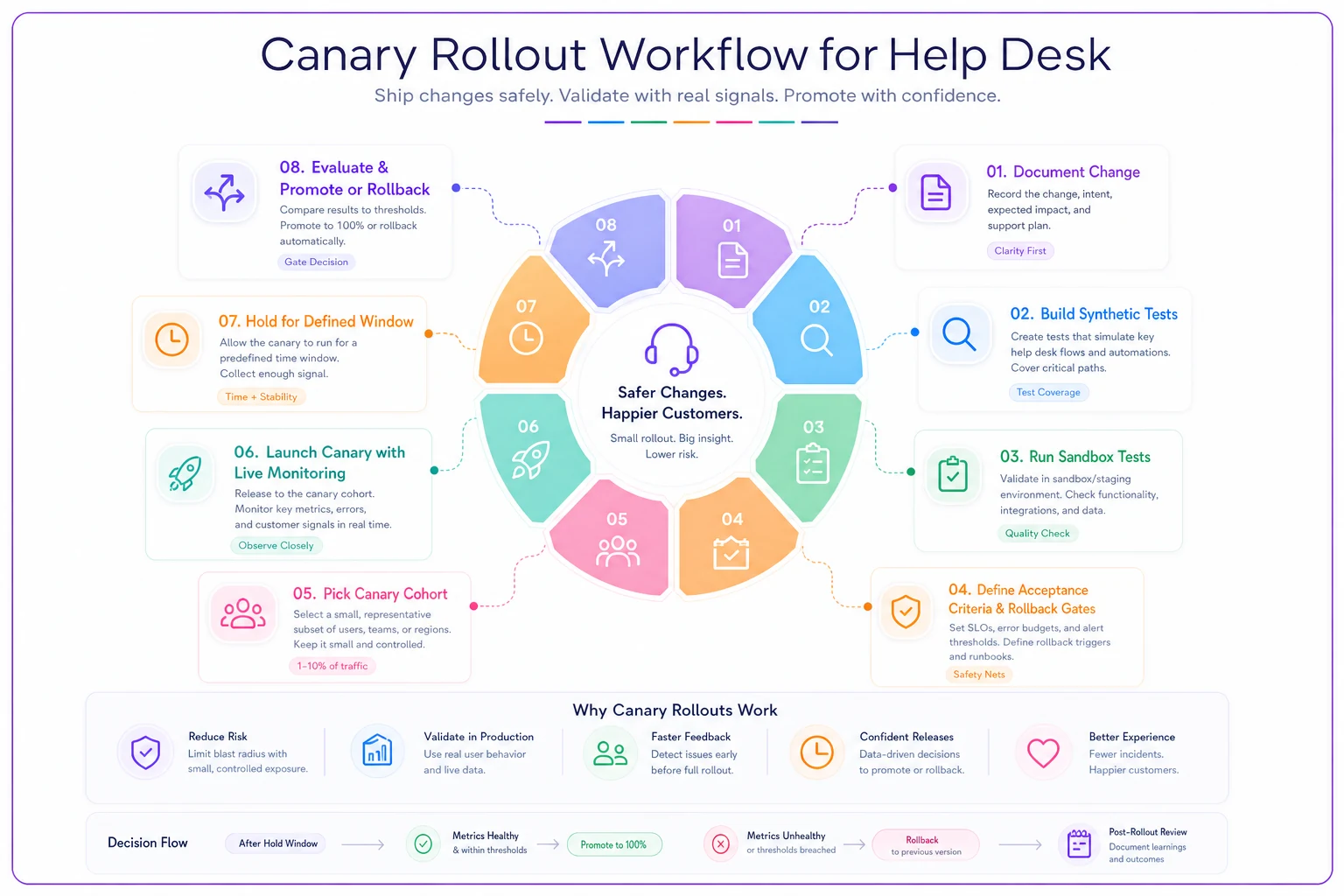
Use this as a visual checklist while someone watches the canary and the rollback-gate metrics in real time.
Post-canary validation: don't declare victory at promotion
Promoting to full rollout isn't the finish line. The canary ran on a small slice — full traffic has more variety and more volume. A rule that behaved on 5% can still surprise you at 100%.
-
Compare full-rollout metrics to the canary's. If the misroute rate was 1% in the canary and 6% at full volume, something about the broader traffic mix broke your assumptions.
-
Spot-check a sample of real routed tickets by hand. Pull 20–30 tickets that hit the new rule and read them. Metrics aggregate; reading individual tickets catches the weird ones.
-
Check the queues the change was supposed to relieve. If you built a rule to take load off a senior queue, confirm that queue actually got lighter. Routing changes often move the problem rather than solve it.
-
Ask the receiving agents. The team now getting these tickets knows within a day whether the routing makes sense. Their feedback is faster than any dashboard.
Keep this window short but real — a day or two of attention after full rollout, then it folds into normal monitoring.
A real scenario
A mid-sized SaaS support team — around 12 agents — kept having their most experienced tier-2 people buried in password-reset and billing tickets that should've gone to tier-1. Someone built a routing rule to auto-sort those based on keyword and category matching. First attempt, done the old way, went live directly to production. Within a few hours it had misrouted a batch of genuine escalations into tier-1 because those escalations happened to mention "billing." Tier-1 couldn't resolve them, bounced them back, and the reopen/transfer churn ate most of the day.
The second time, they ran it through a sandbox against a synthetic set that included the conflict case — escalations that mention billing — and immediately saw the over-match. They adjusted the rule to exclude tickets already flagged as escalations, re-tested, then ran a canary on just their SMB segment during business hours. Over a couple of days the misroute rate stayed under 2%, no escalations got swallowed, and the tier-1 agents confirmed the tickets made sense.
When they promoted to full rollout, tier-2 saw a noticeable drop in low-complexity work — enough that the senior folks got meaningful time back for the harder problems they were actually hired to handle. The difference between attempt one and attempt two wasn't a smarter rule. It was the process around it.
When this is worth it, and when it's overkill
When a sandbox-and-canary process makes sense:
-
The change affects routing or automation that touches a large share of inbound volume.
-
You've been burned by a silent automation failure before.
-
The change interacts with existing rules — anything with shared triggers or overlapping conditions.
-
High-stakes ticket types could be affected.
When it's overkill:
-
You're editing a single macro's wording. Just proofread it.
-
The change affects a tiny, manually-reviewed queue where a human sees everything anyway.
-
You're a two-person team handling 20 tickets a day where you'd notice a misroute within minutes and fix it by hand.
Very small teams with no spare capacity should start minimal — a sandbox tenant and a handful of synthetic cases for your riskiest changes only. The discipline can grow as the cost of a bad rollout grows with you.
The takeaway
Routing and automation changes fail quietly, at scale, with delayed feedback — the worst combination for a support team. A sandbox gives you somewhere to break things without customers watching. Synthetic scenarios force you to test the edges, not just the happy path. A canary cohort limits the damage of the cases you couldn't imagine. And written acceptance criteria and rollback gates keep you from rationalizing a bad outcome after the fact.
None of this requires a big budget or an engineering team. It requires deciding, once, that you'll stop testing routing logic on live customers — and then building the small amount of process that makes that possible. The teams that do it don't ship fewer changes. They ship the same changes with far fewer three-hundred-ticket Monday mornings.
None of this requires a big budget or an engineering team. It requires deciding, once, that you'll stop testing routing logic on live customers — and then building the small amount of process that makes that possible. The teams that do it don't ship fewer changes. They ship the same changes with far fewer three-hundred-ticket Monday mornings.
Ready to transform your support operations?
Join 500+ support teams using Servyly to reduce resolution times, improve customer satisfaction, and boost team productivity.