
Most support teams have a plan for when their own systems go down. Fewer have a real plan for when a vendor goes down and takes half their operation with it. And when your telephony provider, ticketing platform, identity vendor, or payments processor hiccups, your SLAs don't pause out of sympathy. The clock keeps running while you scramble.
The modern help desk is a stack of dependencies you don't control. You can write the cleanest internal runbooks in the world, but if your knowledge base is hosted by a vendor that just went dark, your agents are answering from memory. A support resilience framework is the connective tissue between "we know this could break" (your risk register) and "here's exactly what we do in the first 15 minutes" (your runbooks). Most teams have one or the other. Almost nobody has both wired together.
This article is about building that wiring — in a way your board will actually approve, your agents can actually execute, and your customers will actually forgive you for.
Why vendor failure breaks support differently than internal outages
When your own infrastructure fails, you usually have direct visibility and direct control. You can see the logs, page the on-call engineer, roll back a deploy. Vendor failures are worse in a very specific way: you're blind and you're waiting. You're refreshing a status page that hasn't updated in 40 minutes, opening a ticket into a queue flooded with every other customer of that vendor, and trying to explain to your own customers why they can't log in — when you genuinely don't know either.
This is where support teams quietly lose trust. Not during the outage itself, but during the silence. A payments outage that lasts 90 minutes is survivable. A 90-minute outage where you posted nothing, gave agents no talking points, and let tickets pile with generic auto-replies — that's what customers remember at renewal.
There's also a compounding effect that gets underestimated. During a vendor outage, contact volume doesn't stay flat. It surges, because the same failure hits thousands of your users simultaneously and they all reach out at once. So you're operating with degraded tooling and elevated load at the same moment. That combination is exactly what a resilience framework has to plan around — not a calm single-incident scenario, but the messy compounding one.
Start with a risk register that a support team can actually use
Most risk registers are built by security or IT and read like compliance documents. Fine for audits, useless in a live incident. A support-usable register is narrower and more honest. For each critical vendor, you want a small, boring table that answers: what breaks, how bad, and who owns the response.
Never lose track of a customer request again.
Servyly helps you track, assign, and resolve every ticket quickly and efficiently.
- Centralized ticket management
- Automated response workflows
- Team collaboration tools
No credit card required
| Vendor / dependency | What breaks if it's down | Blast radius | Detection method | Owner |
|---|---|---|---|---|
| Ticketing platform | Agents can't see or route tickets | All channels, all segments | Synthetic check + agent report | Support Ops |
| Telephony / IVR | Inbound calls drop | Phone segment, ~30% of volume | Carrier status + failed-call monitor | WFM lead |
| Identity / SSO | Customers can't log in | Enterprise segment first | Auth error-rate alert | Eng liaison |
| Knowledge base host | KB + macros unavailable | All agents, self-serve deflection | Uptime monitor | KB owner |
| Payments processor | Billing tickets spike | Revenue-critical, finance loops in | Processor webhook failures | Escalation mgr |
The value isn't the table itself — it's the discipline of forcing three decisions per row that teams normally avoid. First, blast radius in terms of your customers, not the vendor's SLA language. Second, a detection method that doesn't depend on the vendor telling you (their status pages lag, sometimes by half an hour). Third, a single named owner who runs the playbook, so nobody wastes the first ten minutes deciding who's in charge.
One pattern worth flagging: teams tend to over-index on vendors that failed recently and ignore the ones that have been quietly reliable. The identity provider that's been rock-solid for two years is often the scariest row on this table, because nobody has practiced what happens when it fails.
Fallback rules: in-house vs partner, decided in advance
The middle of an outage is the worst possible time to decide whether you're going to handle something in-house or lean on a partner. That decision needs to be made before, written down, and triggered by a clear condition.
-
In-house fallback makes sense when you have a manual or degraded path you can actually operate yourself. If your ticketing tool dies, agents log contacts in a shared spreadsheet with a strict schema so nothing is lost and everything can be re-imported later. It's clunky, but it keeps you in control.
-
Partner / alternate fallback makes sense when the function genuinely can't be run manually. You can't hand-process card payments, and you can't recreate SSO on a whiteboard. Here you need a pre-arranged alternate or a documented graceful-degradation mode — temporary read-only access, or a secondary provider on standby.
A practical rule that actually works in practice: define the trigger as a time-box, not a judgment call. "If the ticketing platform is unavailable for more than 15 minutes, we switch to the manual capture sheet" is executable at 2 a.m. by a stressed shift lead. "If it seems like it'll be down a while, consider switching" is not.
When in-house fallback is a bad idea
Don't build an in-house fallback for a function where the manual version introduces new risk. A DIY workaround for identity or payments can create security or compliance exposure worse than the outage itself. In those cases the honest answer is "we wait, we communicate, and we protect the queue" — not "we improvise a login system." Knowing when not to have a fallback is part of the framework.
Time-boxed runbooks that tie back to the register
Every row in your risk register should point to exactly one runbook, and every runbook should be time-boxed — meaning each phase has a clock attached. This is what turns a nice document into something that actually protects your SLAs.
A time-boxed runbook for a vendor outage generally follows this shape:
-
0–5 minutes — Confirm and declare. Owner verifies it's real (not a local network issue), checks the detection signal, and declares the incident internally. No customer messaging yet. The goal is speed of confirmation, not speed of announcement.
-
5–15 minutes — Contain and switch. Trigger the fallback rule if the time-box condition is met. Redirect affected channels. Freeze automations that might make things worse (auto-close, auto-refund, escalation loops). Post the first internal update so agents aren't guessing.
-
15–30 minutes — Communicate outward. Publish the customer-facing status message and load the agent talking points. Set queue expectations (see communication templates below).
-
30–60 minutes — Stabilize and staff. Pull in surge coverage if volume is climbing, reassign agents off blocked work onto the channels that still function, and start the running incident log for the post-review.
-
Recovery — Verify before you celebrate. Don't declare "all clear" the moment the vendor's status page turns green. Run your parallel-run acceptance checks first.
The reason for the time-boxes is coordination. In a real incident, three people will independently decide it's "too early" to communicate, and the result is 45 minutes of silence. A clock removes that ambiguity. At the 15-minute mark, somebody posts something, full stop.
If you're building these runbooks alongside a release process, the same discipline that goes into a gate-based release readiness system applies here — pre-defined gates, named owners, and go/no-go criteria that don't depend on in-the-moment judgment.
Here's a quick visual of the time-boxed runbook flow.
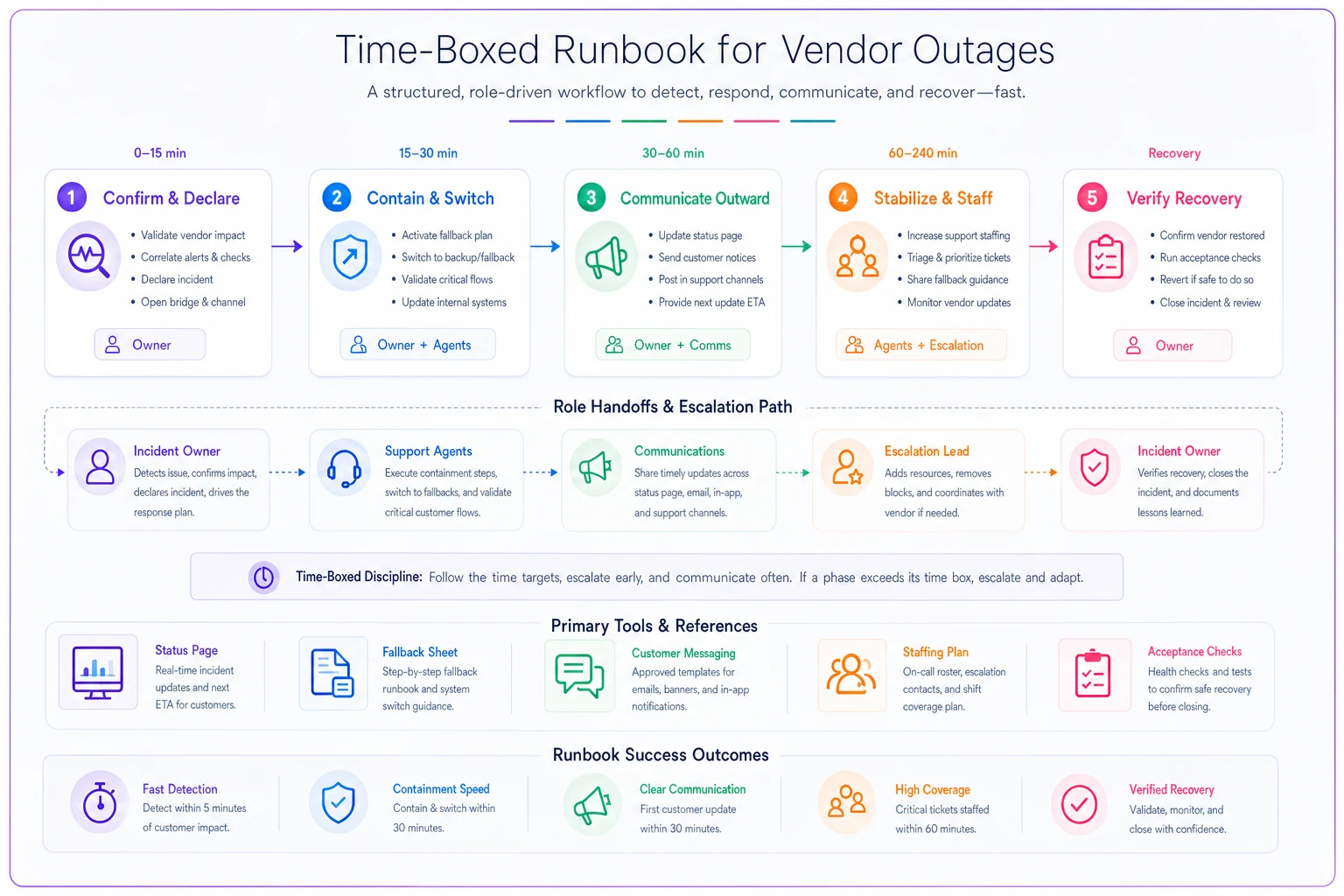
This diagram maps the phases and handoffs described above.
Parallel-run acceptance criteria: how you know recovery is real
This is the part almost everyone skips, and it's the part that causes the second outage. The vendor comes back, you flip everything over, and thirty minutes later it falls over again — or worse, your fallback data doesn't reconcile with the recovered system and you've lost or duplicated tickets.
Parallel-run acceptance criteria are the checks you run before fully trusting a recovered vendor. The idea is simple: for a defined window, you run the recovered system alongside your fallback and verify they agree before you commit.
-
Sustained health the vendor's error rate stays below your threshold for a continuous window (say, 15 minutes), not just a single green ping.
-
Data reconciliation contacts captured in your fallback sheet re-import cleanly, with no duplicates and no gaps in the ticket ID sequence.
-
End-to-end test you push one real transaction through the full path (create ticket → route → reply → close) and confirm every step works, not just login.
-
Automation re-enable in order you unfreeze automations one category at a time — routing first, then notifications, then any auto-actions — watching for misfires between each.
Skipping the sustained-health window is the single most common recovery mistake. A flapping vendor that's up-down-up will trigger a premature "all clear," you'll re-enable everything, and then you're re-declaring the incident with a much angrier customer base who thought it was over.
Recovery-time SLAs for support (separate from the vendor's SLA)
This distinction matters and gets blurred constantly: the vendor's recovery time is not your recovery time. The vendor's SLA covers when their service is restored. Your recovery-time SLA covers when your support operation is back to normal — which is later, because you still have to drain the backlog, reconcile data, and work through the surge.
-
Time to first customer communication (target this aggressively — 15 to 30 minutes from confirmation).
-
Time to fallback active (how fast the degraded mode is running).
-
Backlog drain time (how long after the vendor recovers until queues are back within normal SLA).
-
Time to post-incident review published (usually 24–72 hours).
The backlog drain metric is the one that surprises leadership. A 60-minute vendor outage during peak hours can generate a backlog that takes three or four hours to clear even after everything is technically fixed. If your customer-facing messaging says "resolved" at the 60-minute mark but customers are still waiting hours for replies, you've created a trust gap between what you announced and what they're experiencing. Set the expectation to match the drain, not the fix.
For teams operating under contractual guarantees, this is also where your resilience framework has to line up with your commercial commitments — the same rigor that goes into enterprise support contracts that guarantee operational SLAs should inform how you word force-majeure and dependency clauses, so a vendor's failure doesn't automatically put you in breach.
Customer-communication templates that preserve trust
The fastest way to lose trust during an outage is to sound like a legal disclaimer. The second fastest is to over-promise a recovery time you can't hit. Good outage communication does three things: acknowledges quickly, sets an honest expectation, and updates on a predictable rhythm.
Pre-write these so nobody is drafting copy while the building is on fire:
-
Initial acknowledgment (within 15–30 min) "We're aware some customers are experiencing [specific symptom]. We're actively investigating and will update by [specific time]." Name the symptom in the customer's words, not "a service degradation."
-
The holding update posted on a fixed cadence even if there's nothing new. "Still investigating, no change, next update by [time]." Silence reads as incompetence; a boring update reads as control.
-
The workaround message if there's a partial path (e.g., "you can still access X via Y"), lead with it. Customers forgive outages faster when you hand them something useful.
-
The resolution message honest about the drain. "Service is restored. You may still see delays as we work through a backlog — we expect normal response times by [time]."
-
The follow-up for significantly affected accounts, a short human note after the fact. Disproportionately effective at preserving relationships and rarely done.
Two things separate good templates from bad ones. First, every message contains a next-update time. That single habit does more for trust than almost anything else. Second, agent-facing talking points are written alongside the public status. If your status page says one thing and agents are improvising something different in tickets, customers notice the inconsistency immediately.
A short real scenario
A mid-sized B2B SaaS support team — around 14 agents, handling roughly 900–1,100 tickets a week across chat and email — relied on a single SSO vendor for customer logins. When that vendor had a partial outage during a weekday morning, enterprise customers couldn't log in and contact volume roughly doubled inside 40 minutes.
Before they had a framework: their first outage of this kind produced about 50 minutes of silence, agents giving inconsistent answers, and a queue that took most of the day to recover. Two enterprise accounts escalated to their execs, and one brought it up during the next renewal conversation.
After building the framework: the second time it happened, the incident was declared in under five minutes, the first customer message went out around the 20-minute mark with a next-update time, agents worked from a shared talking-point doc, and automations were frozen so nobody got auto-closed mid-outage. The outage itself was actually longer — closer to 75 minutes — but the backlog cleared in about two hours instead of a full day, and no accounts escalated to leadership. Same failure, completely different customer perception. The difference wasn't the vendor. It was the coordination.
Where this framework tends to break at scale
As the team and vendor stack grow, the failure modes shift. Three patterns show up repeatedly:
Runbook drift. The register and runbooks get written once, then the tool stack changes and nobody updates them. Six months later the runbook references a fallback process that no longer exists. The fix is treating runbooks as living documents with a scheduled review — even a quarterly 30-minute check catches most of the drift.
Owner ambiguity during handoffs. A single named owner works fine until you have follow-the-sun coverage and the incident spans a shift change. Now the "owner" is asleep and the incoming shift doesn't know they've inherited a live incident. The fix is a named role on each shift, not a named person, plus a hard handoff step in the runbook itself.
Untested fallbacks. The most dangerous state is a fallback that exists on paper but has never been run. The first time your agents use the manual capture sheet shouldn't be during a real outage. A quick tabletop drill once or twice a year — literally walking through "the ticketing tool is down, go" — exposes gaps that no document review ever will.
When to build the full framework vs. a lightweight version
Not every team needs the full apparatus. If you're a small team with two or three critical vendors and low volume, a one-page register, a couple of time-boxed runbooks, and pre-written templates will cover you. Building elaborate parallel-run acceptance procedures for a five-person help desk is over-engineering.
The full framework — detailed register, per-vendor fallback rules, formal acceptance criteria, recovery-time SLAs, drills — earns its keep when you have enterprise customers with contractual SLAs, multiple revenue-critical dependencies, and enough volume that a one-hour outage creates a multi-hour backlog. That's the threshold where the cost of not having it shows up directly in escalations and renewals.
The teams that get this right aren't the ones with the most sophisticated tooling. They're the ones who decided, in advance and in writing, what they'd do when something they don't control fails — and then practiced it at least once before they needed it.
Vendor failure isn't a question of if. Treating it as a coordination problem you can pre-solve, rather than an emergency you improvise through, is the whole game.
Ready to transform your support operations?
Join 500+ support teams using Servyly to reduce resolution times, improve customer satisfaction, and boost team productivity.