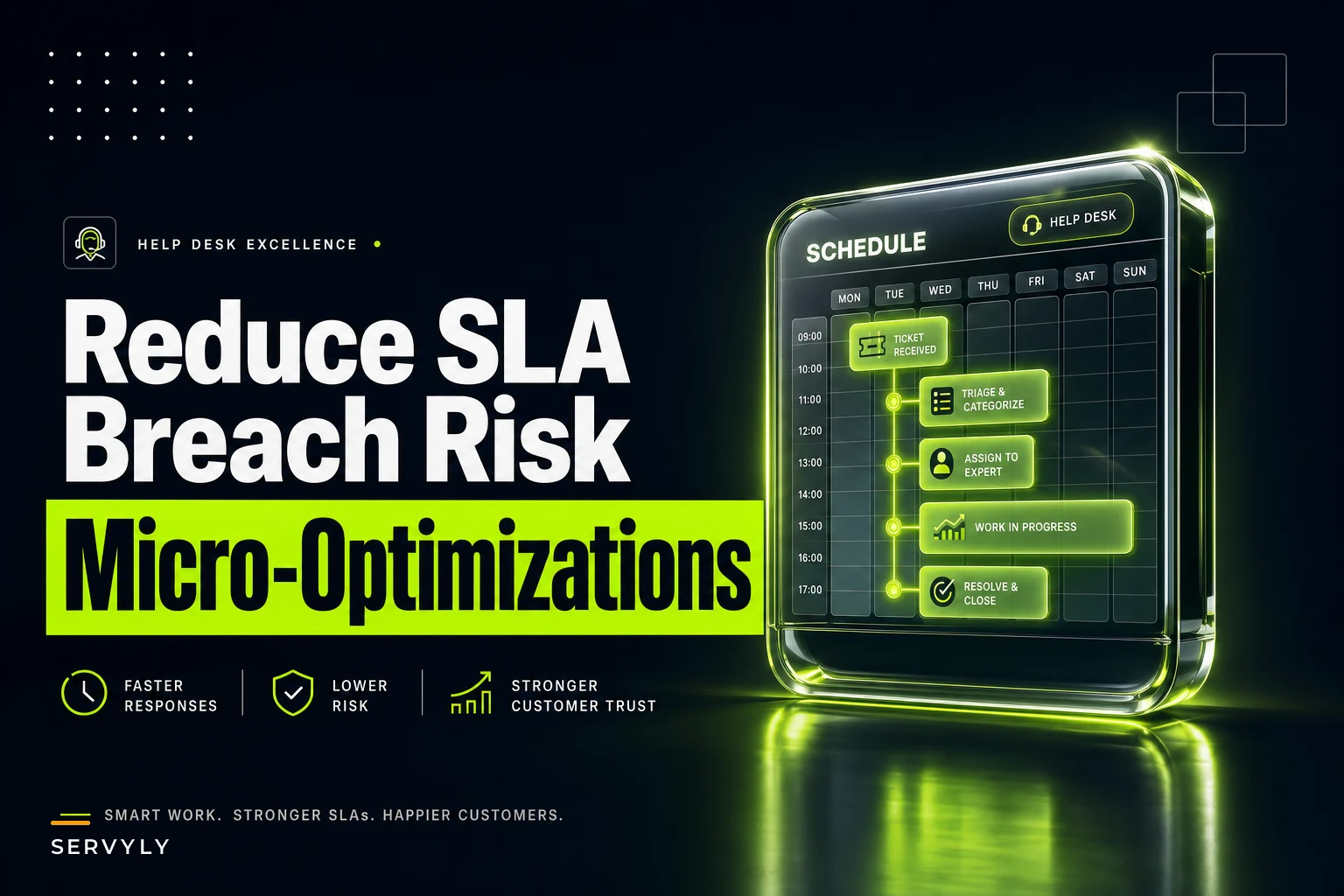

Your support team just breached SLA on 47 tickets this morning. Not because agents weren't working—everyone showed up, everyone's busy. The breach happened in that dead zone between 11:30 and noon when three agents took lunch at once, leaving just two people to handle a sudden ticket surge from a product update email that marketing sent without telling anyone.
This keeps happening. Every support manager knows the pattern: you staff correctly on paper, agents work their scheduled hours, but small coverage gaps create expensive breaches. The traditional fix—hiring more people or paying overtime—feels like using a sledgehammer on a thumbtack.
Why Coverage Looks Good on Paper But Falls Apart in Reality
Schedule micro-optimizations aren't about rebuilding your entire workforce plan. They're about recognizing that support demand doesn't follow neat hourly blocks, and neither should your coverage approach.
Most support teams build schedules around standard shifts. Eight agents from 9–5, four agents from 1–9, maybe some part-timers filling gaps. The spreadsheet shows adequate coverage. Average handle times suggest you should hit your SLAs. Then reality kicks in.
A typical 50-person support team sees somewhere between 14 and 18 micro-coverage failures per week. Not full outages—partial gaps where coverage dips below the threshold needed to hold SLA. Each gap might only last 15–30 minutes, but when tickets stack during those windows, breach penalties add up fast. Teams with strict enterprise SLAs can absorb $8,000–$12,000 in monthly penalties just from these gaps alone.
-
Multiple agents take breaks simultaneously
-
Shift changes create 15-minute handoff delays
-
Lunch schedules overlap more than planned
-
Someone calls in sick and the backup isn't ready
-
A product release or marketing campaign creates an unexpected surge
Traditional workforce management tries to solve this with more bodies or rigid break schedules that agents hate. There's a middle path—micro-optimizations that squeeze more out of your existing team without burning them out.
The Four Micro-Optimization Tactics That Actually Move the Needle
Dynamic Shift Swapping Without the Chaos
Never lose track of a customer request again.
Servyly helps you track, assign, and resolve every ticket quickly and efficiently.
- Centralized ticket management
- Automated response workflows
- Team collaboration tools
No credit card required
Shift swapping usually turns into a mess of Slack messages, spreadsheet updates, and managers manually approving every change. By the time someone actually swaps, the coverage gap already happened.
The fix isn't stopping swaps—agents need flexibility. It's creating swap rules that protect coverage automatically.
Set up "swap pairs" where agents are pre-approved to swap with specific partners who work complementary schedules. Sarah works mornings, Tom works evenings, they're both Tier 2, they can swap without approval as long as they give 2 hours notice. This cuts processing time from 20 minutes of back-and-forth to a single notification.
Create coverage thresholds that block swaps automatically. If dropping below 4 agents during peak hours would risk SLA, the system blocks the swap and suggests alternative times. No manager intervention, no arguments about "just this once."
Build in swap credits too. Agents who cover difficult shifts—Sunday morning, holiday weeks—earn credits they can use for priority swapping later. This naturally balances coverage without forcing anyone into anything.
One mid-sized SaaS support team implemented this and reduced swap-related breaches by roughly 70% in six weeks. Not because they stopped swapping, but because swaps happened within guardrails that protected SLA metrics.
Split Coverage That Agents Actually Accept
Split shifts get a bad reputation because they're usually implemented wrong. Asking someone to work 6am–10am then 4pm–8pm destroys work-life balance. But strategic split coverage, used sparingly, fills critical gaps without burning people out.
The key is making splits optional and compensating them properly. Instead of forcing splits, offer them as voluntary overtime with these ground rules:
-
Maximum 2-hour gap between split segments
-
Minimum 3-hour segments (no 1-hour mini-shifts)
-
1.5x pay for the second segment
-
Guaranteed no splits two days in a row
-
First choice on preferred shifts the following week
A retail software company's support team started offering optional split coverage during their 11am–1pm danger zone when lunch breaks typically stacked up. Four agents volunteered to work 9am–12pm and 1pm–5pm twice a week, earning extra pay while solving the coverage gap. SLA breaches during lunch hours dropped from around 23% to about 8%.
The splits work because they're predictable, voluntary, and properly compensated. Agents know exactly when they're working, choose to do it, and get something out of it. Compare that to mandatory splits that kill morale and push people toward the door.
Surge-Attach Rules That Activate Automatically
Every support team has surge periods. Product releases, marketing campaigns, Monday mornings after long weekends. Traditional surge planning means scrambling to pull people from other tasks or begging agents to stay late.
Surge-attach rules flip this into proactive coverage. Here's how the framework flows in practice: Surge Trigger Detected ↓ System checks severity threshold ↓ Level 1: 2 backup agents shift from project work to queue Level 2: Part-time agents receive shift extension offers Level 3: All available agents receive overtime notifications ↓ Coverage active — queue monitored ↓ Queue drops below 20 tickets for 15+ minutes ↓ 30-minute cooldown → agents return to regular duties ↓ Surge pay stops 15 minutes after stand-down
Define surge triggers based on real metrics:
-
Queue depth exceeds 40 tickets
-
Average wait time passes 5 minutes
-
First response SLA drops below 85%
-
Specific event flags (product launch, outage)
The value of surge-attach is removing human delay from the equation. No manager needs to notice the surge, make the call, and track down coverage. The trigger hits, agents get notified, coverage appears. A fintech support team using this model handles surges roughly 3x faster than manual escalation—usually preventing breaches entirely instead of reacting after the fact.
A quick visual helps teams understand the activation steps at a glance.
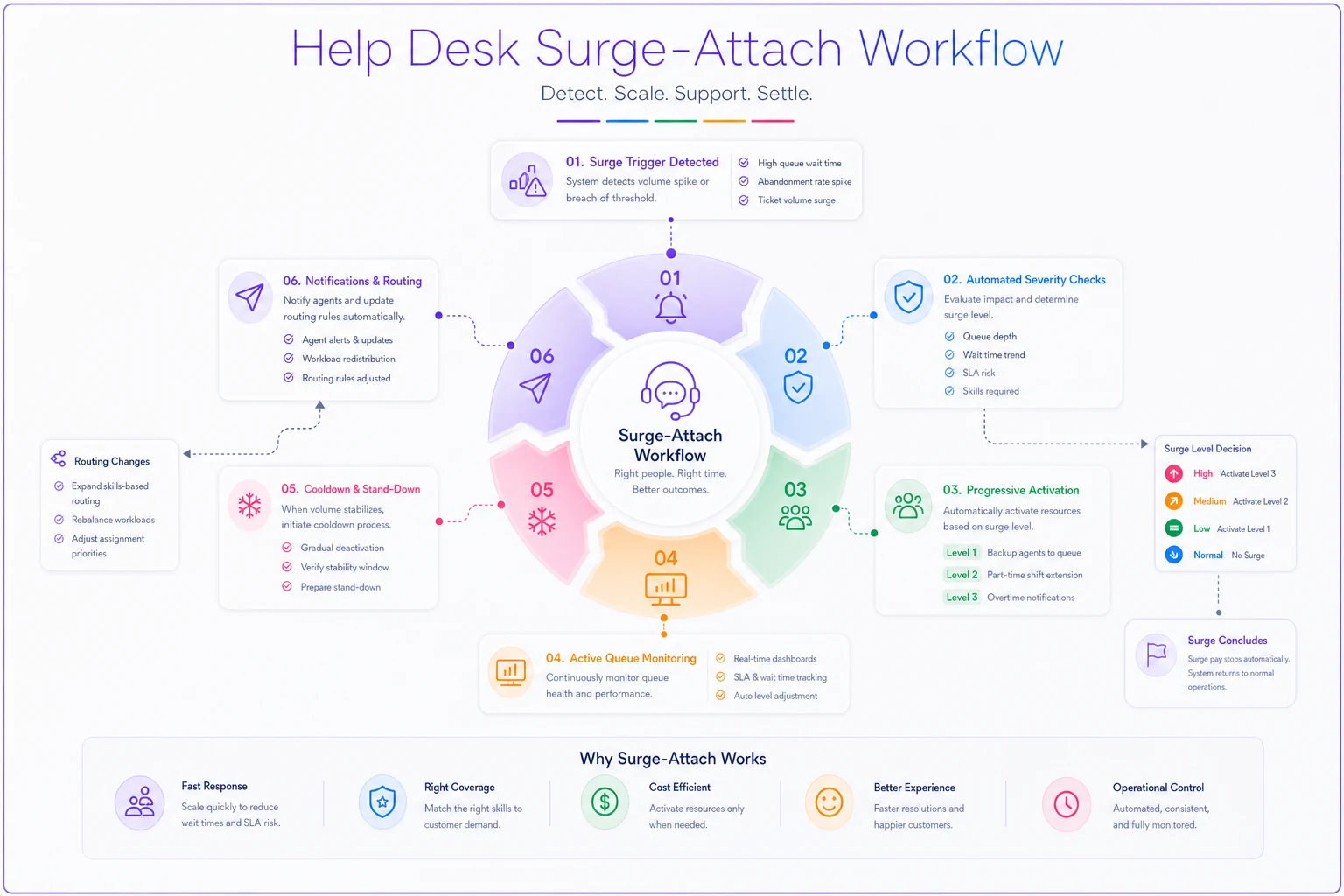
A simple visual of that surge-attach flow helps teams understand activation steps at a glance.
Quick Routing Changes That Prevent Cascade Failures
Most routing rules are set in stone. Tier 1 gets basic issues, Tier 2 gets technical problems, Tier 3 handles escalations. This rigid structure creates bottlenecks when one tier gets swamped while another has capacity sitting idle.
Dynamic routing adjustments—overflow valves—let you shift work between tiers temporarily without blowing up your entire routing logic. These aren't permanent changes. Just 15–30 minute adjustments that prevent cascade failures.
Here's a practical routing overflow setup:
-
Create skill overlap maps showing which agents can handle adjacent work
- 30% of Tier 1 can handle basic Tier 2 technical issues - 50% of Tier 2 can grab simple Tier 1 password resets - 20% of Tier 3 can take complex Tier 2 investigations
-
Set overflow triggers based on tier-specific SLA risk
- If Tier 1 SLA drops below 80%, overflow 20% of password resets to qualified Tier 2 - If Tier 2 queue exceeds 30 tickets, route integration questions to Tier 3 - If Tier 3 is full, escalate critical issues only and queue others
-
Build in automatic reversion
- Overflow routing expires after 30 minutes - Regular routing resumes when SLA recovers above 90% - Agents get a 5-minute warning before overflow ends
These routing changes work because they're temporary and targeted. You're not asking Tier 3 engineers to handle password resets all day—just pulling 5–6 tickets during a crunch to prevent broader SLA failure.
A Real Schedule Micro-Optimization in Action
Here's an actual implementation from a B2B software company's 35-person support team. They were consistently breaching SLA during three periods: Monday mornings, lunch hours, and end-of-month when enterprise customers hit them with renewal questions.
Their original schedule had 8 agents on Monday mornings, which looked fine based on average ticket volume. But tickets didn't arrive evenly—nothing until 9:30am, then 40+ tickets flooding in within 20 minutes as customers surfaced weekend issues.
Instead of adding permanent Monday morning staff, they implemented a surge-attach rule. Four agents who normally started at 10am got offered optional 8:30am starts on Mondays with 1.5x pay for that 90 minutes. Three usually accepted.
Lunch coverage came from voluntary split shifts. Part-time agents who wanted extra hours picked up 11am–2pm and 3pm–6pm splits. Two agents grabbed these regularly, treating them as guaranteed overtime.
End-of-month surges got handled through routing overflow. When renewal questions spiked, 40% automatically routed to Tier 2 agents who'd been trained on billing basics—spreading the load without pulling senior agents off complex technical issues.
| Problem Period | Before | After |
|---|---|---|
| Monday morning breaches | ~18% | ~4% |
| Lunch hour breaches | ~22% | ~7% |
| End-of-month breaches | ~31% | ~11% |
| Monthly SLA penalties | baseline | reduced by ~$6,400 |
| Agent satisfaction | mixed | improved |
They spent an extra $3,200 monthly on surge pay and split shift bonuses—but saved more than double that in penalties while avoiding the cost of 2–3 additional full-time hires.
When Micro-Optimizations Make Sense (And When They Don't)
Schedule micro-optimizations work best when you have predictable trouble spots but don't need permanent coverage increases. They're a good fit for teams with:
-
15–50 agents (enough flexibility but not so large that changes disappear into the noise)
-
Clear SLA penalties that justify the optimization effort
-
Predictable surge patterns or coverage gaps
-
Agents willing to work flexible arrangements for extra pay
-
Management willing to pay bonuses instead of adding headcount
They don't work well for:
-
Teams under constant pressure (you need permanent staff, not workarounds)
-
Companies with rigid union rules about scheduling
-
Teams where agents are already working splits or irregular hours
-
Situations where the real problem is understaffing, not inefficiency
The test: if you're breaching SLA less than 20% of the time and breaches follow patterns, micro-optimizations can probably fix it. If you're breaching constantly across all periods, you need something more fundamental.
Common Mistakes When Implementing Schedule Tweaks
Forcing changes instead of incentivizing them. Mandatory split shifts or surge coverage creates resentment. Make everything voluntary with proper compensation and agents will actually compete for the opportunities.
Optimizing everything at once. Start with one problem period, prove the model works, then expand. A support team that tried fixing all their coverage gaps simultaneously created so much schedule complexity that agents couldn't keep track of when they were supposed to work.
Ignoring agent feedback loops. That surge-attach rule might look perfect in the planning spreadsheet, but if agents hate how it's triggered or communicated, it'll fail. Run small pilots, gather feedback, adjust before scaling.
Setting triggers too sensitive. If your surge rules activate every time the queue hits 15 tickets, you'll exhaust your surge responders quickly. Look at your actual breach points and set triggers just below those thresholds.
Forgetting to document everything. When Sarah swaps with Tom, when surge activates, when routing overflows—all of it needs clear documentation. Not just for compliance, but so you can actually analyze what's working versus what just feels like it's working.
The Tools and Systems That Make This Manageable
Manual schedule micro-optimization using spreadsheets and Slack is technically possible but practically unsustainable. You need systems that handle the complexity without creating more work than they save.
At minimum, you need:
-
Real-time queue visibility for all agents and managers
-
Automated notification system for swaps, surges, and routing changes
-
Historical data on breach patterns and coverage gaps
-
Simple interface for agents to accept or decline opportunities
-
Automatic tracking of who worked what and when
This is where operational software that understands support workflows becomes essential. You can't manage surge-attach rules through email chains. Agents need to see available shifts, accept them with one click, and know their schedule updated everywhere automatically.
The same applies to routing overflows. Manual routing decisions during a crisis create more problems than they solve. The system needs to recognize the trigger, adjust routing automatically, track which tickets went where, and revert without anyone touching it.
Integrate surge triggers directly with your notification and scheduling system so responders can accept shifts with one click and the system tracks who responded automatically.
AI automation helps here in practical ways—predicting surge periods before they hit, suggesting optimal swap pairs based on historical performance, flagging which agents handle overflow work well. Instead of reactive scrambling, you get proactive adjustments that agents barely notice except in their SLA numbers and bonus payments.
Building Your First Micro-Optimization Pilot
Start with one thing. Pick your single worst coverage gap—probably Monday morning or lunch hour—and design one intervention.
-
Weeks 1–2
Measure the current problem.
Track exact breach times and ticket volumes. Note which agents are working during breaches. Calculate current SLA penalty costs. Survey agents about schedule flexibility interest. -
Weeks 3–4
Design the intervention.
If it's shift swapping, identify swap pairs and create rules. If it's split coverage, define the structure and compensation. If it's surge-attach, set triggers and responder pools. If it's routing, map skill overlaps and overflow rules. -
Weeks 5–6
Run the pilot.
Voluntary participants only. Over-communicate every change. Track everything: breaches, agent hours, ticket routing. Gather daily feedback from participants. -
Weeks 7–8
Analyze and adjust.
Compare breach rates before and after. Calculate actual cost savings versus additional pay. Incorporate agent feedback. Decide whether to expand, adjust, or abandon.
A successful pilot shows clear SLA improvement, acceptable cost increase (should be less than breach penalties saved), and neutral-to-positive agent feedback. Hit all three and expand gradually. Miss any of them and fix the model before growing it.
The Reality of Schedule Optimization
Perfect coverage doesn't exist. Even with all these optimizations, you'll still breach SLA sometimes. The goal isn't perfection—it's reducing preventable breaches without destroying team morale or blowing up your budget.
What makes schedule micro-optimizations work is that they acknowledge reality. Agents need flexibility, businesses need coverage, and nobody wants to pay for unnecessary overhead. These tweaks find the middle ground where a little flexibility and smart automation prevent most problems without creating new ones.
The support teams that do this well share a few traits. They track everything but don't obsess over perfect metrics. They pay fairly for flexibility without making it feel mandatory. They use technology to remove friction but keep humans in control of decisions that actually matter.
Most importantly, they treat schedule micro-optimizations as ongoing work, not a one-time project. Demand patterns shift, agents' situations change, business priorities evolve. The teams consistently hitting their SLAs aren't the ones with perfect schedules—they're the ones making small adjustments based on what actually happens versus what was supposed to happen on paper.
Your next step isn't implementing all of these at once. It's finding your most painful, predictable coverage gap and designing one small fix. Prove it works, then expand. Because the difference between chronic SLA breaches and consistent performance usually isn't adding more agents—it's getting more out of the ones you already have.
Ready to transform your support operations?
Join 500+ support teams using Servyly to reduce resolution times, improve customer satisfaction, and boost team productivity.