
Most coverage plans fall apart in the same spot: a ticket lands at 3:14 AM local time for the agent who's technically "on shift," but the customer is halfway around the world expecting an answer inside four hours. The queue looks staffed. The dashboard is green. And yet a growing pile of tickets keeps missing their targets because the clock the SLA runs on and the clock the agent works on aren't the same clock.
That mismatch is the core problem this piece solves. Not staffing forecasts, not shift swaps — those matter, but they're downstream. What quietly breaks global support coverage planning is that routing rules ignore timezone weight, SLA tiers get applied globally instead of locally, and nobody has a written handoff matrix for what happens when a region goes dark.
Here's how to fix that end to end, with the math and a way to actually see your gaps.
Start with the coverage map nobody draws correctly
Before any routing logic, you need an honest picture of where your ticket demand comes from by hour. Not by region label — by hour, in UTC, weighted by volume.
The mistake almost everyone makes: staffing to headcount availability instead of demand density. A team will proudly say "we cover 18 hours a day" while 40% of their inbound volume hits during the 6-hour gap. Coverage in hours means nothing. Coverage against your demand curve is the only number that matters.
A typical example looks like this. Pull 90 days of ticket creation timestamps and bucket them into UTC hours. You might find something like:
| UTC Hour Band | Share of Inbound | Region driving it | Agents online |
|---|---|---|---|
| 00:00–06:00 | ~12% | APAC + AU | 2 |
| 06:00–12:00 | ~31% | EU + India | 5 |
| 12:00–18:00 | ~38% | EU tail + US East | 6 |
| 18:00–00:00 | ~19% | US West + LATAM | 3 |
The 00:00–06:00 band is the trap. It's only 12% of volume, which feels ignorable, but those tickets often carry the highest-severity APAC enterprise accounts and the fewest agents. Twelve percent of volume against two agents is where your worst breaches hide. Low volume, high stakes, thin coverage — that's the exact profile that shows up in your worst-week postmortems.
Draw this table first. Everything else flows from it.
Timezone-weighted routing rules
Standard round-robin routing treats every available agent as equal. Timezone-weighted routing doesn't. It biases assignment toward the agent whose local working hours best overlap the customer's expected response window — and it de-prioritizes agents who are technically online but near the end of their shift.
Never lose track of a customer request again.
Servyly helps you track, assign, and resolve every ticket quickly and efficiently.
- Centralized ticket management
- Automated response workflows
- Team collaboration tools
No credit card required
The logic has three inputs:
-
Customer timezone (from account data, not IP — IP lies for travelers and VPNs).
-
Agent local time and where they are in their shift.
-
SLA clock remaining for that ticket's tier.
In plain language the rule reads roughly like this: route to the agent with the most shift-time remaining whose region overlaps the customer's business hours; if none exist, route to whoever can start the SLA clock cleanly, and flag the ticket as a coverage-gap assignment.
That last clause matters more than the routing itself. When a ticket gets flagged as a "coverage-gap assignment," you're generating data. Over a month, the count of gap-flagged tickets per UTC band tells you exactly where to add a shift — not by guessing, but by evidence.
Weight by shift-time-remaining and skill tier together.
A pattern worth naming: teams that weight only by agent availability end up dumping overnight tickets on whoever's newest, because senior agents guard their queue. So your highest-risk hours get your least-experienced coverage. Weighting by shift-time-remaining and skill tier together fixes that quietly.
Localized SLA tiers (stop running one global clock)
A "4-hour first response" SLA should almost never run on a flat 4-hour timer across all regions. It should run on business hours defined by the customer's timezone, unless the tier explicitly says 24/7.
Consider two customers on the same plan:
-
Customer A is in Berlin. Their ticket arrives at 16
30 CET.
-
Customer B is in Sydney. Their ticket arrives at 16
30 AEDT.
If your SLA is "4 business hours, 08:00–20:00 local," both are fine. But if your tool applies a naive 4-hour wall-clock timer, Customer A's ticket that arrives near their end-of-day looks late by morning even though nobody expected an overnight answer — and you've "breached" an SLA the customer didn't even feel.
| Tier | First Response | Clock basis | Applies to |
|---|---|---|---|
| Platinum | 1 hr | 24/7 wall-clock | Enterprise + P1 |
| Gold | 4 hr | Local business hours | Mid-market |
| Standard | 1 business day | Local business hours | SMB / self-serve |
The insight most teams miss: mixing tier and clock-basis in the same table is what makes handoffs sane. Your overnight skeleton crew only needs to actively defend Platinum and any P1 escalations. Everything else legitimately waits for local business hours to open. That single decision shrinks the "who has to be awake at 3 AM" problem considerably.
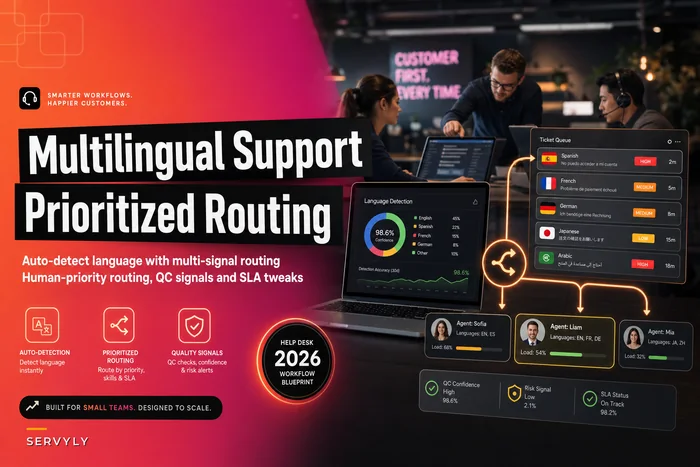
For teams juggling multiple languages on top of timezones, this pairs directly with prioritized routing logic — the mechanics of detecting and routing by language are worth reading alongside this in Multilingual Support Workflows for Small Teams, because language and timezone routing often collide on the same ticket.
The handoff matrix
Follow-the-sun only works if the handoff is defined, not assumed. The failure mode is predictable: EU shift ends, APAC picks up, and a dozen in-flight tickets sit in nobody's queue because the outgoing shift assumed "the tool handles it" and the incoming shift assumed "it's already assigned."
A workable handoff matrix looks like this:
-
Shift boundary times in UTC (not local — always UTC for the matrix itself).
-
Outgoing owner and incoming owner by queue.
-
What must be updated before handoff
any P1 gets a one-line status; anything with <90 min SLA remaining gets flagged; anything blocked-on-customer stays with the region that opened it.
-
The "hot ticket" list
the outgoing shift explicitly names tickets the incoming shift must touch first.
The written rule that prevents most drops: no ticket changes shift ownership silently. Every cross-region handoff either gets an explicit reassignment with a note, or it stays with the original region and follows that region's business calendar. Silent reassignment is where tickets disappear.
One operational pattern worth stealing: keep a standing 10-minute overlap between shifts. Not a meeting — an overlap where both the outgoing and incoming lead are online simultaneously and clear the hot list together. Teams that do this see the "orphaned overnight ticket" category basically disappear.
Staffing heuristics that respect timezones
Now the math. You've got a demand curve by UTC band and SLA tiers with clock bases. Staffing becomes a per-band question, not a total-headcount question.
-
Per UTC band, compute active-work tickets = inbound volume in that band × average handle time ÷ band length in minutes.
-
Add a concurrency buffer for the SLA tiers you must defend live in that band (Platinum/P1 only overnight).
-
Apply an occupancy ceiling — never plan a band above ~80% occupancy, or the first surge blows your SLA.
-
Compare required agents vs scheduled agents per band. The gap is your staffing plan.
Worked example. Suppose the 00:00–06:00 UTC band carries roughly 45 tickets over six hours, average handle time around 18 minutes, and you must keep Platinum first-response under 1 hour. That's about 13.5 agent-hours of work spread over 6 hours — roughly 2.25 agents of raw load. At an 80% occupancy ceiling, you actually need close to 3 agents online, not the 2 you scheduled. That one-agent shortfall, night after night, is almost certainly the source of your overnight Platinum breaches.
This per-band approach connects naturally to a proper demand model — if you don't have one yet, the lightweight version in Workforce Forecasting for Small Help Desks gives you the shift-supply map that feeds directly into these bands.
The heuristic mistake to avoid: staffing to average volume across the whole day. Averages smear the overnight risk into the busy daytime bands and make everything look fine. Always staff per band.
A visualization recipe for coverage gaps
Tables get you the math, but you need to see the gaps to get anyone to fund the fix. This works with nothing more than a spreadsheet.
Build a 24×7 heatmap grid:
-
Rows UTC hours 00–23.
-
Columns days of the week.
-
Cell value required agents minus scheduled agents (from the staffing heuristic above).
Color it so positive numbers (understaffed) go red, zero goes neutral, and overstaffed goes cool. Suddenly your coverage gaps aren't a debate — they're a red block sitting in the Tuesday–Thursday 02:00–05:00 UTC corner that everyone can point at.
A second, sharper view: overlay breach density on the same grid. Plot where tickets actually breached their SLA, in the same UTC-hour × weekday cells. When the breach heatmap lines up with the understaffing heatmap, you've got your proof. When it doesn't line up — breaches happening in well-staffed bands — you don't have a coverage problem, you have a routing or handoff problem, and you'd have wasted money hiring.
The workflow below captures the steps to build the heatmap and overlay breach density.
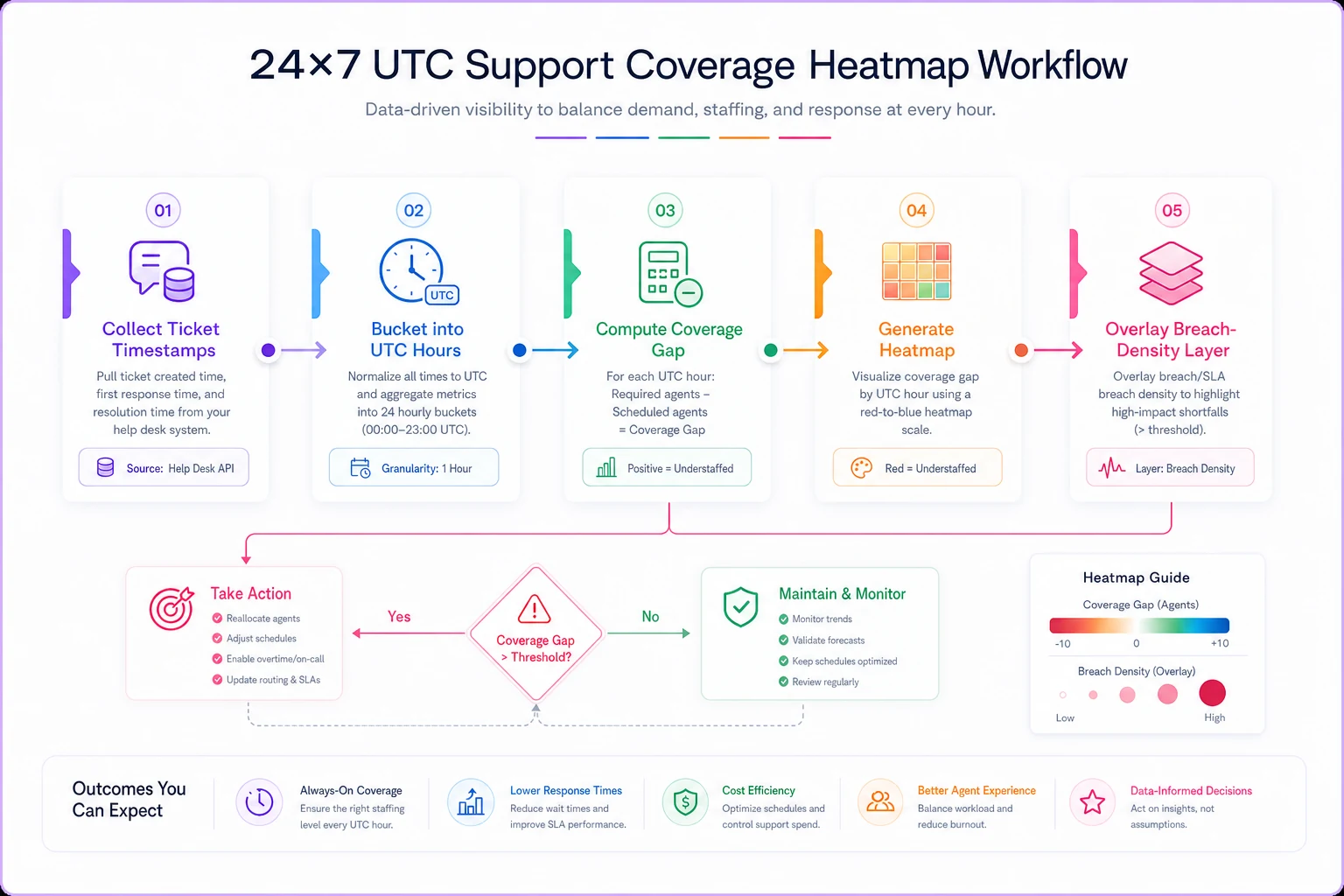
Use this workflow image to demonstrate coverage gaps and justify schedule changes.
That distinction alone is worth building the visualization for. Coverage gaps and routing failures look identical on a summary dashboard. They look completely different on these two overlaid heatmaps.
When timezone-weighted coverage is worth it — and when it isn't
When it makes sense:
-
You have measurable volume in three or more timezones and are already seeing overnight breaches.
-
You carry tiered contracts where some accounts genuinely pay for round-the-clock response.
-
Your team spans regions and you're currently coordinating handoffs on gut feel.
When it's a bad idea:
-
Your volume is 80%+ concentrated in one or two overlapping timezones. Then this is over-engineering — a simple extended-hours shift beats a routing matrix.
-
You have fewer than around 6 agents total. You don't have the bodies to weight-route meaningfully; you need coverage before you need cleverness.
Who should not do this: early teams still stabilizing basic SLA definitions. If your tiers aren't clean and your clock basis is inconsistent, timezone-weighted routing just automates a mess faster. Get the localized SLA tiers right first, then layer routing on top.
A short real scenario
A B2B analytics company running support out of two hubs — Lisbon and a small US East team — kept eating overnight breaches on their APAC enterprise accounts. Roughly 8–10 Platinum tickets a week arriving in the 00:00–05:00 UTC window, landing on a two-person US late shift already stretched thin.
They didn't hire an APAC team. They did three things: moved to local-business-hours clocks for Gold and Standard tiers (which took the overnight pressure off everything except true P1/Platinum), wrote a handoff matrix with a 10-minute overlap between Lisbon and US shifts, and used the heatmap to justify shifting one existing agent's schedule to cover the worst UTC band.
Over the next couple of months, overnight Platinum breaches dropped from around 6–7 a month to under 2. The part they didn't expect — daytime SLA performance improved too, because the overnight crew stopped hoarding low-priority tickets that were never actually due until morning.
Global support coverage planning fails so often not because of a lack of agents, but because the SLA clock, the routing rule, and the agent's real working hours are three different clocks nobody bothered to line up. Get those three onto the same map — demand by UTC band, tiers with a defined clock basis, a written handoff matrix — and the staffing math and the coverage gaps stop being mysteries. They become a red block on a grid you can actually do something about.
Ready to transform your support operations?
Join 500+ support teams using Servyly to reduce resolution times, improve customer satisfaction, and boost team productivity.