
Your support manager just quit. Not because of the workload during regular hours — they actually enjoyed that part. They quit because being on-call meant checking Slack at their kid's soccer game, waking up at 2am for password resets, and never truly disconnecting even on supposed days off.
Small support teams face a brutal reality with on-call coverage. You need someone available outside business hours, but you don't have the luxury of a 50-person department where each person only covers nights once a month. When you've got 4-6 people total, the math gets ugly fast.
The traditional enterprise on-call playbook completely breaks down at this scale. PagerDuty's complex rotation algorithms? Useless when you're rotating between three people. Detailed runbooks for every possible scenario? Your team doesn't have time to write them, let alone maintain them. Escalation chains with five levels? Your entire company might only have five levels total.
The Coverage Math That Kills Small Teams
With a team of four people covering nights and weekends, the math alone should concern you:
-
168 hours in a week
-
Minus 45 business hours (9 hours x 5 days)
-
Equals 123 off-hours per week needing coverage
-
Divided by 4 people = roughly 31 hours of on-call per person per week
That means each person is technically "on" for almost an entire work week's worth of time outside their regular hours. Even if actual incidents are rare, the psychological weight of being constantly reachable wears people down fast.
The problem compounds because small teams usually handle a wider variety of issues than specialized enterprise teams. Your on-call person might field everything from billing questions to API errors to angry customer escalations. Without clear boundaries, they become the default solution to every after-hours problem that comes up.
Setting Up Rotation Rules That Actually Protect Staff
Forget complex rotation matrices. Small teams need simple, enforceable rules that prevent burnout while maintaining coverage.
Never lose track of a customer request again.
Servyly helps you track, assign, and resolve every ticket quickly and efficiently.
- Centralized ticket management
- Automated response workflows
- Team collaboration tools
No credit card required
The most sustainable pattern is a primary/backup rotation with mandatory handoff windows. Instead of one person carrying the burden alone, you always have two people sharing responsibility — but with clear distinctions about who responds first.
-
Maximum 7 consecutive days on primary
-
Minimum 7 days off between primary rotations
-
Backup only gets contacted after 15-minute non-response from primary
-
No back-to-back primary and backup weeks for the same person
One team running a SaaS help desk switched from solo on-call to primary/backup and reduced their turnover from around three people per year to zero over the following 18 months. The backup rarely got called, but knowing someone else was available made the primary role bearable.
Schedule swaps need to be frictionless but documented. Build a simple swap form that captures who's switching, when, and who approved it. Informal Slack agreements work until someone doesn't remember them — and that always happens at the worst possible time.
Building Your Minimal Viable Runbook
Small teams don't need comprehensive documentation. They need five critical decision trees that cover 80% of situations.
Your runbook should fit on two pages and answer:
Is this actually an emergency? Define exactly what requires immediate response versus what can wait until morning. Password resets at 2am? Not an emergency unless it's for an enterprise customer with an active SLA. Website completely down? Emergency. The distinctions need to be crystal clear, not left to interpretation.
Who else needs to know? List the exact people to notify for different incident types. Don't make your on-call person guess whether to wake up the CEO for a data breach versus a slow API response.
What can I actually fix? Document which issues on-call can resolve independently versus what requires escalation. Give them explicit permission to restart services, issue credits up to a certain threshold, or temporarily disable problematic features.
When do I escalate? Set clear time limits. If you can't diagnose the issue within 30 minutes, escalate. If you're seeing data loss, escalate immediately. Remove the guilt from asking for help — that guilt is what keeps people spinning their wheels at 3am instead of calling someone who can actually fix it.
How do I document this? A simple incident template: what happened, when it started, what you tried, current status. Five minutes to fill out, saves hours of confusion in the morning.
Here's a simple workflow visualization:
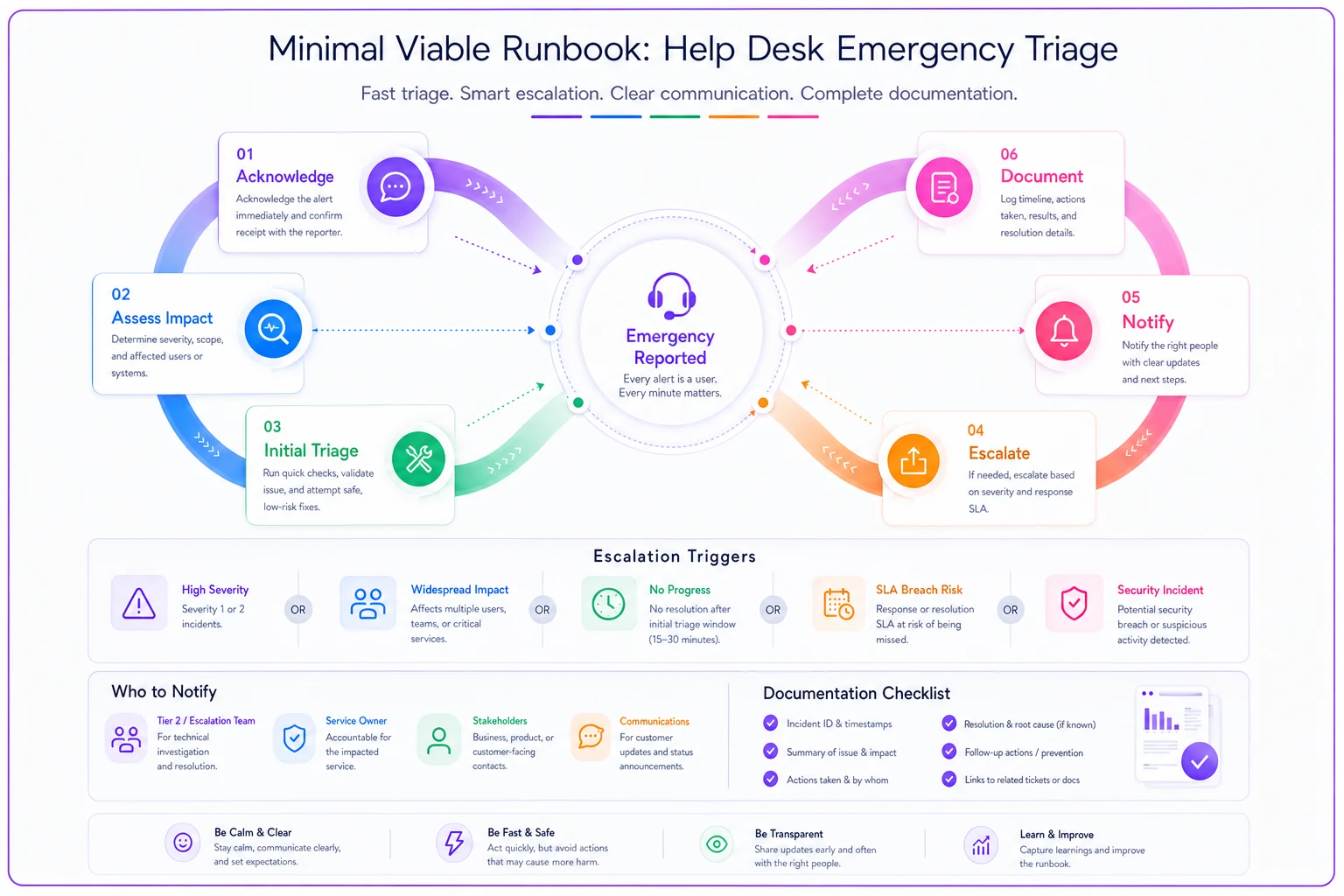
The visualization maps emergency checks to escalation nodes and documentation steps so responders know exactly when to act and when to escalate.
Your Escalation Matrix for Four People
Small teams can't support complex escalation chains, but you still need structure when things go wrong.
| Issue Type | First Response | Escalate After | Escalate To |
|---|---|---|---|
| Service Outage | On-call primary | 15 minutes | On-call backup → CTO |
| Data Issue | On-call primary | Immediately | CTO → Engineering lead |
| Security Concern | On-call primary | Immediately | CTO → CEO |
| Billing/Payment | On-call primary | 30 minutes | Finance contact |
| Feature Bug | Log and queue | Next business day | Engineering |
Notice how flat this structure is. You go from on-call to senior leadership in one hop for serious issues. That's not ideal from a hierarchy standpoint, but it's realistic for small organizations where the CTO might be one of six total engineers.
The key is setting expectations with leadership upfront. They need to understand that working at a small company means occasionally getting pulled into operational issues after hours. If they're not willing to be part of the escalation chain, you either need to hire more people or reduce after-hours support commitments. There's no third option that works long-term.
Compensation Models That Recognize the Burden
Money doesn't fix burnout, but fair compensation at least acknowledges the sacrifice. Small teams often skip this because budgets are tight — which is exactly backward. When fewer people carry more burden, compensation becomes more important, not less.
Three models that actually work:
Flat weekly rate: $200–400 per week on primary, $100–200 on backup. Simple to administer and predictable for budgeting.
Hourly activation fee: Around $50 per incident responded to, regardless of duration. Rewards actual work while keeping costs variable.
Time-off banking: One comp day earned per week on-call, usable within 30 days. Preserves cash while ensuring people actually recover.
One startup tried running on-call without any compensation for six months, reasoning that equity packages were enough. They lost two senior support engineers in three months. After implementing a $300/week primary rate, they retained the same core team for two years after that. The math isn't complicated.
Technology Boundaries That Preserve Sanity
The tools you use for on-call directly impact quality of life. Get this wrong and you'll have people checking Slack every ten minutes during dinner, which defeats the point of having any rotation at all.
Your alerting system needs intelligent filtering. Not every customer message needs to wake someone up. Set up rules that only trigger pages for:
-
Service outages affecting multiple customers
-
Enterprise customer issues where SLAs are at stake
-
Security events
-
Data loss indicators
Everything else goes to a queue that gets checked periodically during on-call windows, not immediately.
Phone calls should route through a dedicated on-call number — Google Voice works fine for this — never personal phones. This lets people fully disconnect when off rotation without worrying about missing something critical. It also gives you a clear record of who called when, which matters more than people expect.
Response SLAs need to be different for after-hours. If you promise 1-hour response during business hours, make it 4 hours after hours for non-critical issues. Set these expectations clearly in your support documentation and customer contracts before there's an incident, not during one.
Real Scenario: How a Six-Person Team Fixed Their On-Call Mess
A small EdTech company's support team was losing people steadily. Six support engineers covering 24/7 for their learning platform, each person on-call for a full week every six weeks.
The breaking point came when their senior engineer missed his daughter's recital because of a non-critical alert about slow page loads. He quit the following week. That single departure triggered a cascade that nearly collapsed their support function entirely.
-
Split into day and night shifts so no single person was covering 24 hours
-
Defined only three scenarios as requiring immediate response
-
Implemented primary/backup rotation with $250/$125 weekly compensation
-
Created a two-page runbook focused on decision-making, not exhaustive procedures
-
Set up automatic escalation to the VP of Engineering after 30 minutes of no resolution
Six months later, they still had the same team. Actual after-hours incidents dropped by roughly 60% once they defined what truly needed immediate attention. Most things, it turned out, could wait until morning.
Making the Economic Case for Sustainable On-Call
Bad on-call is expensive. It's just not expensive in obvious line-item ways, which is why companies keep tolerating it.
-
Turnover costs (roughly $15,000 to replace a support engineer when you factor in recruiting, onboarding, and lost productivity)
-
Training time for new hires — typically 2–3 months before someone is truly independent
-
Customer impact from inconsistent after-hours coverage
-
Morale damage that spreads to people not even on the rotation
One team calculated they were spending around $45,000 annually on turnover directly linked to on-call burnout. Implementing proper compensation and boundaries cost them $18,000 per year. Less than half the hidden cost of doing nothing.
The quality angle matters too. Burned-out on-call responders make worse decisions, give terse customer responses, and miss things they'd normally catch. They're technically working but operating at significantly reduced effectiveness — which is a problem that doesn't show up in any dashboard.
Automation's Role in Protecting Your People
This is where well-designed operational software makes a real difference — not by replacing on-call, but by reducing the volume of after-hours interruptions that don't actually need human judgment.
AI-powered systems can handle repetitive issues that don't require someone to wake up at 2am. Password resets, basic status checks, common troubleshooting paths — these can be automated or queued for business hours. When you strip those out of your on-call burden, what remains are the genuinely critical issues that justify the interruption.
Smarter escalation routing also helps. Instead of everything going straight to on-call, platforms built with AI automation can assess severity, cross-reference runbooks, and attempt basic resolution steps before pulling in a human. The goal isn't replacing your team — it's making sure they only get involved when their judgment is actually needed.
The platforms that work best for small teams plug into your existing tools rather than requiring you to rebuild everything. Over time, they learn from how your team actually responds and gradually absorb more of the routine work. Your on-call burden decreases without a massive upfront configuration project, which matters a lot when you're already stretched thin.
For teams building more structured support workflows, pairing this kind of automation with a solid end-to-end support operations system makes the on-call layer much more manageable. And for situations where engineering gets pulled in, having a clear escalation packet process prevents the handoff chaos that wastes everyone's time at 3am.
Warning Signs Your On-Call Is Failing
Watch for these:
-
People start getting mysteriously sick during their on-call weeks. That's not malingering — it's self-preservation from a system that's asking too much.
-
Your strongest performers start turning down senior roles that include on-call responsibilities. When promotion feels like punishment, the structure is broken.
-
Incidents during handoff periods go unaddressed. This happens when people are so eager to be done with their rotation that they let things slide in the final hours.
-
Response quality degrades as the week goes on. If Monday's tickets get thoughtful answers and Friday's get one-liners, your rotations are probably too long.
-
One person keeps covering for everyone else. That looks like dedication until the day they burn out completely, and suddenly you've lost your entire institutional knowledge buffer at once.
One person keeps covering for everyone else. That looks like dedication until the day they burn out completely, and suddenly you've lost your entire institutional knowledge buffer at once.
Building Your Lightweight On-Call System
Start with the minimum and build from there.
A simple rotation schedule visible to everyone. A shared calendar works. Include primary, backup, and next week's assignments so people can actually plan their lives.
-
A simple rotation schedule visible to everyone. A shared calendar works. Include primary, backup, and next week's assignments so people can actually plan their lives.
-
Clear definitions of what constitutes an after-hours emergency. Write it down, share it with customers, and stick to it. Every deviation from those definitions erodes the whole framework.
-
One escalation path that everyone knows by memory. Don't try to create separate chains for different scenarios when you're starting out. One clear path beats five confusing ones every time.
-
Basic compensation or time-off policy from day one. Even modest recognition matters.
-
A monthly feedback loop. Look at what got escalated, what probably shouldn't have, and where your runbook has gaps. Thirty minutes a month spent on this prevents a lot of 2am confusion.
Make the swap form a simple Slack shortcut so schedule swaps actually get filed and approved, not just mentioned in a DM.
Clear definitions of what constitutes an after-hours emergency. Write it down, share it with customers, and stick to it. Every deviation from those definitions erodes the whole framework.
The Long-Term View
Sustainable on-call for small teams isn't about finding people willing to sacrifice their personal lives for the company. It's about building a system that distributes burden fairly, compensates appropriately, and uses technology to reduce unnecessary interruptions.
The companies that get this right treat on-call as an operational investment. They measure success by team retention and response quality, not by coverage percentage alone. A slightly slower response from a well-rested engineer almost always beats an immediate response from someone on their fifth consecutive night of broken sleep.
Small support teams will always face coverage challenges that larger organizations sidestep through sheer headcount. But with the right boundaries, clear escalation paths, and targeted use of automation, you can build an on-call system that provides real coverage without grinding your team into dust.
Every unnecessary 2am wake-up call is a small withdrawal from your team's commitment. Make enough withdrawals, and even your most dedicated people will eventually close the account. Build your on-call system like your team's retention depends on it — because it does.
Ready to transform your support operations?
Join 500+ support teams using Servyly to reduce resolution times, improve customer satisfaction, and boost team productivity.