
Most support teams track SLA compliance as one big number. "We hit 94% last month." That number hides something important: your paying enterprise customers probably sat at 87% while free users got 98% response times. The averages look fine. The renewal conversations don't.
I ran operations for a SaaS platform that served everyone from solo freelancers to 500-person companies. Our overall SLA metrics looked healthy—consistently mid-90s. Then we lost three enterprise accounts in one quarter. Each cited support responsiveness. Technically, we'd met SLA on their tickets. But when we dug into the data, enterprise tickets were consistently landing at the bottom edge of acceptable response windows while simple password resets for free users got handled in minutes.
The problem wasn't agent performance. It was treating all tickets equally when the business impact varied wildly. A billing question from a $50k/year account deserves different handling than a feature request from someone on a free trial—not because one customer matters more as a person, but because operational reality demands resource allocation that protects revenue.
Why Generic SLAs Create Hidden Operational Debt
Support teams inherit SLA targets from somewhere—leadership decisions, competitor benchmarks, industry standards. "24-hour first response for all tickets" sounds reasonable until you realize your highest-value customers are waiting the same 23 hours as everyone else.
Every enterprise ticket that sits for 20+ hours while agents clear simpler requests adds friction to the renewal process. The debt compounds invisibly until it surfaces as churn, negative reviews, or emergency all-hands situations when a key account threatens to leave.
The traditional fix is manually flagging VIP accounts or creating special inboxes. That works for a while. Then your VIP list grows from 10 to 50 accounts. Agents miss flags. Routing rules conflict. Maintaining the exceptions becomes its own operational burden.
What actually works is building a proper support SLA/SLO framework from scratch—not just different response times by tier, but a complete operational model with error budgets, automated monitoring, and clear remediation paths when things break down.
Mapping SLA to SLO: The Operational Bridge Most Teams Miss
Most teams set SLAs (what you promise customers) but never define SLOs (what you measure internally to make sure you can actually deliver those promises). It's like promising 2-day shipping without tracking warehouse processing times.
Never lose track of a customer request again.
Servyly helps you track, assign, and resolve every ticket quickly and efficiently.
- Centralized ticket management
- Automated response workflows
- Team collaboration tools
No credit card required
SLAs are external commitments. "Enterprise customers receive first response within 4 hours." That goes in the contract.
SLOs are internal targets that create buffer room. "Enterprise tickets must receive first response within 3 hours." That one-hour gap absorbs normal operational variance—lunch breaks, system slowdowns, unexpected ticket spikes. Without it, you're constantly operating at the edge of failure. One sick agent or one server issue pushes you into breach territory.
Here's the mapping structure that tends to work well in practice:
| Customer Segment | External SLA | Internal SLO | Error Budget |
|---|---|---|---|
| Enterprise | 4hr first response | 3hr target | 15 tickets/month |
| Professional | 8hr first response | 6hr target | 30 tickets/month |
| Starter | 24hr first response | 20hr target | 50 tickets/month |
| Free | 48hr first response | 44hr target | Unlimited |
The error budget column is where things get interesting. That's your acceptable failure rate—the number of tickets that can breach SLO before you trigger remediation. Enterprise segments get tight budgets because every breach matters. Free tiers get loose budgets because occasional delays won't impact revenue.
Building Error Budgets That Actually Protect Operations
Error budgets are structured permission to fail within acceptable limits. Without them, every SLO breach becomes a fire drill. With them, you know exactly when to act and when to stay calm.
Say you handle 300 enterprise tickets monthly with a 15-ticket error budget. That's a 95% SLO target. If you breach SLO on 8 tickets by mid-month, you're on track. If you've hit 12 by day 10, you need intervention.
The key is making error budgets consumable throughout the month, not just measured at month-end. A team that burns through their entire enterprise error budget in week one needs immediate remediation—not a retrospective on day 31.
Most teams understand the concept but struggle with implementation because they're tracking budgets in spreadsheets. That's where automation matters. Your ticketing system needs to track budget consumption in real-time and trigger alerts at specific thresholds.
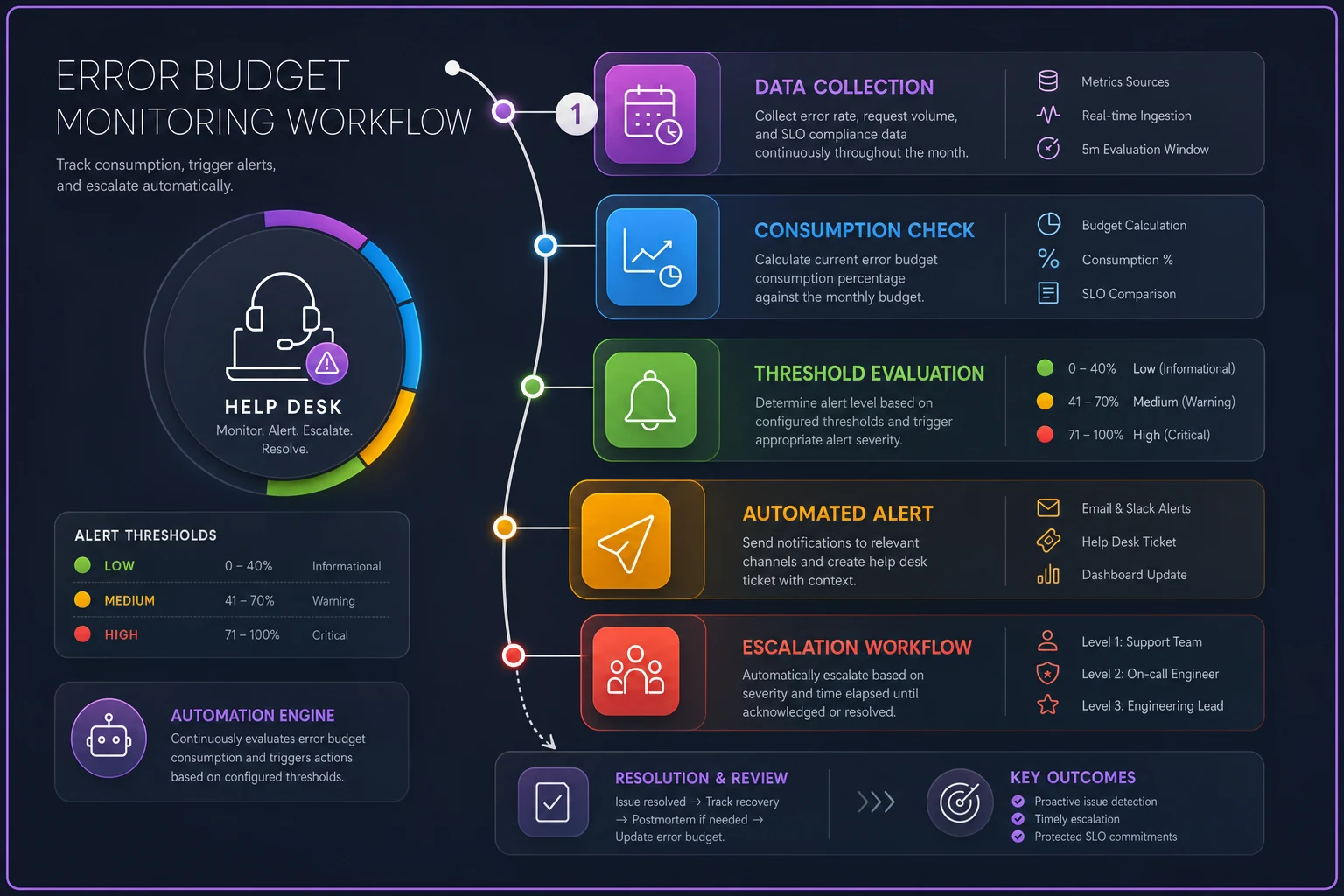
This diagram shows budget consumption and escalation flow across a monthly cycle.
-
50% budget consumed
Yellow alert to team lead
-
75% budget consumed
Orange alert to support manager
-
90% budget consumed
Red alert to director with remediation required
-
100% budget consumed
Automated escalation protocol triggered
The value of error budgets is they eliminate debate about when to act. Hit 75% of your enterprise budget? Add coverage or redistribute tickets. No "let's see how tomorrow goes." The budget decides.
Automated Breach Signals: Catching Problems Before Customers Notice
The worst way to discover an SLA breach is through an angry customer email. The second worst is during a quarterly business review. Both mean you've already failed operationally.
Automated breach detection needs to work at three levels.
Pre-breach warnings flag tickets approaching SLO limits. An enterprise ticket sitting at 2.5 hours without a response should trigger an alert, giving agents 30 minutes to act before breaching the 3-hour SLO.
Active breach alerts fire the moment a ticket crosses the SLO threshold. This seems obvious, but plenty of teams only run SLA reports weekly. By then, that enterprise ticket has been breached for days.
Pattern detection identifies systemic issues before they spread. If three enterprise tickets breach within two hours, something's wrong with routing, staffing, or systems. The alert should flag the pattern, not just individual tickets.
A media production company I worked with had decent overall SLA numbers but kept losing enterprise accounts. After setting up automated breach detection, we found their ticket routing system had been silently failing for certain subject lines. Enterprise tickets with "urgent" in the title—exactly the ones needing fastest response—were getting filtered into a low-priority queue. They'd been bleeding enterprise trust for months without realizing it.
The monitoring setup that fixed it:
-
Ticket age check every 15 minutes
-
Pre-breach warning at 75% of SLO time consumed
-
Breach alert with automatic escalation
-
Pattern detection for multiple breaches within 2-hour windows
-
Daily budget consumption report at 9am
The alerts felt like noise at first. Then agents started catching issues they'd been missing for months.
Time-Boxed Remediation Runbooks That Actually Get Followed
When error budgets burn too fast, you need standardized responses. Not meetings to discuss what might help—actual runbooks that spell out exactly what to do.
Most teams create elaborate remediation plans that nobody follows during a crisis because they're too complex. When you're down to 10% of your enterprise error budget on day 15, you need simple and clear.
Here's a remediation runbook structure that holds up in practice:
Enterprise Budget at 50% (Yellow)
-
Time box
1 hour to implement
-
Action
Team lead audits queue for stuck tickets
-
Action
Redistribute any enterprise tickets older than 2 hours
-
Action
Send proactive update to enterprise tickets near SLO
-
Success metric
No additional breaches for 24 hours
Enterprise Budget at 75% (Orange)
-
Time box
2 hours to implement
-
Action
Support manager adds one agent to enterprise queue
-
Action
Pause non-critical work like documentation updates
-
Action
Implement enterprise-only focus hours for the next 4 hours
-
Action
Route all new enterprise tickets to senior agents only
-
Success metric
Budget burn rate decreases by 50%
Enterprise Budget at 90% (Red)
-
Time box
30 minutes to implement
-
Action
Director involved, all hands on enterprise queue
-
Action
Delay all starter/free responses
-
Action
Assign a dedicated agent to each open enterprise ticket
-
Action
Send proactive SLA warning to affected customers
-
Success metric
Zero additional breaches for 72 hours
The time box is the part teams skip, and it's the most important part. Without it, teams debate remediation instead of executing it. At 90% budget consumed, there's no time for a discussion—run the runbook, retrospect later.
Routing Rules That Enforce Segment Priorities
Your routing system is where segment-based SLOs become operational reality. Generic round-robin routing treats all tickets equally—which is exactly the problem you're trying to solve.
Smart routing considers both segment and current SLO status. An enterprise ticket at 2 hours old should jump ahead of a professional ticket at 1 hour, even if the professional ticket arrived first. That feels unfair until you consider the actual business impact of an enterprise breach versus a professional one.
The routing logic that tends to work best:
-
Enterprise tickets approaching SLO (>75% of time consumed)
-
Professional tickets approaching SLO (>75% of time consumed)
-
Enterprise tickets at normal age (<75% of time)
-
Professional tickets at normal age (<75% of time)
-
Starter tickets approaching SLO
-
All other tickets by age
This looks complex but modern ticketing systems handle it fine with proper configuration. The key is making priorities dynamic based on time consumption, not static based on segment alone.
Use time-consumed metrics rather than absolute arrival time when dynamically prioritizing queues.
One thing to watch: agent gaming. When agents see certain tickets always jump the queue, some will let those tickets age to avoid complex issues. That's where error budgets create accountability. If agents game the system, budgets burn faster and trigger remediation that makes everyone's job harder. The system tends to self-correct.
Triage Rules That Prevent Misrouted Disasters
Even perfect routing fails when tickets are miscategorized. A billing issue from an enterprise customer tagged as "feature request" might sit for days in the wrong queue. These misroutes are brutal for SLO performance and customer trust.
Traditional triage relies on customer-selected categories or keyword matching. Both fail regularly. Customers pick wrong categories. Keywords miss context. An enterprise billing issue gets tagged as low-priority because the customer wrote "whenever you have time" in their message.
Better triage uses multiple signals:
-
Account tier (pulled from CRM)
-
Historical ticket patterns (billing issues usually come from finance@)
-
Language urgency scoring
-
Economic signals (ticket from an account worth >$50k/year)
But triage rules also need escape hatches. When the CEO of an enterprise account emails from their personal Gmail about a critical outage, standard triage will fail. The system needs to flag anomalies and escalate to human review.
Three routing paths that work in practice:
Confident routing (90%+ certainty)
-
Clear signals match (enterprise account + urgent language + billing category)
-
Route directly to appropriate queue
-
No human review needed
Uncertain routing (50-90% certainty)
-
Mixed signals (enterprise account + casual language + feature request)
-
Route to likely queue with a review flag
-
Team lead checks within 1 hour
Failed routing (<50% certainty)
-
Conflicting signals or no clear match
-
Route to triage queue
-
Human reviews and routes within 30 minutes
This feels like overhead until you see what one misrouted enterprise ticket sitting for 24 hours does to your error budget.
Real Implementation: How a B2B SaaS Fixed Their Enterprise Retention
A project management software company was losing enterprise accounts despite decent overall support metrics. They had around 200 enterprise customers paying $30k–60k annually, 500 professional accounts at $5k–10k, and thousands on starter plans.
Overall SLA compliance: 92%. Segmented:
-
Enterprise
76% SLA compliance
-
Professional
89% SLA compliance
-
Starter
97% SLA compliance
The team was unconsciously optimizing for volume. Starter tickets were simpler and faster to close. Agents naturally grabbed those first to boost ticket counts. Enterprise issues—often complex integration problems—aged in the queue.
We implemented the full framework over six weeks:
-
Weeks 1–2
Defined SLOs with buffers and error budgets per segment
-
Week 3
Built automated breach detection with 15-minute monitoring cycles
-
Week 4
Created time-boxed remediation runbooks and trained the team
-
Week 5
Reconfigured routing to factor in segment and ticket age
-
Week 6
Implemented triage rules with confidence scoring
The first month was rough. Alerts fired constantly. They burned through enterprise error budgets by day 10. But the visibility forced immediate changes—dedicated enterprise coverage hours, smarter ticket prioritization, misrouted tickets caught within hours instead of days.
By month three:
-
Enterprise SLA compliance hit 94%
-
Professional held steady at 90%
-
Starter dropped slightly to 93% (an acceptable trade-off)
-
Enterprise churn decreased by roughly 40%
-
Two accounts that had threatened to leave renewed with multi-year contracts
Ticket volume per agent actually decreased slightly as they spent more time on complex enterprise issues. The improvement came from working with clear priorities backed by systems that actually enforced them.
When Segment-Based SLOs Make Sense (And When They Don't)
This framework isn't for everyone. If you're running a consumer app with a single pricing tier, segment-based SLOs add complexity without much value.
But if you have multiple pricing tiers with 10x+ price differences, enterprise accounts representing more than 5% of revenue each, or renewal conversations where support experience regularly comes up—you need segment differentiation. The operational overhead pays for itself in retention.
A reasonable starting point is two segments: paid and free. Get that working before adding more granularity. Some teams successfully run just two tiers—high-touch and standard—without breaking it down further.
The anti-pattern to avoid: creating so many segments that agents can't track priorities. Teams with 12 customer segments, each with different SLOs, aren't running operational excellence—they're building complexity for its own sake. Three to five segments is plenty, with meaningful value differences between each.
Closing the Loop: From Breach to Prevention
The best support SLA/SLO framework doesn't just detect and remediate breaches—it prevents them through continuous improvement. Every breach should generate learnings that improve the system.
That requires connecting breach data back to root causes:
-
Technical issues (system downtime, routing failures)
-
Staffing gaps (unexpected absence, training needs)
-
Process breakdowns (unclear escalation, missing documentation)
-
External factors (product bugs, feature launches)
Monthly breach reviews should cover:
-
Segment performance against SLO targets
-
Error budget consumption patterns
-
Root cause analysis for all breaches
-
Remediation runbook effectiveness
-
Routing and triage rule performance
-
Recommended system adjustments
The goal isn't perfect SLO compliance—that's actually a sign you're over-investing in support. The goal is predictable, manageable performance that protects high-value relationships while efficiently serving everyone else.
AI-powered operational software makes this framework manageable for teams without a dedicated operations department. Instead of manually tracking budgets, maintaining complex routing rules, or managing remediation triggers by hand, modern platforms handle the orchestration automatically—monitoring SLO performance in real-time, alerting on budget consumption, routing tickets based on dynamic priority, and surfacing patterns before they become crises. Teams that previously spent hours each week managing spreadsheets now have continuous visibility and automated responses without adding headcount.
Teams still measuring one global SLA percentage are flying blind. They'll discover their enterprise problems during renewal conversations, when it's already too late to do much about it. Build the framework now, while there's still time to course-correct.
Ready to transform your support operations?
Join 500+ support teams using Servyly to reduce resolution times, improve customer satisfaction, and boost team productivity.