


Support managers keep getting stuck between two bad options. Either agents type everything from scratch and burn through half their capacity, or they blast template responses that customers immediately recognize as generic garbage.
Why most support automation kills customer relationships before they get a chance
The disconnect happens because most template systems treat personalization like an afterthought — a few merge tags for names and order numbers. But customer context goes way deeper than that. Their frustration level, account history, previous interactions, and the specific details of their problem all shape how they actually receive your response.
A support team I worked with destroyed their CSAT scores after rolling out what looked like a solid template library. They had 200+ templates covering every scenario. Clean categorization, quick access shortcuts, and average response time dropped from around 8 minutes to 3 minutes.
Within two months, satisfaction ratings crashed from 88% to 61%. Customers started opening new tickets complaining about "canned responses" and "not reading my actual issue." The templates technically answered the questions — they just missed the emotional context completely.
Why standard template systems fail at scale
Template libraries grow like weeds. A support team starts with 20 essential templates. Six months later they have 150. A year later, 400+ that nobody can navigate effectively.
Never lose track of a customer request again.
Servyly helps you track, assign, and resolve every ticket quickly and efficiently.
- Centralized ticket management
- Automated response workflows
- Team collaboration tools
No credit card required
The multiplication happens because agents keep creating slight variations for edge cases. You end up with things like:
-
Password reset (standard)
-
Password reset (frustrated customer)
-
Password reset (VIP account)
-
Password reset (after failed attempts)
-
Password reset (mobile app specific)
Each variation tries to handle different context, but agents still pick the wrong one half the time. Or they default to the safest generic version that fits nobody well.
Traditional template systems also fall apart on multi-step issues. A billing problem involving both a refund and a subscription adjustment needs pieces from multiple templates. Agents end up copying sections from different sources, breaking the flow and creating responses that sound disjointed.
At higher volumes it gets worse. When agents are handling 80+ tickets a day, they stop customizing templates properly. They hit send on whatever's fastest, and customers can feel that.
Modular template patterns that actually preserve context
Instead of complete templates, build modular components that combine based on context. Think of it like assembling responses from tested building blocks rather than picking pre-written letters.
Opening acknowledgments — varies by customer emotion and issue severity Problem validation — confirms you understood their specific issue Solution components — technical steps or explanations Next step guidance — what happens after resolution Closing tone — matches the relationship and how well things were resolved
For a shipping delay complaint, the system might combine a frustrated acknowledgment opener, a shipping-specific problem validation, tracking information, proactive update scheduling, and an apologetic closer with a compensation mention.
The same shipping issue for a calm first-time customer pulls different modules — a standard acknowledgment, a shipping explanation, standard tracking steps, educational next steps, and a warm relationship-building closer.
This modular approach reduces template count while actually increasing personalization options. Instead of 400 full templates, you might have 50 openers, 80 solution components, and 30 closers that combine into thousands of contextual variations. The math works out better and the responses feel less robotic.
Below is how a modular response assembly flow works in practice:
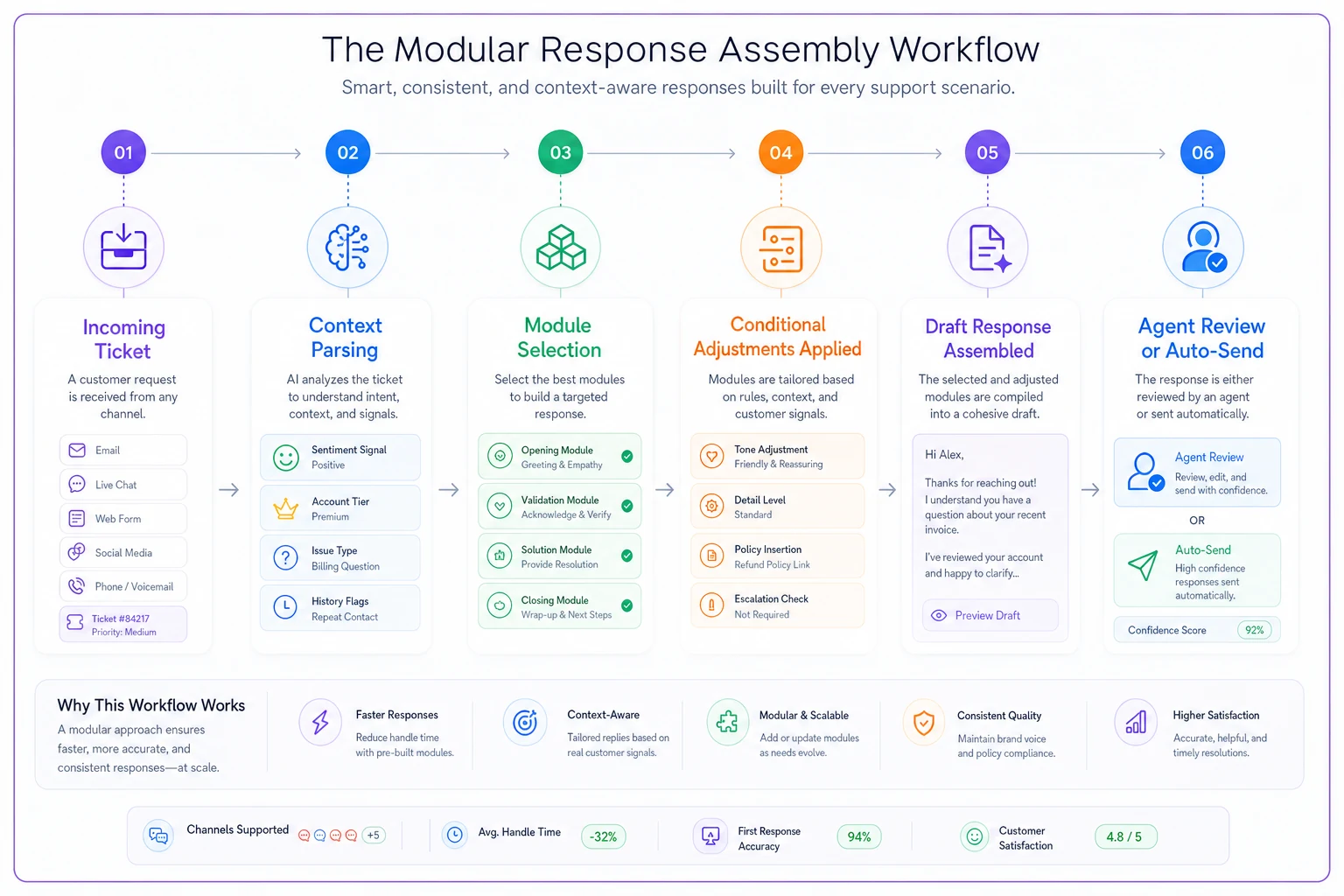
This flow shows how modules are selected and assembled into a draft response for agent review or auto-send.
Conditional personalization rules beyond basic merge tags
Most template systems stop at {{customername}} and {{ordernumber}}. Real personalization needs conditional logic built around comprehensive customer context.
Set up conditional rules that adjust tone and content based on:
Account tier indicators:
-
Lifetime value thresholds
-
Subscription level
-
Purchase frequency
-
Account age
Interaction history patterns:
-
Previous ticket count
-
Escalation history
-
Product areas used
-
Communication preferences
Current context signals:
-
Time since issue started
-
Number of contact attempts
-
Channel switching (email to chat)
-
Language intensity markers
Here's how conditional logic transforms a basic refund template:
| Context Signal | Template Adjustment |
|---|---|
| 3+ previous refunds | Add fraud prevention language |
| VIP customer | Include direct line for future issues |
| First refund request | Explain process in detail |
| Angry language detected | Lead with stronger empathy |
| Mobile app issue | Include app-specific troubleshooting |
The conditionals layer on top of each other. A VIP customer with angry language and a mobile issue gets all three adjustments applied to the same response. That's not complexity for its own sake — it's just what good support actually looks like.
Variable sets that capture business-specific context
Generic variables like {{product}} or {{issue_type}} miss critical business context. Every industry has specific data points that change how customers expect to be responded to.
For SaaS companies, useful variables include:
-
Current plan limitations
-
Feature access levels
-
Integration points that are failing
-
Team size impacts
-
Billing cycle timing
For ecommerce:
-
Shipping method selected
-
Product category specifics
-
Return window status
-
Inventory availability
-
Regional restrictions
Build variable sets around your actual operational reality. A fitness studio needs class capacity, instructor changes, and membership freeze options. A consulting firm needs project phases, deliverable status, and stakeholder involvement levels.
These business-specific variables feed directly into response generation. When a SaaS customer asks about a feature, the response adjusts automatically based on whether that feature exists in their plan, requires an upgrade, or is sitting on the roadmap somewhere waiting to ship.
Escalation triggers that preserve conversation flow
Automated replies fall apart when they can't recognize when to stop automating. Few things frustrate customers more than getting three template responses when they clearly need a person.
Design escalation triggers around pattern recognition:
-
Sentiment degradation — customer language gets increasingly negative across messages
-
Complexity indicators — multiple product areas mentioned, technical error codes, legal language
-
Repetition signals — same issue mentioned three or more times, "already tried that" language
-
Direct escalation requests — "manager," "human," "real person" keywords
-
Business impact mentions — revenue loss, deadline impacts, team blocked
The escalation shouldn't feel like starting over. When automation hands off to a human, that agent needs to see the full picture: which automated responses were sent, what solutions were already suggested, the customer's emotional trajectory, and the key variables captured along the way.
A smooth handoff might read: "I can see this issue needs more specialized attention. I'm connecting you with Sarah from our technical team — she'll have the full conversation history and will respond within 20 minutes."
When triggering escalations, include links to the exact automated messages sent so the agent can pick up without asking the customer to repeat themselves.
That's a small thing, but it makes a noticeable difference.
Real anti-patterns that destroy personalization
The Wikipedia Response: Dumping an entire knowledge base article instead of answering the specific question. Customer asks about password requirements, gets 2,000 words on account security philosophy.
The Cheerful Mismatch: Upbeat language for serious problems. "Great question! I'm excited to help you with your data loss issue! 😊"
The Corporate Robot: Forcing formal language that doesn't match your brand. "Per your inquiry regarding the aforementioned transaction, please be advised that our records indicate..."
The False Personalization: Using the customer's name five times in one paragraph. It's easy to spot and it reads as desperate.
The Context Amnesia: Ignoring previous interactions. Customer on their fourth contact about the same issue gets "Thanks for reaching out! Have you tried restarting?"
The Over-Automation: Trying to automate complex emotional situations — like automated responses to complaints about safety issues or harassment.
Each of these patterns has a common root cause: the system was optimized for speed or coverage rather than for how an actual person would respond. That trade-off costs you more in customer trust than it saves in handle time.
Setting up tone preservation across channels
Email, chat, SMS, and social media responses need different tones even for the exact same issue. A refund confirmation reads differently in a text than in an email.
Email allows for comprehensive responses with multiple sections. Include context, solution, and follow-up. Professional but warm.
Chat needs conversational chunks. Break solutions into steps with confirmation between each. Slightly casual, quicker back-and-forth.
SMS requires extreme brevity. Skip pleasantries, deliver essential information. Link to details rather than explaining them.
Social demands public-appropriate responses. Acknowledge publicly, solve privately. Extra attention to brand voice since others are watching.
Same shipping delay, different channels:
Email: "I've reviewed your order #4521 and see it's running 2 days behind schedule. This happened because severe weather in Memphis delayed our fulfillment center operations. Your package is now moving and will arrive Thursday. I've added a 20% credit to your account for the inconvenience."
Chat: "Just checked — weather delays hit your package. Now it's moving though! Should arrive Thursday. Want me to add some account credit for the wait?"
SMS: "Order #4521 delayed by weather, arriving Thursday. Added 20% credit for the inconvenience. Track: [link]"
The content is effectively the same. The delivery is completely different. Systems that use a single template across all channels miss this entirely.
Building context awareness into automation rules
Context awareness goes beyond individual tickets. Smart automation considers the full customer journey and what's happening operationally.
Track signals like:
-
Recent product launches affecting support volume
-
Known issues currently being fixed
-
Seasonal patterns in your business
-
Customer's phase in product lifecycle
-
Team capacity and expertise availability
During a product outage, templates should automatically acknowledge the known issue so customers don't have to explain something you already know about. During busy seasons, set expectations differently. For new customers in onboarding, include more education.
A payment failure response changes based on context:
-
During system-wide processing issues — acknowledge the known problem upfront before explaining anything else
-
For a brand new customer — explain the payment process clearly without assuming familiarity
-
After recent successful payments — focus on troubleshooting rather than explanations
-
During renewal period — emphasize continuity of service and what the customer won't lose
This kind of conditional logic is where AI-assisted platforms genuinely earn their keep. Encoding these patterns manually into rule trees is tedious. Systems that parse signals automatically and assemble responses accordingly take hours of operational design off your team's plate.
The compound effect on customer relationships
One ecommerce company tracked customer behavior after implementing modular personalization. Customers who received contextually-aware automated responses submitted roughly 31% fewer follow-up tickets, rated satisfaction around 22 points higher, and showed meaningfully better retention after support interactions. They also spent more in the following quarter — not a massive lift, but consistent.
The financial impact goes beyond support metrics. When customers trust your support system, they buy more confidently, recommend more freely, and forgive occasional product issues more readily. That last one matters more than people realize. A customer who's had a frustrating support experience doesn't just churn — they tell people.
Measuring personalization effectiveness
Response relevance score — how often customers say "that doesn't answer my question"
Escalation rate changes — truly personalized responses need fewer escalations
Sentiment progression — customer tone should improve through the conversation
Template modification frequency — how often agents edit automated responses before sending
Resolution quality — first-contact resolution rate for automated responses
Run regular audits where team members review automated conversations. Look for moments where personalization failed — the customer repeated their question, the agent had to apologize for the automated response, context was clearly missed, or the tone felt off.
Every mismatch teaches you about a context pattern you haven't captured yet. That's genuinely useful data, not just a quality control exercise.
Moving from template libraries to intelligent response systems
The shift from static templates to modular, conditional systems requires different thinking about support automation. Stop asking "which template fits?" Start asking "what context matters here?"
Modern support platforms with AI automation handle this contextual assembly naturally. They parse customer messages for emotional signals, pull relevant account history, recognize patterns from previous issues, and construct responses from modular components — without agents having to manually piece it together.
The AI doesn't replace human judgment. It amplifies it. Your team's expertise gets encoded into rules and patterns that scale across thousands of interactions. Agents focus on complex situations while automation handles routine issues with more nuance than a static template ever could.
The real test: customer perception
Good personalization means customers can't tell if they're talking to automation or a person who deeply understands their situation. They feel heard, helped, and valued — regardless of who or what crafted the response.
This isn't about tricking customers. It's about delivering consistent, contextual support at scale. When automation preserves the human elements of conversation — empathy, understanding, some flexibility — it stops feeling robotic.
The goal isn't to automate everything. It's to automate intelligently, with real respect for customer context and conversation flow. When you get that balance right, support stops being a cost center and starts being something customers actually appreciate.
Smart templates with genuine personalization transform support from something customers dread into something that builds the relationship — and that's when automating replies stops feeling like a compromise.
Ready to transform your support operations?
Join 500+ support teams using Servyly to reduce resolution times, improve customer satisfaction, and boost team productivity.