


Most help centers have a decent number of articles. That's rarely the problem. The problem is that people search for something, get a wall of half-relevant results, don't find the answer in the first two, and open a ticket anyway. Your knowledge exists. Your search just isn't connecting it to the person who needs it.
Help center search tuning is the unglamorous work of fixing that gap. Not rewriting your whole KB, not migrating platforms—just making sure the top things people search for actually surface the right article on the first try. Done well, it's one of the cheapest ways to knock down ticket volume you already know how to answer.
Here's how to do it, in an order that produces measurable results instead of busywork.
Start With What People Actually Search—Not What You Think They Search
The single biggest mistake teams make is tuning search based on their own mental model of the product. Support leads know the correct term is "billing cycle anchor date." Customers type "why did I get charged twice."
Pull your search logs before doing anything else. Almost every help center platform logs internal search queries, and if yours doesn't, that's the first thing to turn on. You want two lists:
-
Top queries by volume — what people search most
-
Zero-result and low-click queries — searches that returned nothing useful, or where nobody clicked a result
The zero-result list is gold. Those are the moments where search failed completely and the person almost certainly went on to file a ticket. In practice, the top 30–40 queries usually account for a surprising chunk of total search traffic—often more than half. You don't need to fix everything. You need to fix the head of the distribution.
A pattern worth noticing: query volume rarely matches article count. Teams write dozens of articles about setup and onboarding because that's what they think about, but the highest-volume searches are often boring operational stuff—password resets, refund status, "how to cancel," export limits. The mismatch between where you spend writing effort and where people actually search is the first thing tuning exposes.
Cross-Reference Search Terms Against Ticket Reasons
Search logs alone tell you what people look for. They don't tell you which failed searches turned into tickets. That's the connection that makes tuning worth prioritizing.
Never lose track of a customer request again.
Servyly helps you track, assign, and resolve every ticket quickly and efficiently.
- Centralized ticket management
- Automated response workflows
- Team collaboration tools
No credit card required
| Ticket Reason (volume) | Matching Search Query | Search Result Quality |
|---|---|---|
| "Refund not received" (high) | "where is my refund" | Zero relevant results in top 3 |
| "Can't log in" (high) | "login not working" | Correct article ranks #6 |
| "Change plan" (medium) | "downgrade subscription" | Article titled "Modify Subscription Tier"—no keyword match |
| "Data export" (medium) | "export csv" | Good result, ranks #1 |
The rows where you have high ticket volume and bad search results are your priority queue. That last column matters: notice how "downgrade subscription" doesn't match "Modify Subscription Tier." The article exists. Search just can't connect the words. That's a synonym problem, not a content problem, and it's a five-minute fix versus a two-hour rewrite.
Map Synonyms Ruthlessly
Synonym mapping is where you get the highest return for the least effort. Your customers and your internal team speak different dialects, and search engines match words literally unless you teach them otherwise.
-
- cancel → deactivate, close account, end subscription, stop billing, terminate
-
- refund → money back, reversal, chargeback, reimbursement
-
- downgrade → change plan, lower tier, cheaper plan, reduce seats
-
- login → sign in, log in, can't access, locked out
-
- export → download, csv, backup, pull data
-
- invoice → receipt, bill, statement, charge
Most search tools—whether it's Algolia, Zendesk's search, Helpscout, or whatever your platform uses—let you configure synonyms or search dictionaries. Load these in and re-run the failing queries to confirm they now surface the right article.
One thing people underestimate: typos and phrasing fragments matter as much as true synonyms. "Cant login" (no apostrophe), "log-in," "signin," and "how do i sign in" should all land on the same article. If your search doesn't handle fuzzy matching well, add the common fragments manually. It feels tedious. It's also exactly the input that separates a help center that deflects tickets from one that just looks nice.
Fix the Landing Pages People Actually Reach
Getting someone to the right article is only half the job. If they land on a wall of text that buries the answer in paragraph six, they still bounce to a ticket.
For your top-priority queries, open the article the person lands on and read it the way a frustrated customer would—skimming, impatient, wanting the answer immediately. A few fixes that consistently move the needle:
-
Put the answer in the first two lines. If someone searched "how to cancel," the first sentence should tell them how to cancel, not explain what cancellation means or why they might reconsider.
-
Match the article title to the search term. Rename "Modify Subscription Tier" to something like "Change, Upgrade or Downgrade Your Plan." Titles are heavily weighted in search ranking and they're the first thing a person scans in results.
-
Add the failed search terms into the article body. If people search "double charged" and land on your billing article, the phrase "charged twice" or "double charged" should literally appear in the text. Search can't rank words that aren't there.
-
Cut the preamble. Intro paragraphs that restate the problem before answering it are the enemy of self-service.
-
One article, one job. If a single page tries to cover cancel, pause, and downgrade, search can't tell which intent to rank it for, and readers can't find their specific path.
Renaming articles to match customer language often does more for deflection than writing new content. The knowledge is usually there. It's just mislabeled.
The Recipe: A Repeatable Tuning Cycle
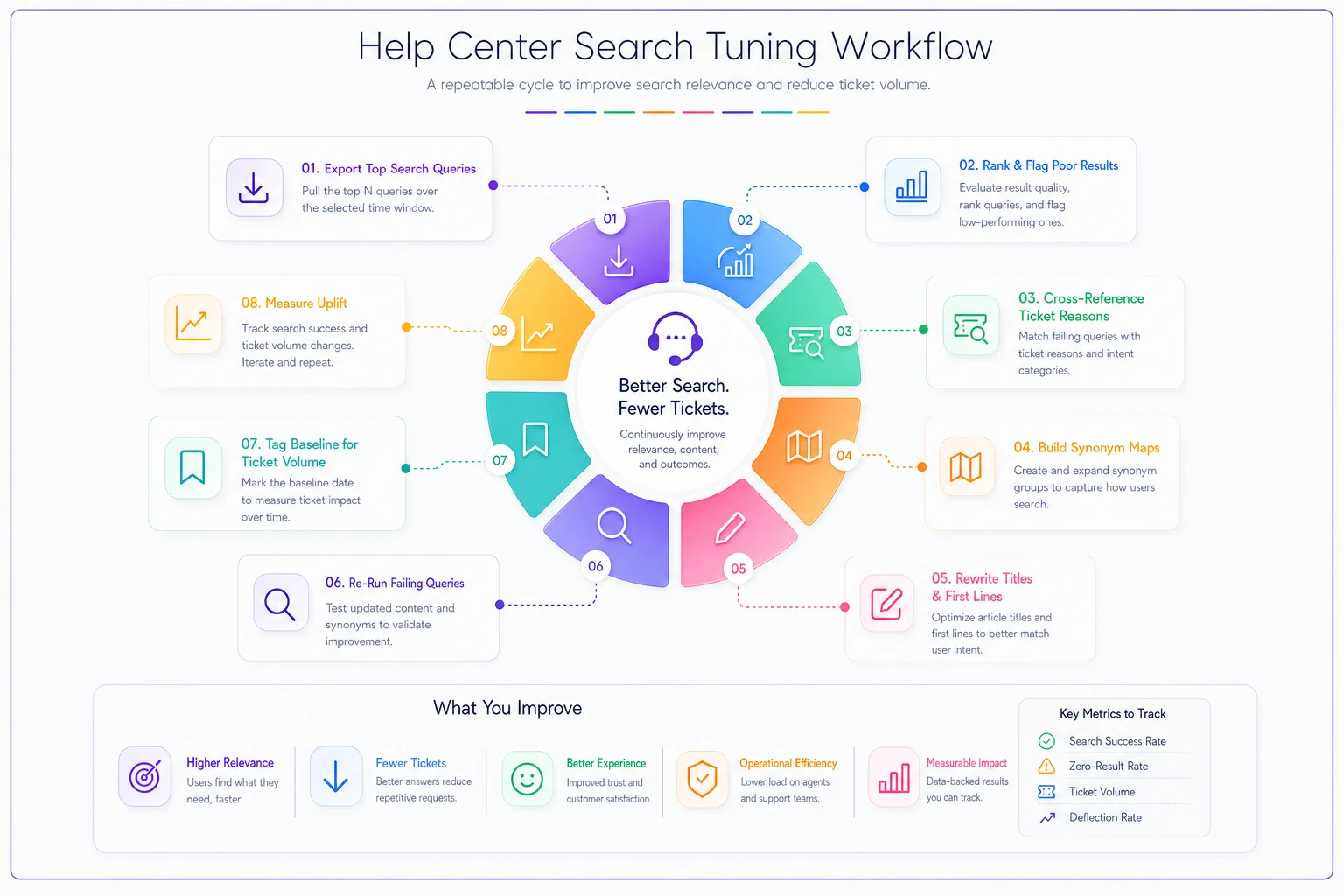
Here's the whole thing as a run-once, then run-monthly process:
-
Export top search queries and zero-result queries for the last 30 days.
-
Rank them by volume and flag anything with poor result quality.
-
Cross-reference against your top ticket reasons to find high-volume, high-failure overlaps.
-
Build synonym maps for the mismatched terminology and load them into your search config.
-
Rewrite titles and first lines for the top 20–30 landing pages so they match how customers phrase things.
-
Re-run the failing queries manually to confirm the right article now surfaces in the top 1–2 results.
-
Tag a baseline—record current ticket volume for the categories you touched.
-
Measure uplift after two to four weeks.
The first pass is the heavy one, usually a couple of days of focused work. After that, monthly maintenance is an hour or two—new queries appear as your product changes, and zero-result lists tell you exactly where the next gap is.
The cycle doesn't have to be perfect to be useful; even a rough monthly check beats letting your search config sit frozen for six months.
How to Actually Measure Search → Ticket Uplift
This is the part most teams skip, and it's why search tuning gets deprioritized—nobody can prove it worked. You need a before/after that ties search behavior to ticket volume.
The cleanest signal is ticket volume for a specific reason, before and after you fixed its search path. If "refund status" tickets were running around 120 a week and dropped to the 80s after you fixed the search result and rewrote the landing page, that's your uplift. It won't be perfectly clean—seasonality and product changes muddy things—which is why you measure per-category rather than total ticket volume.
-
Search-result click-through rate on your priority queries (did people start clicking results instead of bouncing?)
-
Zero-result rate, which should visibly shrink after synonym mapping
-
Deflection proxy
sessions that searched, clicked an article, and did not file a ticket in the next hour
Don't overbuild this. Two numbers—ticket volume per fixed category, and zero-result rate—tell you most of what you need. If you've already invested in a proper support data layer, tying search events to ticket outcomes is far easier; we've covered how that foundation works in building an end-to-end support operations system.
A quick real-world scenario
A small B2B SaaS team—two support agents, maybe 900 tickets a month—noticed roughly a third of their tickets were "how do I do X" questions that were already documented. Their search logs showed a big cluster of zero-result queries around plan changes and data exports.
They spent about a day and a half on it: built a synonym map covering around 40 term groups, renamed 18 articles to match customer phrasing, and rewrote the opening lines on their top 25 pages. No new articles written.
Over the next month, tickets in the plan-change and export categories dropped somewhere in the range of 20–25%. Zero-result searches fell noticeably. Nothing dramatic, no headline number—but for a two-person team, cutting a couple hundred repetitive tickets a month freed up real hours for the harder stuff.
When This Is Worth It—and When It Isn't
Search tuning pays off when you have decent article coverage but people still file tickets for documented things. If your search logs show high volume and lots of zero-results against topics you've already written about, you're the ideal case.
When it's not the right first move: if your knowledge base is genuinely thin—if the answers just aren't written yet—tuning search won't help, because there's nothing to surface. Fix coverage first, then tune. Similarly, if your ticket volume is dominated by genuinely novel issues or bugs, no amount of search work deflects those; that's a product or engineering conversation.
Who should probably skip the heavy version: very early teams with low ticket volume. If you're getting 40 tickets a week, the ROI on a formal tuning cycle is low—just fix the obvious search misses as you notice them and move on. The full recipe earns its keep once repetitive, documented questions become a real slice of your inbox.
The honest takeaway is that search tuning isn't a project you finish—it's a small habit. Language drifts, features ship, and new failed searches show up every month. Teams that treat it as a monthly 90-minute check keep their deflection working. Teams that do it once and walk away watch the gains erode as their product moves on and their search config stays frozen in place.
Ready to transform your support operations?
Join 500+ support teams using Servyly to reduce resolution times, improve customer satisfaction, and boost team productivity.