

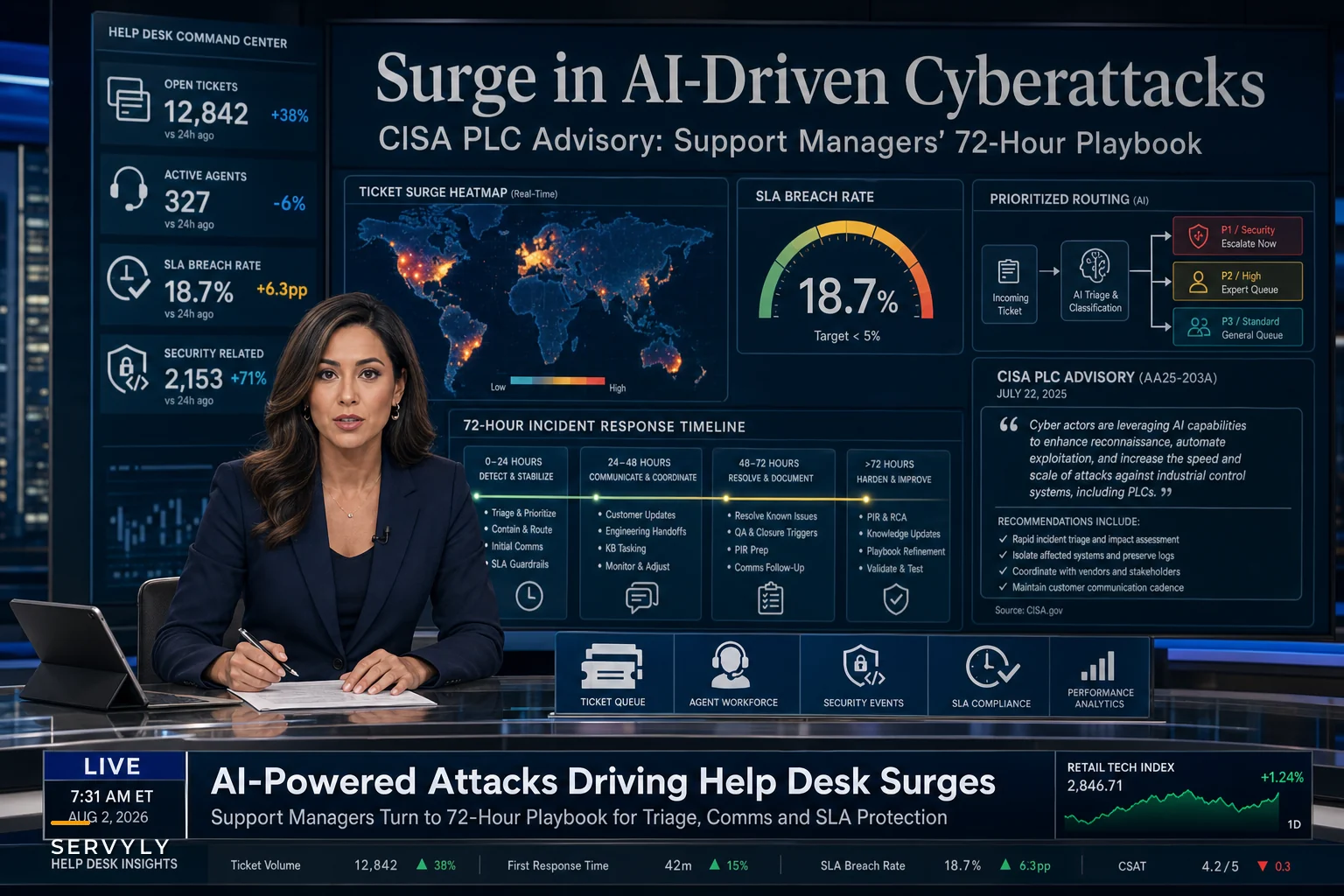

Last week's dual punch of warnings should have every support manager rethinking their incident playbooks. CISA's updated advisory about Iranian actors exploiting programmable logic controllers across U.S. infrastructure dropped just days before Reuters reported a surge in AI-enabled cyberattacks targeting American companies.
The math is brutal for support teams. When a manufacturing client's PLCs get compromised, you're not dealing with one angry customer—you're managing cascading outages that ripple through their entire supply chain. Every downstream partner floods your queue with tickets. Meanwhile, your regular SLAs become meaningless when half your team is stuck explaining why the customer's production line went dark at 3 AM.
This exact scenario played out at a mid-sized MSP I worked with. Their client, a food processing facility, got hit with ransomware that jumped from office systems to production controllers. Within four hours, the queue went from 40 tickets to over 600. Every downstream restaurant, distributor, and logistics partner wanted answers. The carefully maintained 2-hour response SLA became a joke. By day three, they were losing customers who felt abandoned during the crisis.
The operational reality of cyberattack support incident response
Most support playbooks assume incidents follow predictable patterns. Server goes down, customers report it, you acknowledge, engineering fixes it, you send an all-clear. Clean and linear.
Cyberattacks blow up that model completely.
The timeline gets weird. Attackers might have been in systems for weeks before triggering ransomware. Your engineering team discovers new compromised systems hourly. Legal won't let you say anything definitive. Customers demand answers you literally cannot provide. Your ticket system becomes a dumping ground for fear, anger, and speculation.
And regulatory requirements kick in on top of all that. You have 72 hours to notify affected parties under certain breach scenarios. But determining who's actually affected takes longer than 72 hours. So you're simultaneously triaging technical issues, managing customer communications, coordinating with legal, and documenting everything for potential regulatory review.
Standard support metrics become meaningless fast. First response time? Irrelevant when you're responding with "we're investigating" for three days straight. Resolution time? There's no resolution when the attackers still have footholds in the network. Customer satisfaction? Expect it to crater regardless of how well you handle things.
Triage patterns that actually work during security incidents
After seeing dozens of security incident responses play out, clear patterns emerge between teams that maintain control and those that drown.
Never lose track of a customer request again.
Servyly helps you track, assign, and resolve every ticket quickly and efficiently.
- Centralized ticket management
- Automated response workflows
- Team collaboration tools
No credit card required
The ones that fail try to treat security incidents like technical outages. They queue tickets by arrival time, assign them round-robin, and work through sequentially. That approach collapses within hours as critical customers get buried under routine inquiries.
Successful teams immediately switch to security-specific triage criteria:
Customer impact severity trumps everything Forget your normal priority matrix. During a cyberattack, you need brutal triage. Customers with regulatory reporting requirements jump the queue. Healthcare providers processing patient data get immediate attention. Financial services clients with affected transaction systems become priority one. Everyone else waits, even if they're paying more or complaining louder.
Message type determines routing Not all security tickets require the same expertise. Data exposure questions need different handling than service availability issues. Smart teams create temporary routing rules:
-
Legal/compliance questions → designated senior agents with legal coordination
-
Technical impact queries → agents with engineering liaison access
-
General status requests → automated updates with manual review triggers
-
Ransom/extortion mentions → immediate escalation to security team
Time-boxed response cycles Instead of trying to fully resolve each ticket, teams set strict time limits per interaction. Five minutes maximum per ticket in the initial sweep. Acknowledge receipt, categorize impact, promise a follow-up window. This stops agents from getting trapped in lengthy exchanges while the queue explodes.
Keep pre-mapped legal and engineering points of contact for top customers to speed routing during incidents.
A logistics software company refined this after their second ransomware incident. They built what they called "security surge routing"—a completely different queue configuration that activated during incidents. Normal SLAs suspended, temporary skills-based routing engaged, and all non-critical ticket types auto-deflected to status pages. Their third incident saw roughly 4x higher ticket volume but significantly faster initial response times.
Communication frameworks that preserve trust while saying nothing
The hardest part of cyberattack support incident response is that customers want specific answers you cannot legally give them.
"Was my data stolen?" You don't know yet. "When will service restore?" Depends on the attacker's next move. "Should I notify my customers?" Ask your legal team. "Are you paying the ransom?" Can't discuss that.
Standard support training emphasizes transparency and complete answers. Security incidents require the opposite—controlled information release that maintains trust while revealing minimal specifics.
The shift is from answering questions to managing concerns. When a customer asks "Was my data compromised?", they're really asking "Should I panic?" Your response framework needs to address the underlying anxiety without making promises about unknown facts.
Effective security incident messaging follows this pattern:
Acknowledge the legitimate concern "I understand you need to know about potential data exposure for your compliance reporting."
Provide current action status "Our security team is conducting forensic analysis on all affected systems, with initial findings expected by [specific time]."
Offer concrete next steps "You'll receive a detailed impact assessment for your account within 24 hours of our forensic completion. If we discover any data exposure requiring immediate action before then, we'll contact you directly."
Create boundaries around what you'll discuss "For security reasons, we can't share specifics about attack methods or ongoing defensive measures."
This keeps conversations focused on customer needs rather than speculation about attacker behavior. It also sets clear expectations about communication timelines, which cuts down on repeat contacts from anxious customers.
Protecting SLAs when everything burns
Your carefully calibrated SLAs assume normal operations. Cyberattacks are anything but normal. The question isn't whether you'll breach SLAs during a major incident—you will. The question is how to breach them strategically while limiting long-term damage.
Most SLA agreements include force majeure or security exception clauses, but invoking them requires careful documentation. You need to prove the incident genuinely prevented normal operations, not just made them harder. That means tracking everything: attack timeline, systems affected, remediation steps taken, resource allocation decisions.
But legal protection is just one piece. The real challenge is keeping customer relationships intact despite SLA breaches. Some approaches that work:
| Tier | Normal SLA | Degraded SLA |
|---|---|---|
| Premium | 1 hour | 4 hours |
| Standard | 4 hours | 24 hours |
Proactive SLA suspension notices Don't wait for customers to complain about missed SLAs. Send notices within hours of incident detection: "Due to an active security incident, standard SLA timelines are temporarily suspended. Priority support remains available for security-related issues."
Tiered service degradation Instead of completely abandoning SLAs, create degraded tiers. Premium customers might see response times shift from 1 hour to 4 hours. Standard tier might go from 4 hours to 24 hours. This maintains some service differentiation while acknowledging operational constraints.
Credit preprocessing Calculate and offer SLA credits proactively rather than waiting for claims. "We've automatically applied a service credit for the SLA disruption during our security incident." This eliminates friction and shows accountability without a customer having to fight for it.
Enhanced post-incident support Once the immediate crisis passes, offer enhanced support windows to affected customers. Extra hours, dedicated agents, expedited tickets for the following month. It helps rebuild confidence without admitting fault.
Building your incident-ready operational platform
The gap between teams that handle security incidents well and those that collapse comes down to preparation. Not just runbooks and phone trees, but actual operational infrastructure designed for crisis mode.
A properly configured support platform should be able to shift configurations the moment a security incident triggers. Ticket routing rules change. Auto-responses update. Escalation paths reconfigure. Dashboard views switch from efficiency metrics to crisis management views. This isn't something you can build during an incident—it has to exist beforehand.
When a security incident flag triggers in a well-built operational platform, things shift fast. Public status pages activate with pre-approved messaging templates. Internal dashboards switch from average handle time to customer impact severity. Ticket routing abandons skill-based distribution for security-tier prioritization. Auto-classification rules identify and surface potential attack indicators in customer messages.
The AI automation layer adds real value here. Instead of agents manually scanning hundreds of tickets for ransom demands or data exposure mentions, automated analysis flags critical patterns immediately. Natural language processing picks up customers describing suspicious activity that might indicate broader compromise. Sentiment analysis prioritizes customers who are extremely distressed and at risk of churning without immediate attention.
More advanced platforms now include breach simulation modes—teams can practice incident response using historical ticket patterns from real breaches, scaled to their customer base. That kind of practice reveals gaps in routing logic, communication templates, and escalation procedures before an actual attacker exposes them.
Here's a visual of that workflow.
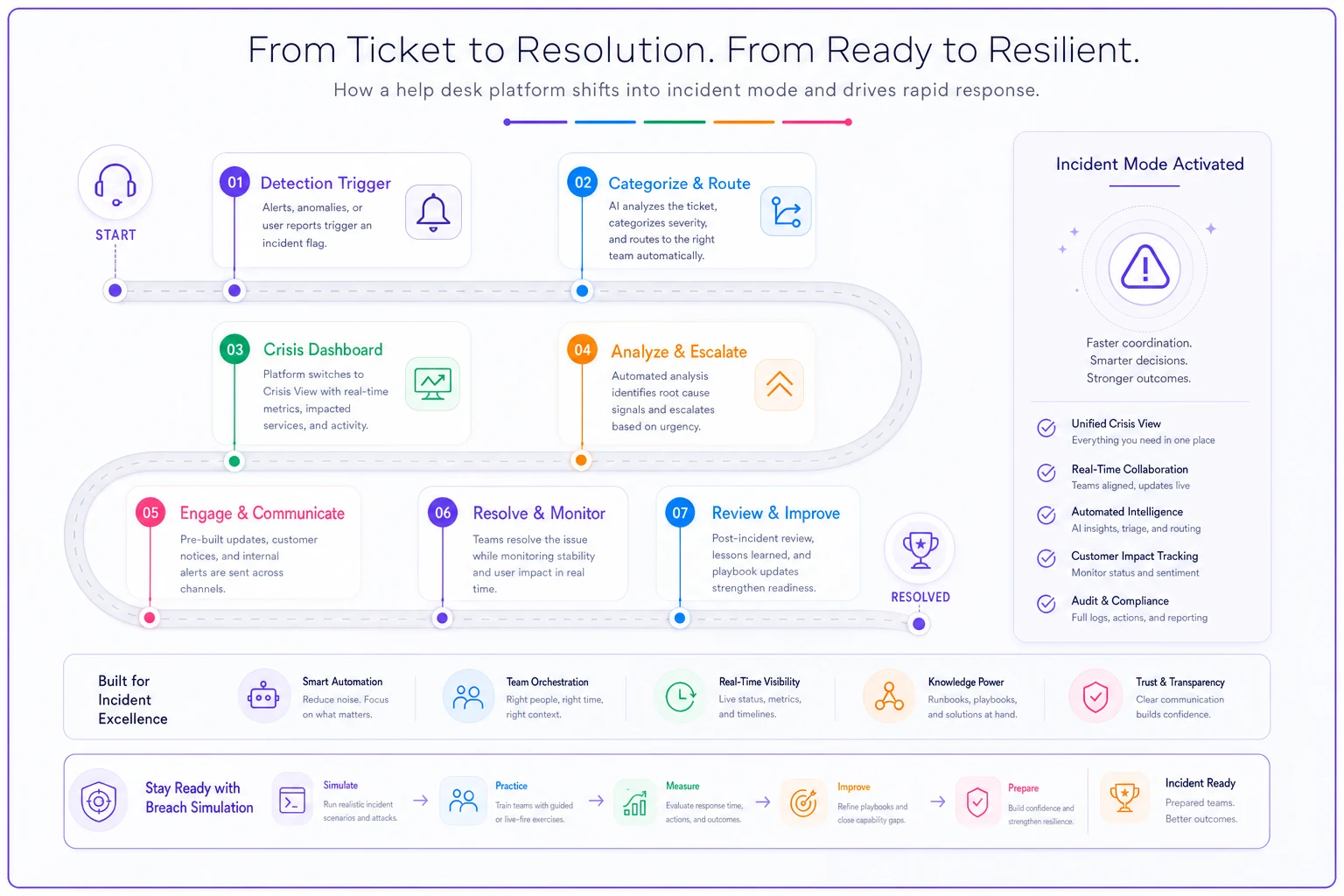
When a security incident flag triggers in a well-built operational platform, things shift fast. Public status pages activate with pre-approved messaging templates. Internal dashboards switch from average handle time to customer impact severity. Ticket routing abandons skill-based distribution for security-tier prioritization. Auto-classification rules identify and surface potential attack indicators in customer messages.
The post-incident reality check
After ransomware is contained and services restore, most teams want to forget the nightmare and return to normal. That's exactly when you need to dig deepest into what went wrong.
Post-incident reviews for security events require a different focus than standard outage reviews. You're not just examining technical failures—you're analyzing communication breakdowns, triage mistakes, and customer trust damage.
Key areas that security-focused reviews need to cover:
Communication effectiveness audit Pull every customer message sent during the incident. Analyze for clarity, consistency, and legal compliance. Did agents accidentally promise things legal hadn't approved? Did status updates contradict each other? Did anything get revealed that attackers could exploit?
Triage decision analysis Review ticket routing during the crisis. Which customers got immediate attention? Who waited too long? Did severity classifications hold under pressure? Would different routing rules have prevented specific escalations?
SLA impact documentation Calculate the real cost of breached SLAs—not just credits issued, but customers lost, trust damaged, and recovery effort required. This becomes the business case for better incident preparedness.
Knowledge gap identification What questions couldn't agents answer? What procedures didn't exist? What escalation paths failed? Each gap becomes a knowledge base article or runbook update.
A financial services platform I worked with found through post-incident review that roughly 40% of customer tickets during their ransomware event asked the same five questions. They built response macros for those specific queries. The next incident saw significantly less average handle time despite similar ticket volume.
Practical preparations you can implement this week
Another cyberattack will hit someone in your customer base soon. Whether it's ransomware, supply chain compromise, or PLC manipulation, your support team will be the first to know and last to rest.
-
Create security incident ticket tags Build a taxonomy specifically for security events: data-exposure-inquiry, ransom-mention, service-restoration-timeline, compliance-documentation-request. Train agents to apply these instantly during incidents.
-
Draft legal-approved response templates Work with legal now to pre-approve messaging for common scenarios. What can agents say about data breaches? How should they respond to ransom discussions? What promises can they make about timelines? Get this approved before you need it.
-
Design degraded service tiers Document exactly how SLAs change during security incidents. Which customer segments maintain priority? What response times can you realistically maintain? How will credits be calculated?
-
Build customer impact scoring Create formulas for quickly assessing customer priority during incidents. Factors might include regulatory requirements, data sensitivity, revenue impact, downstream dependencies, and contract terms.
-
Establish security escalation paths Map out who needs to be involved in different scenarios. Who approves customer communications? Who coordinates with law enforcement? Who handles cyber insurance claims? Document this with actual names and phone numbers—not just titles.
-
Configure monitoring for attack indicators Set up alerts for suspicious patterns in support tickets: multiple customers reporting unusual system behavior, mentions of ransom messages, or descriptions of data exposure. Early detection through support channels often beats technical monitoring.
Configure monitoring for attack indicators Set up alerts for suspicious patterns in support tickets: multiple customers reporting unusual system behavior, mentions of ransom messages, or descriptions of data exposure. Early detection through support channels often beats technical monitoring.
The competitive advantage hidden in crisis readiness
Most businesses treat cyberattack support incident response as a disaster scenario they'd rather not think about. The organizations that hold up under attacks are the ones that view incident response capability as core operational infrastructure—as essential as their ticketing system or knowledge base.
Teams running well-configured AI-powered operational software gain real advantages here. Their platforms automatically shift into incident mode, reconfiguring support operations for crisis management without anyone manually flipping switches. Agents see different dashboards. Customers receive different auto-responses. Tickets route through different logic.
But even without sophisticated platforms, the principles hold. Security incidents will happen. Your choice is whether your support operation collapses under the pressure or demonstrates the kind of operational discipline that retains customers through crisis.
The teams that invested in proper incident response capabilities—the triage frameworks, communication templates, SLA protection strategies—will come out stronger. Their customers will remember who communicated clearly during chaos. Who maintained some level of service when everything burned. Who took accountability without admitting liability.
That's the real differentiator. Not preventing every incident, but responding to inevitable ones in a way that builds customer trust rather than destroying it.
Ready to transform your support operations?
Join 500+ support teams using Servyly to reduce resolution times, improve customer satisfaction, and boost team productivity.