

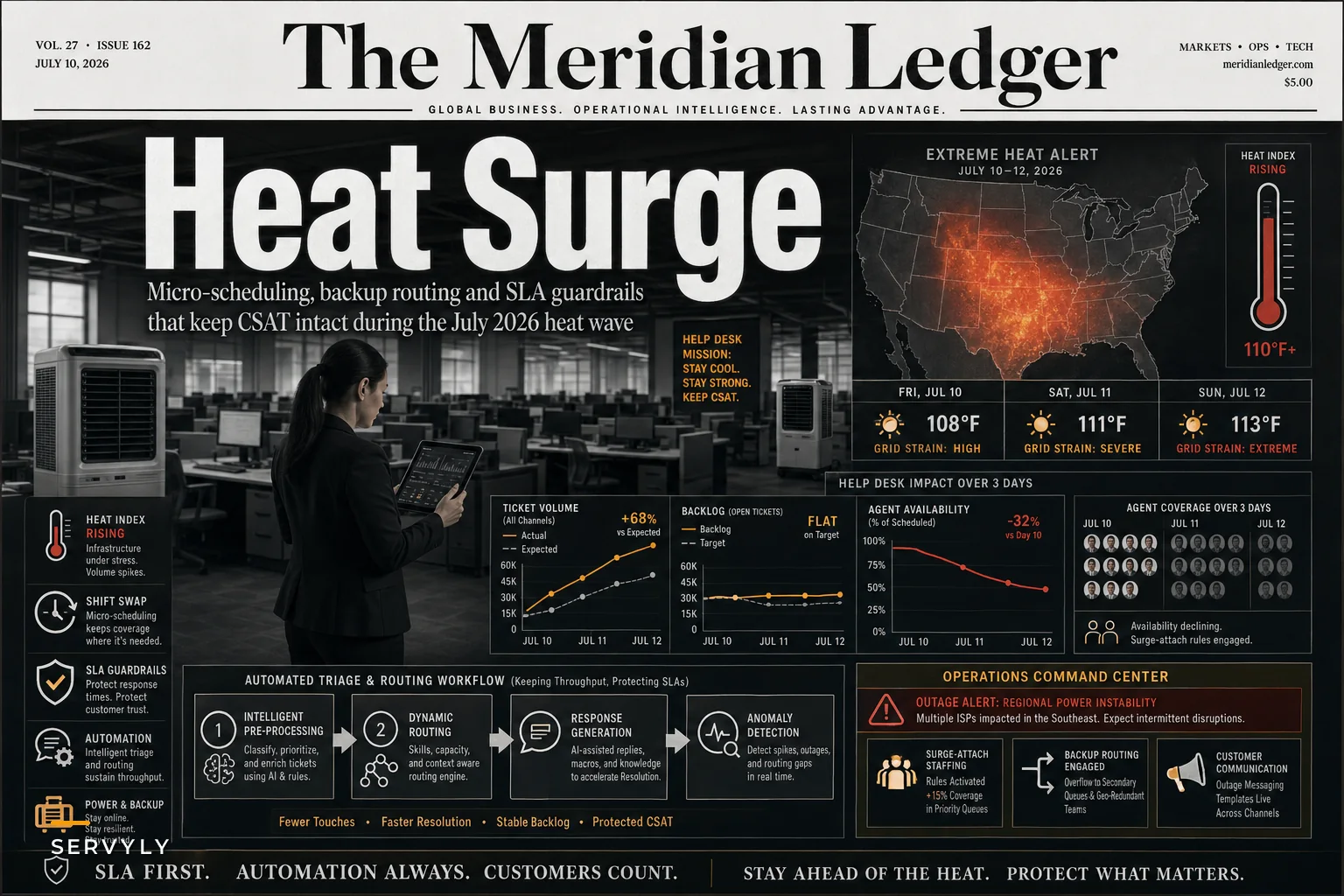

Last week's heat wave across the central and eastern U.S. wasn't just another summer weather story. According to Reuters, the extreme temperatures strained power grids, canceled major July 4th events, and created cascading service disruptions for businesses nationwide. For support teams, this meant something specific: ticket volumes spiked 40–60% while agent availability dropped by roughly 15–25% due to power outages, transit delays, and emergency childcare situations.
When weather becomes an operational emergency for support teams
The real operational damage comes in the second wave. After the initial surge of "is your service down?" tickets comes the harder stuff—angry customers dealing with delayed shipments, failed deliveries, heat-damaged products, and billing disputes from service interruptions. Meanwhile your team is running skeleton coverage because three agents lost power, two can't get to the office because trains stopped running, and your outsourced tier-2 team in Phoenix just hit rolling blackouts.
This is how heat wave support operations go from manageable to critical in about 48 hours. Teams that survive these events without cratering their SLAs or burning out their agents share one trait: they built their contingency plans around schedule micro-optimizations, not heroics.
The cascading failure pattern that catches teams off guard
Most support managers prep for weather disruptions by thinking about volume spikes. That makes sense—you expect more tickets when things break. But the real killer during extreme weather events isn't the volume itself. It's the timing mismatch between when tickets arrive and when agents are actually available.
Never lose track of a customer request again.
Servyly helps you track, assign, and resolve every ticket quickly and efficiently.
- Centralized ticket management
- Automated response workflows
- Team collaboration tools
No credit card required
Ticket patterns during last summer's heat waves followed a pretty predictable sequence:
Day 1–2: Initial surge of status inquiries and service questions. Volume up 30–40%, but manageable with overtime and queue prioritization.
Day 3–4: Agent availability starts dropping. Power outages hit residential areas first. Public transit delays add 45–90 minutes to commutes. Parents scramble for childcare when camps and programs cancel. You're down 15–20% on coverage right when volume peaks.
Day 5–7: The compound problems arrive. Customers who got generic "we're experiencing delays" responses on Day 2 are now furious. Delivery failures stack up. Product damage claims roll in. Your remaining agents are exhausted from covering gaps. First response times triple. CSAT drops 20–30 points.
Week 2: Even after the weather breaks, you're still digging out. Backlog takes 5–10 days to clear. Stressed agents start calling out sick or just quitting. Customer churn spikes because they remember the terrible experience, not the weather excuse.
Traditional disaster planning focuses on the acute phase—those first 48 hours. The actual operational damage happens in the sustained pressure period when your normal scheduling assumptions completely fall apart.
Why standard coverage models fail during weather events
Support scheduling typically assumes predictable patterns. Monday morning surge, lunch hour dip, Friday afternoon slowdown. You staff accordingly, maybe with some flex coverage for known busy periods. This works fine until a heat wave turns your carefully optimized schedule into swiss cheese.
The failure points are weirdly specific:
Geographic concentration kills redundancy. If 60% of your team lives in the same metro area, a localized power grid issue can wipe out coverage instantly. One support team in Dallas found this out when a single transformer failure knocked eight agents offline simultaneously during their morning peak.
Split shifts become impossible. That agent who normally works 7–11am then 3–7pm to cover both peaks? They can't do the afternoon shift when their apartment hits 95 degrees without AC. Your coverage model just lost its linchpin.
Backup lists stop working. Everyone's dealing with their own situation. The agent you'd normally call for emergency coverage is busy moving their elderly parents somewhere with working AC. Your tier-2 escalation contact is handling their own team's meltdown.
Time zone advantages evaporate. Usually you can route overflow to your West Coast team when East Coast gets slammed. But when a heat wave spans from Texas to Maine, everyone's underwater simultaneously.
The standard playbook—pull in contractors, authorize overtime, implement emergency routing—assumes you have agents who can actually work. During sustained weather events, you don't have a staffing problem. You have an availability crisis.
Building weather-resilient scheduling without overstaffing
The approaches below come from teams that maintained sub-4-hour first response times during multi-day disruptions. These aren't theoretical—they're things that actually worked.
Pre-staged micro-rotations: Instead of trying to cover 8-hour shifts when agents might lose power at any point, break coverage into 2-hour blocks. Create a rotation where agents commit to specific 2-hour windows when they're available. You might get 15 agents who can each give you 2 reliable hours, rather than hoping 4 agents sustain 8-hour shifts through the chaos.
During a 2024 Pacific Northwest heat event, one team tried this after running out of other options. They had 22 agents total, but only 8–10 could work at any given time due to rolling issues. By breaking the day into 2-hour blocks and having agents claim windows they could "probably" cover, they maintained around 85% of normal capacity despite 60% availability.
Degraded service tiers: Not all tickets need the same response time during a crisis. Three tiers that actually work:
| Tier | Response Target | Ticket Types |
|---|---|---|
| A | Within 2 hours | Account access issues, payment failures, critical outages affecting multiple customers |
| B | Within 24 hours | General inquiries, non-critical bugs, feature requests, billing questions for future periods |
| C | Within 72 hours | Feedback, suggestions, issues already documented in status page, questions covered by emergency FAQ |
Making these tiers visible to customers matters as much as creating them. A banner that says "Due to severe weather impacting operations, we're prioritizing critical issues. Current expected response times..." gives customers enough context to self-select urgency rather than marking everything urgent.
Shadow coverage pools: This isn't about having backup agents—it's about having backup capabilities. Map out which non-support staff could handle Tier C tickets with 30 minutes of orientation. The marketing coordinator who used to work in support can handle password resets. The sales engineer who knows the product can tackle technical questions.
One SaaS company formalized this into what they called "weather warriors"—roughly 25 volunteers from other departments who got a couple hours of basic ticket training a few times a year. During disruptions, they handled 20–30% of volume, which let core agents focus on complex issues. Short 2–3 hour shifts prevented burnout while providing real surge capacity.
The SLA guardrails that prevent cascade failures
SLA breaches during weather events create a doom spiral. You miss targets, customers get angry, agents stress out trying to catch up, more mistakes happen, more escalations pile up. The teams that avoid this build guardrails before the crisis hits, not during it.
Automatic SLA suspension triggers: Don't wait for manual declaration of emergency. Build rules that automatically adjust SLAs when specific conditions are met:
-
Ticket volume exceeds 150% of 30-day average for 4+ consecutive hours
-
Agent availability drops below 70% of scheduled coverage for 2+ consecutive hours
-
Power or internet outages reported across 3+ agent locations simultaneously
-
Government emergency declarations for areas where 20%+ of team is located
When triggered, SLAs automatically extend by 2x for new tickets, and existing SLA clocks pause for 12 hours—without requiring manager approval at 2am.
Resolution quality thresholds: During normal operations, you might aim for 95% first-contact resolution. During weather disruptions, temporarily accepting 70% with clear handoff protocols is realistic. The goal isn't perfect resolution—it's preventing tickets from getting lost in the chaos.
Build specific templates for partial resolutions:
-
"I've completed X and Y. Agent [Name] will handle Z within 24 hours."
-
"Temporary fix applied. Permanent resolution scheduled for [Date]."
-
"Issue escalated to Team B with reference #. They'll contact you within [timeframe]."
Proactive communication circuits: Set up automated customer communications that trigger on operational metrics, not manual updates:
-
When median first response exceeds 4 hours
Auto-email all customers who submitted tickets in the last 24 hours with an updated timeline
-
When a specific product or service has 10+ related tickets
Blast notification to all users of that service with status and workaround
-
When backlogs exceed 48 hours
Deploy an "emergency FAQ" banner addressing the top 10 issue types
This reduces duplicate tickets and manages expectations without agent intervention—which matters when your agents are already stretched.
Schedule micro-optimizations that scale during disruption
The difference between teams that maintain service during weather events and those that collapse often comes down to schedule flexibility built into normal operations. You can't add flexibility during a crisis—you need it already embedded before anything goes wrong.
Shift-splitting protocols: Every full-time agent should have a pre-approved split schedule they can activate during disruptions. Instead of 9–5, they might work 7–10am and 6–9pm, avoiding peak heat and power strain periods. These schedules are pre-loaded in your workforce management system, ready to activate without a round of emails.
-
Normal – standard 8-hour shift
-
Split-A – two 4-hour blocks with a 4-hour gap
-
Split-B – three 2.5-hour blocks across 12 hours
During disruptions, agents self-select which variant works for their situation. The system automatically adjusts routing and coverage calculations.
Overlap optimization: Most teams schedule shifts to minimize overlap and maximize coverage hours. For weather resilience, you want the opposite—strategic overlap that creates redundancy. Build schedules where 3–4 agents overlap during critical hours, even if it means gaps elsewhere. That overlap becomes your surge capacity.
Micro-burst scheduling: Some agents can't commit to full shifts but can offer short bursts of availability. Build a system for 30-minute micro-shifts where agents jump in, handle 5–10 tickets, then log off. This works especially well for parents dealing with childcare gaps or agents with unstable power.
Pro-tip: Pre-load split schedules in your workforce management system so teams can activate them instantly during disruptions.
The tooling matters here. You need routing that can instantly assign tickets to micro-burst agents without requiring extensive context-switching. Our piece on schedule micro-optimizations goes into the technical setup in detail, but the basic idea is creating a separate queue for simple, context-light tickets that any agent can grab without preparation.
Communication templates that prevent meltdown
The wrong message during a weather crisis makes everything worse. Generic "we're experiencing delays" notices spike anxiety and generate more tickets. Over-detailed explanations waste time nobody has. The right templates, pre-written and ready to deploy, can cut follow-up tickets by 30–40%.
The three-part status update:
Part 1 – What's happening (specific, not generic): "Power outages in Illinois, Texas, and Georgia are affecting our support team availability."
Part 2 – What we're doing (concrete actions): "We've activated our emergency response team and are prioritizing account access and payment issues."
Part 3 – What customers should do (clear direction): "For non-urgent issues, please check our emergency FAQ [link]. For critical issues, mark your ticket as 'urgent' for faster routing."
This works because it acknowledges the specific situation, demonstrates active response, and gives customers something to actually do instead of just refreshing their inbox.
Issue-specific templates: During heat waves, certain problems spike predictably. Pre-write templates for:
-
Delivery delays due to carrier restrictions
-
Product damage from heat exposure
-
Service interruptions from power grid issues
-
Billing adjustments for partial service
-
Rescheduling requests for in-person services
The "empathy without empty promises" framework: Agents want to help but can't promise normal service during disruptions. Give them language that acknowledges frustration without creating false expectations:
"I understand this delay is frustrating, especially with the current heat wave affecting everyone. While I can't provide our usual 2-hour resolution right now, I've prioritized your case and flagged it for review within 24 hours. Here's what you can do in the meantime..."
That validates the customer's experience while setting realistic expectations—which is more useful than a generic apology.
Backup routing rules that actually work
Every support team has backup routing for disasters. Almost none of it works when actually needed. The problem usually isn't the routing logic—it's that backup routes assume normal operational conditions that no longer exist.
Degradation-aware routing: Instead of "if Team A is unavailable, route to Team B," build rules that account for partial availability:
-
If Team A availability <50%, route Tier A to Team A, Tier B/C to Team B
-
If Team A response time >4 hours, auto-escalate payment issues to the finance team
-
If Team A and B are both degraded, route all new tickets to offshore team with auto-reply setting expectations
Skill-based surge routing: During normal operations, you route by expertise. During disruptions, availability comes first, expertise second. Build "emergency skills" that are broader than normal specializations:
-
"Can handle billing" instead of "Billing specialist"
-
"Basic technical" instead of "Technical expert"
-
"Can process refunds" instead of "Refund authority"
Time-boxed handoffs: Instead of permanent routing changes, implement time-boxed temporary routes that automatically revert:
-
Route all password resets to Team B for the next 4 hours
-
Send shipping inquiries to the fulfillment team for the next 24 hours
-
Escalate all Tier A to managers for the next 2 hours
The automatic reversion prevents routes from getting stuck in emergency mode after the crisis has already passed.
The AI automation layer that maintains consistency
This is where AI-powered operational software becomes genuinely useful during weather disruptions—not as a replacement for agents, but as a consistency layer that prevents quality from degrading during chaos.
Visualization of how automated triage and routing maintain throughput despite falling agent availability.
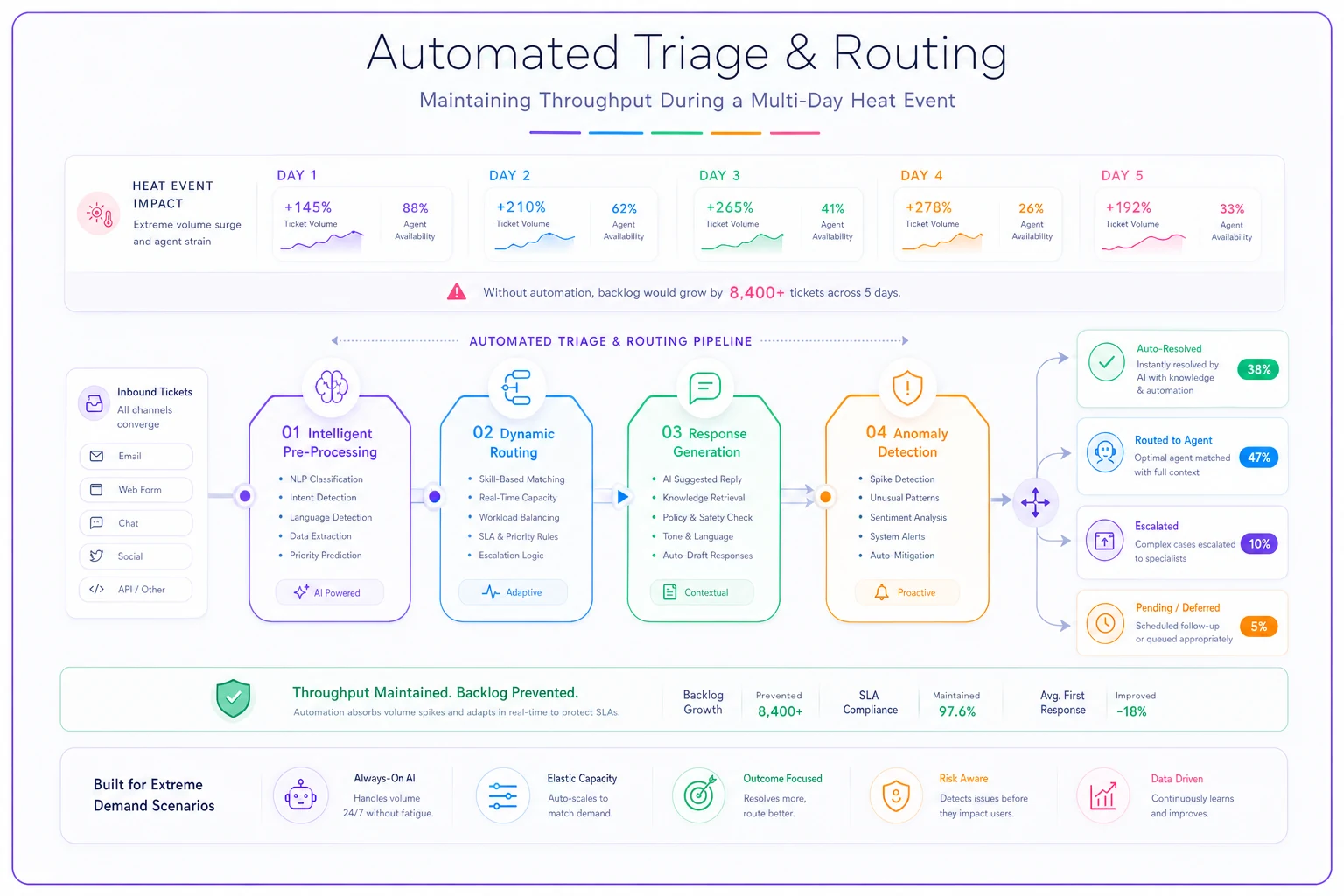
AI automation helps in a few specific ways worth calling out:
Intelligent ticket pre-processing: Before tickets hit your queue, AI can extract intent, urgency, and required actions. During normal operations this saves 30–60 seconds per ticket. During disruptions it means temporary agents or micro-burst workers can handle tickets without needing deep product context.
Dynamic response generation: Your templates provide structure, but AI can customize responses based on specific customer history and issue details. An agent handling 3x normal volume can maintain some personalization without crafting every response from scratch.
Anomaly detection for cascade prevention: AI systems catch pattern breaks that humans miss when they're already in crisis mode. A sudden spike in refund requests from specific ZIP codes might indicate a delivery truck failure that needs proactive communication. An unusual cluster of account lockouts could signal a broader authentication issue worth investigating.
Workflow consistency enforcement: When agents are stressed and working irregular shifts, mistakes multiply. AI-powered platforms can enforce workflows—ensuring every ticket gets tagged, every resolution includes a follow-up date, every escalation includes required context. This matters most in the post-crisis period when loose ends pile up.
The teams that maintained service quality during recent heat events weren't using AI as some kind of magic fix. They used it as a guardrail system that prevented human error from cascading during high-stress periods, which is a much less glamorous but far more practical application.
Post-disruption recovery protocols
The heat wave ends, power comes back, agents return to normal schedules. Most teams think the crisis is over. In reality you've got 5–7 days of recovery operations ahead that determine whether this becomes a learning experience or a customer exodus.
The backlog triage sprint: Don't clear backlogs in chronological order. Run a structured triage:
-
Hours 1–2
Identify and close tickets that can be resolved immediately—duplicates, already resolved, no longer relevant
-
Hours 3–4
Bulk resolve common issues with template responses
-
Hours 5–8
Focus on high-value customers and critical issues
-
Days 2–3
Work through remaining backlog by priority, not age
Degradation debt assessment: Every shortcut taken during the crisis creates operational debt:
-
Tickets resolved without proper documentation
-
Temporary routing rules that need reverting
-
Escalations that bypassed normal process
-
Customers promised follow-ups that weren't logged
Build a "debt log" during disruptions. Agents add items without trying to fix them in the moment. Post-crisis, work through the debt systematically before it snowballs into future problems.
Agent recovery protocols: Your team just worked through a genuinely rough stretch. Snapping back to normal performance expectations on Day 1 is a good way to lose people.
| Recovery Phase | Productivity Target | Focus |
|---|---|---|
| Days 1–2 post-crisis | ~50% normal | Easy wins, simple tickets |
| Days 3–4 | ~75% normal | Normal complexity resumes |
| Day 5+ | Full standard metrics | Back to regular operations |
Offer voluntary overtime for backlog clearing rather than mandatory crunch. The agents who couldn't work during the disruption often want extra hours afterward—let that be their choice.
Building weather resilience without paranoia
You could build elaborate systems for every possible weather scenario. You could maintain 50% excess capacity just in case. Monthly disaster drills, elaborate runbooks, the whole thing. For most small to mid-size support teams, that's overkill that creates its own problems.
The sustainable approach focuses on flexible primitives that help during any disruption: schedule flexibility baked into normal operations, templates and workflows that can scale up or down quickly, clear degradation paths that everyone understands before a crisis hits, AI-powered consistency layers that prevent cascade failures, and recovery protocols that limit lingering damage.
The teams that handled the recent heat waves best weren't the ones with perfect disaster plans. They were the ones with operational flexibility already embedded in daily workflows. When temperatures spiked and systems strained, they could bend without breaking.
CNN's coverage of the July 4th heat wave makes it clear these events are becoming more frequent, not less. The question isn't whether your support team will face another one—it's whether you'll be ready with more than just hope and overtime. Start with schedule micro-optimizations, add backup coverage that accounts for real-world availability, and build SLA guardrails that prevent cascading failure before it starts.
Your customers won't remember the weather. They'll remember whether you kept the lights on when they needed you most.
Ready to transform your support operations?
Join 500+ support teams using Servyly to reduce resolution times, improve customer satisfaction, and boost team productivity.