



Every support manager I've talked to eventually admits the same thing: they inherited a mess, tried fixing individual problems, and made things worse before getting better. Tickets keep piling up, agents keep leaving, and everyone pretends the operation runs smoothly until something breaks catastrophically.
The real problem isn't that support teams lack frameworks. It's that most frameworks come from enterprise IT departments with 500-person teams and million-dollar budgets. Try implementing ITIL when you've got six agents sharing a Zendesk instance and your "knowledge base" lives in a shared Google Doc.
After watching support operations across dozens of businesses—from five-person ecommerce shops to 200-seat B2B SaaS companies—the same growth pattern keeps showing up. Teams move through four distinct operational stages, and trying to skip ahead creates more chaos than just staying where you are.
Why Generic Frameworks Fail Support Teams
Support maturity frameworks usually come in two flavors: academic ITSM certifications that read like compliance manuals, or vendor-specific models designed to sell more licenses. Neither addresses what actually happens in growing support operations.
The disconnect is obvious when you watch a 12-person support team try to implement "service catalog management" while agents are still manually copy-pasting tracking numbers from spreadsheets. Or when a startup adopts enterprise ticketing workflows before they've figured out basic shift coverage.
Real support operations don't evolve through strategic planning sessions. They evolve through operational pressure—when response times crater during a product launch, when your best agent quits and takes all the tribal knowledge with them, when that one customer escalates to the CEO for the third time this month.
A useful support maturity framework has to acknowledge this. It can't assume infinite resources or perfect processes. It needs to show which problems to solve first, which can wait, and which will sort themselves out as you grow.
The Four Stages Every Support Team Passes Through
Stage 1: Reactive Scramble (2-5 agents)
Never lose track of a customer request again.
Servyly helps you track, assign, and resolve every ticket quickly and efficiently.
- Centralized ticket management
- Automated response workflows
- Team collaboration tools
No credit card required
At this stage, everything feels personal because it is. Agents know every difficult customer by name. The manager still takes tickets. Everyone has admin access to everything.
The operation runs on heroics and memory. That one senior agent who remembers how to fix the payment gateway issue from six months ago. The manager who stays late to clear the queue before tomorrow's product update. The shared Excel sheet titled "Customer Issues - DON'T DELETE" that somehow contains critical workflow documentation.
What keeps it running:
-
Individual expertise
-
Direct communication (everyone sits together or shares one Slack channel)
-
Flexible coverage (whoever's available handles whatever comes in)
-
Manager involvement in everything
What breaks first:
-
Coverage during illness or vacation
-
Consistency between agents
-
Tracking anything beyond today's queue
-
Onboarding new people (training means shadowing whoever's free)
Stage 1 Checklist:
-
[ ] Basic ticketing system configured (even if it's just Gmail labels)
-
[ ] Rough priority definitions (what's truly urgent vs. everything else)
-
[ ] Simple schedule that covers business hours
-
[ ] One documented escalation path (usually "ask the manager")
-
[ ] Basic response templates for top 5 issues
Hiring priorities: One experienced agent who's seen scale before. Not a superstar who'll leave in six months, but someone steady who can help establish initial processes.
Critical KPIs:
-
First response time (aim for under 2 hours during business hours)
-
Daily ticket closure rate vs. creation rate
-
Manager hours spent on tickets (should decrease over time)
Tools that matter: One ticketing system. That's it. Don't overcomplicate. Whether it's Zendesk, Freshdesk, or even a well-organized shared inbox—pick one and actually use it properly.
Stage 2: Structured Chaos (6-15 agents)
This is where things get interesting and painful at the same time. The operation is too big to run on memory but too small for specialized roles. Every process you implement breaks something else.
You'll recognize this stage by the meetings. Suddenly there are weekly team meetings, daily huddles, and "quick syncs" that aren't quick. The Slack channel splits into #support-general, #support-escalations, and #support-random. Someone creates a knowledge base that nobody updates.
The coordination tax appears:
-
Agents step on each other's work
-
Different shifts handle the same issue differently
-
Information lives in six places (tickets, Slack, docs, sheets, someone's notepad, verbal handoffs)
-
Quality varies wildly between agents
This stage frustrates experienced managers because problems feel solvable but solutions create new problems. You implement ticket assignment rules, and now agents cherry-pick easy tickets. You create quality standards, but reviewing takes longer than fixing the mistakes.
Stage 2 Checklist:
-
[ ] Defined ticket routing rules (by product area, complexity, or customer tier)
-
[ ] Weekly quality reviews (not comprehensive, just spot checks)
-
[ ] Shift handoff process that actually gets followed
-
[ ] Knowledge base with 20-30 articles for common issues
-
[ ] Basic performance tracking per agent
-
[ ] Escalation tiers (L1 vs. L2 responsibilities)
-
[ ] Customer context tracking (previous issues, account notes)
Hiring priorities: A senior agent who becomes your informal team lead. They don't need a manager title or formal responsibilities—just someone other agents naturally turn to for help. Also start hiring for consistency over raw expertise. Five agents who follow process are more valuable than two stars and three wildcards.
Critical KPIs:
-
Ticket backlog age (nothing over 48 hours)
-
Escalation rate (what percentage needs manager involvement)
-
Internal response time (how quickly agents get help from each other)
-
Documentation usage (are agents actually checking the knowledge base?)
Tools needed:
-
Ticketing system with assignment rules
-
Internal wiki or knowledge base
-
Basic reporting dashboard
-
Macro/template management
Stage 3: Operational Foundation (15-30 agents)
Stage 3 is where support becomes a real operation. You can't know every agent personally anymore. The manager stops touching tickets except for escalations. Specialized roles start appearing—quality analyst, knowledge manager, workforce coordinator.
But here's what nobody really talks about: Stage 3 is where good agents start leaving from boredom, not burnout. The job gets predictable. Same issues, same responses, same customers complaining about the same things.
What Stage 3 operations struggle with:
-
Agent development paths (where do good agents actually go?)
-
Cross-functional coordination (support knows about problems but can't fix them)
-
Proactive vs. reactive balance (always fighting fires, never preventing them)
-
Tool proliferation (separate systems for tickets, quality, workforce, knowledge, etc.)
The operations that handle Stage 3 well invest in career development and start connecting support to the broader business. Agents specialize in product areas. Senior agents mentor juniors. Support metrics show up in company dashboards.
Stage 3 Checklist:
-
[ ] Dedicated quality assurance process and person
-
[ ] Formal training program for new hires (2+ weeks)
-
[ ] Specialization paths (technical, customer success, product expertise)
-
[ ] SLA definitions by customer tier and issue type
-
[ ] Regular calibration sessions for consistency
-
[ ] Proactive outreach for known issues
-
[ ] Integration with product and engineering (not just escalation)
-
[ ] Agent career paths documented
-
[ ] Self-service options reducing ticket volume
Hiring priorities: Specialists, not generalists. A quality analyst who's actually done QA before. A knowledge manager who understands information architecture. A workforce planner who can forecast volume. And promote internally—your best agents should become team leads.
Critical KPIs:
-
Cost per ticket
-
Customer effort score
-
Agent utilization rate (productive time vs. available time)
-
Knowledge base deflection rate
-
Quality scores by category
-
Career progression rate (internal promotions and development)
Tools needed:
-
Workforce management system
-
Quality monitoring platform
-
Robust knowledge management
-
Customer feedback integration
-
Analytics beyond basic reporting
Stage 4: Strategic Operations (30+ agents)
At Stage 4, support isn't just a cost center—it's a genuine operational advantage. The operation runs predictably even when surprises hit. New products launch without destroying SLAs. Seasonal spikes get absorbed without emergency hiring.
But Stage 4 brings enterprise-scale problems without enterprise-scale resources. You're competing with larger companies for talent. Customers expect 24/7 availability. The board wants cost reduction while demanding quality improvement.
Stage 4 Checklist:
-
[ ] Predictive analytics for volume and complexity
-
[ ] Automated workflows for routine tasks
-
[ ] Global coverage model (follow-the-sun or distributed teams)
-
[ ] Customer success integration
-
[ ] Product influence (support drives feature priorities)
-
[ ] Multi-channel orchestration (chat, email, phone, social)
-
[ ] Vendor partnerships for overflow
-
[ ] Executive visibility and input
-
[ ] Innovation projects beyond daily operations
KPIs that matter:
-
Revenue impact (retention, upsell from support interactions)
-
Predictive accuracy (forecast vs. actual)
-
Innovation metrics (new processes, automation, improvements)
-
Strategic project completion
-
Cross-functional influence score
But Stage 4 brings enterprise-scale problems without enterprise-scale resources. You're competing with larger companies for talent. Customers expect 24/7 availability. The board wants cost reduction while demanding quality improvement.
How AI-Powered Operations Accelerate Maturity Progression
The traditional path through these stages takes years because each transition requires rebuilding workflows, retraining people, and replacing tools. Operational software enhanced with AI automation compresses those timelines by handling the coordination overhead that usually breaks growing teams.
Take the Stage 1 to Stage 2 transition. Traditionally, it breaks because agents can't track who's handling what, knowledge isn't documented, and handoffs fail. AI automation can capture ticket patterns automatically, suggest knowledge base articles from resolved tickets, and maintain context across shifts—letting small teams operate with Stage 3 consistency while keeping Stage 1 flexibility.
The Stage 2 to Stage 3 transition typically stalls on quality management. Reviewing every ticket manually doesn't scale. AI-powered operational platforms can flag quality issues in real-time, surface coaching opportunities, and keep interactions consistent without putting the entire QA burden on a human reviewer.
The biggest impact tends to show up at Stage 3 to Stage 4. That transition traditionally requires serious investment in specialized tools and dedicated roles. AI automation handles predictive analytics, workflow coordination, and cross-functional visibility that would otherwise require dedicated headcount and expensive enterprise software.
Practical Roadmapping: Where You Actually Are vs. Where You Think You Are
Most support teams overestimate their maturity. They implement Stage 3 tools while operating at Stage 1. Or they hire for Stage 4 roles when the foundation can't support that kind of specialization yet.
You're still in Stage 1 if:
-
The manager knows every escalation personally
-
Agents have wildly different response styles
-
Coverage planning means hoping someone's available
-
"Documentation" means asking Sarah because she's been here longest
You're in Stage 2 if:
-
Some processes exist but aren't consistently followed
-
Quality varies by shift
-
Knowledge exists somewhere but isn't centralized
-
Metrics exist but nobody fully trusts them
You're in Stage 3 if:
-
Processes run without manager intervention
-
Quality standards get met consistently
-
Career paths exist beyond "senior agent"
-
Metrics actually drive decisions
You're in Stage 4 if:
-
Support influences the product roadmap
-
Predictive models guide resource planning
-
Innovation happens within support, not just to it
-
Other departments come to support for customer insights
The trap is applying Stage 3 solutions to Stage 1 problems. A sophisticated workforce management system won't help if agents don't follow basic schedules. Advanced analytics won't matter if the underlying ticket data is messy.
Building Your 90-Day Roadmap
Whatever stage you're in, the next 90 days should focus on stabilizing current operations before trying to advance. Here's what that actually looks like:
| Stage | First 30 days | Days 31-60 | Days 61-90 |
|---|---|---|---|
| If you're in Stage 1: | Document your top 10 issues and create basic templates | Implement consistent ticket tracking and priority definitions | Establish coverage schedule and basic escalation path |
| If you're in Stage 2: | Audit which processes actually get followed vs. quietly ignored | Fix the three most broken workflows | Implement weekly quality reviews and knowledge base updates |
| If you're in Stage 3: | Map agent career paths and development opportunities | Connect support metrics to company KPIs | Launch one proactive support initiative |
| If you're in Stage 4: | Identify highest-impact automation opportunities | Pilot predictive analytics for one metric | Launch a cross-functional improvement project |
Here's a quick visual of how a 90-day roadmap flows from assessment to pilot to launch.
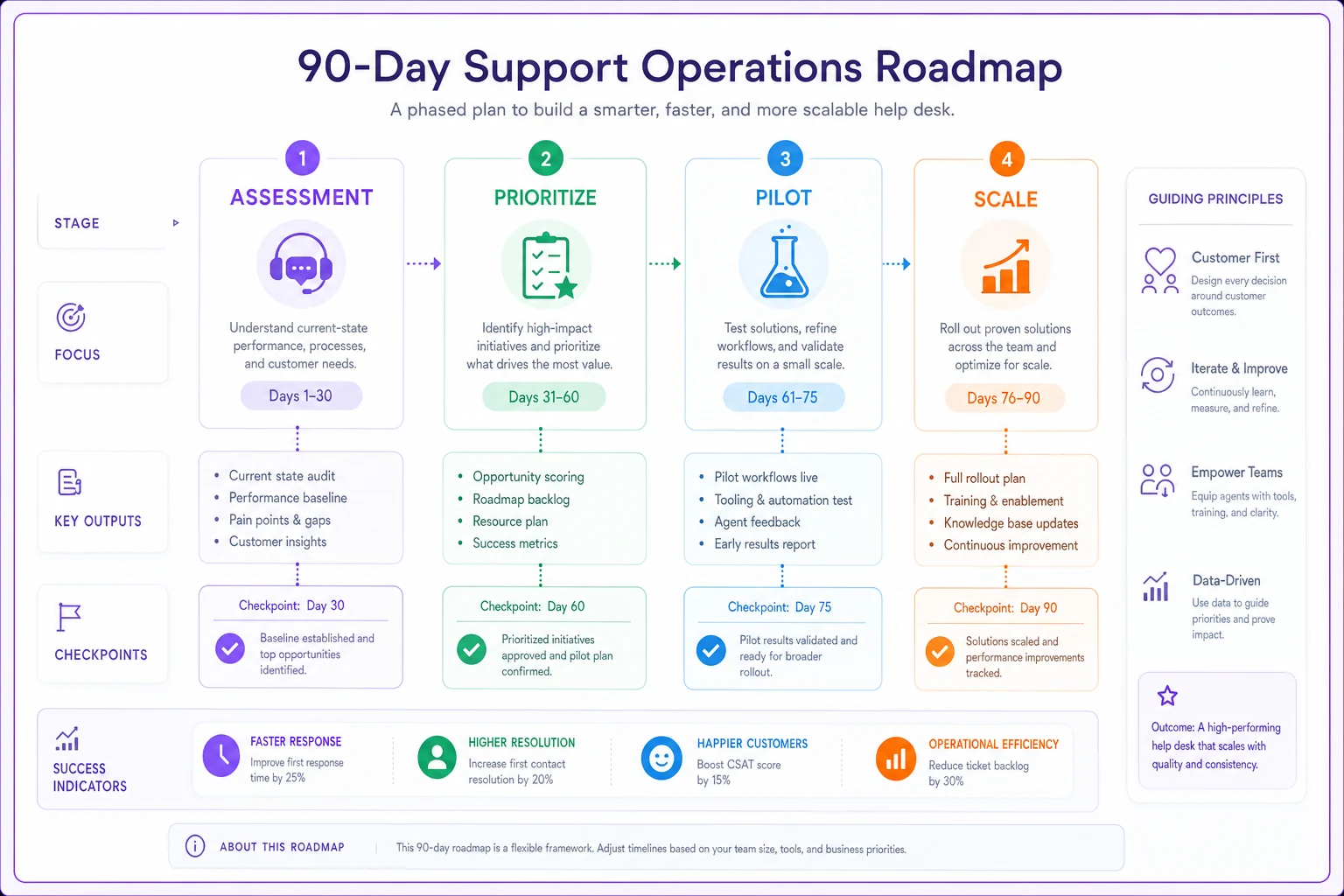
Focus the first 30 days on documentation—it's the multiplier for everything else.
The 90-day focus is about stabilization first, then measured improvements that match your current stage.
The Mistakes That Set You Back
Every stage has failure modes that can knock you backward:
Stage 1 failure: Trying to scale through heroics. That amazing agent handling 50% of tickets becomes a bottleneck, not an asset.
Stage 2 failure: Process for process's sake. Creating workflows that slow things down without actually improving quality.
Stage 3 failure: Losing human connection. Agents become ticket-processing machines, customers become case numbers.
Stage 4 failure: Optimizing metrics that don't matter. Perfect SLA achievement while customers still hate the experience.
The common thread is solving tomorrow's problems with today's resources. A five-person team doesn't need enterprise workflows. A 50-person team can't run on sticky notes and good intentions.
When Maturity Progression Stalls
Some teams get stuck between stages for years. Usually it comes down to a few things:
Resource constraints: Can't hire specialists, can't afford better tools, can't invest in training. This is where AI-powered operational software tends to make the biggest difference—it gives you Stage 3 capabilities at closer to Stage 2 costs.
Leadership gaps: The manager who built a great Stage 2 operation might not have Stage 3 skills. That's not failure—it's just specialization. Sometimes progression requires a leadership change.
Organizational resistance: The company doesn't value support enough to invest in maturity. Support stays reactive because nobody wants to fund proactive.
Technical debt: Years of workarounds, outdated systems, and quick fixes make advancement nearly impossible without rebuilding from scratch.
When progression stalls, pushing harder rarely works. The answer is either accepting your current stage and optimizing within it, or making fundamental changes to unstick things.
A Real Progression Story
A B2B SaaS company I worked with went from Stage 1 to Stage 3 in about 18 months. They started with four agents sharing a Gmail inbox, frustrated customers, and the CEO personally handling escalations.
Month 1-3: Implemented Freshdesk, documented their top 20 issues, created a basic schedule. Still felt chaotic, but tickets stopped getting lost.
Month 4-6: Hired two more agents, created a tier 1 vs. tier 2 structure, started weekly quality reviews. Consistency improved but coordination got painful fast.
Month 7-9: Promoted their best agent to team lead, launched a real knowledge base, created a formal training program. The operation stabilized, but costs went up.
Month 10-12: Added a quality analyst, launched proactive outreach for common issues, integrated AI-powered workflow automation. Ticket volume started dropping despite customer growth.
Month 13-18: Expanded to 15 agents across two shifts, implemented specialization tracks, connected support metrics to the product roadmap. Support NPS went from 12 to 67.
The tools and processes weren't the secret. It was matching solutions to their actual stage instead of where they wished they were.
Moving Forward with Your Support Maturity Framework
The path from reactive scramble to strategic operation isn't linear. Teams move forward, slide back, occasionally skip stages, and sometimes need to rebuild entirely. That's normal.
What matters is understanding where you actually are, what problems that stage creates, and which solutions genuinely fit your current reality. A support maturity framework isn't about reaching Stage 4—it's about operating effectively at whatever stage matches your business needs.
Most support teams don't need enterprise complexity. They need workflows that match their size, tools that solve real problems, and development paths that keep good agents from walking out the door. Whether that means AI automation handling routine tickets so humans can focus on complex issues, or operational software that delivers Stage 3 analytics at Stage 2 scale—the goal is sustainable operations, not theoretical maturity.
Stop adopting frameworks designed for different realities. Build the support operation that serves your customers, fits your resources, and gives your team somewhere to go.
The stages are guideposts, not requirements. Use them to understand where you are, but don't let them dictate where you have to go.
Ready to transform your support operations?
Join 500+ support teams using Servyly to reduce resolution times, improve customer satisfaction, and boost team productivity.